

 We typically respond the same day

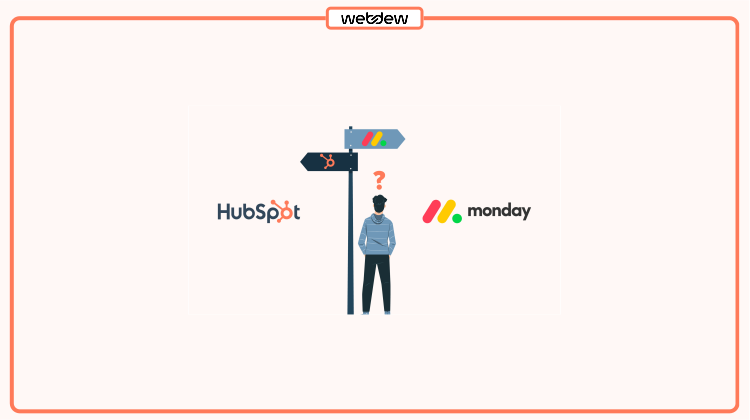
Table of contents
Establishing strong connections with customers is crucial for a business’s success and expansion. Meaningful relations foster customer loyalty which leads to more conversion.
Imagine your go-to coffee shop knowing just how you like your morning brew. It’s this personal touch that retains your customer. What if businesses could do the same on a larger scale? That’s where Customer Relationship Management, or CRM steps in.
CRM is a significant tool that empowers businesses to navigate, organize, and optimize their engagements with customers. HubSpot and Monday have become popular CRM choices for businesses looking to strengthen their relationships with customers.
Let’s explore the features of both HubSpot and Monday, comparing them to understand their strengths and capabilities.
HubSpot vs Monday: 9 Key Differences
HubSpot and Monday are widely used CRMs. Users have evaluated these platforms, considering factors like user-friendliness, ease of setup, management, and the quality of support they provide.
As per the ratings on the G2 platform, HubSpot achieved an average rating of 4.4 out of 5, while Monday secured a score of 4.7 out of 5. However, to make an informed decision, let’s get into a thorough comparison of their features.
1. HubSpot vs Monday: Sales & Marketing
HubSpot and Monday have different strategies and dashboards to help you with sales and marketing activities. Let’s compare features and see what they offer to manage these tasks.
HubSpot: Streamline your sales & marketing efforts
HubSpot CRM (Customer Relationship Management) is designed to help businesses manage customer relationships. It serves as a centralized platform for organizing and tracking customer interactions.
HubSpot CRM allows users to store and organize contact and lead information in a centralized database. This includes details such as contact information, communication history, and any relevant notes. Teams can segment contacts based on various criteria for targeted outreach.
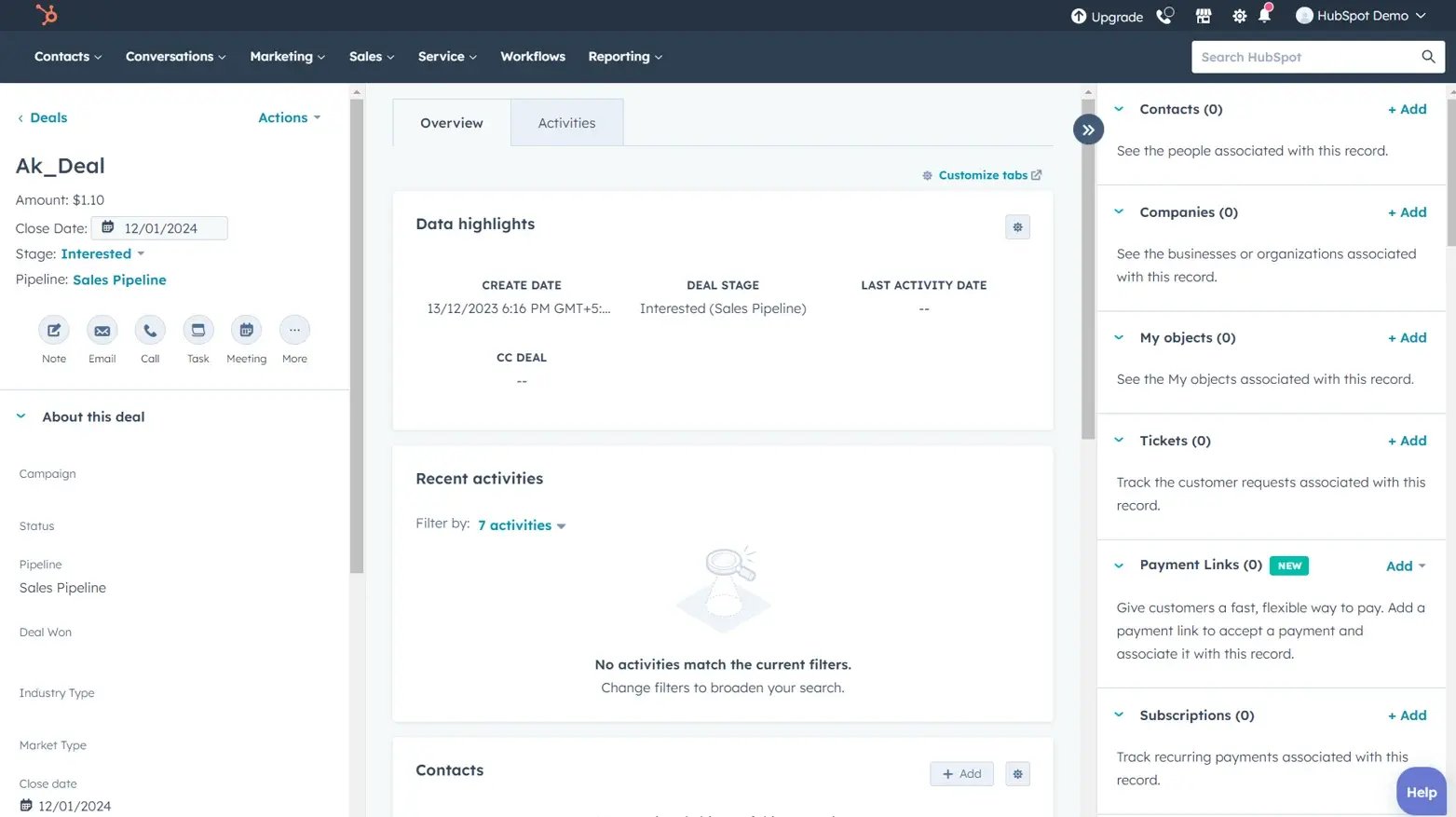
Here are some key sales features within HubSpot CRM:
For users looking for advanced sales features, HubSpot CRM can integrate with HubSpot’s Sales Hub. This integration provides access to additional tools for email templates, sales automation, analytics, and more.
Monday: Effortlessly manage your leads
The platform provides a visual and customizable interface that allows your team members to create workflows according to your marketing goals.
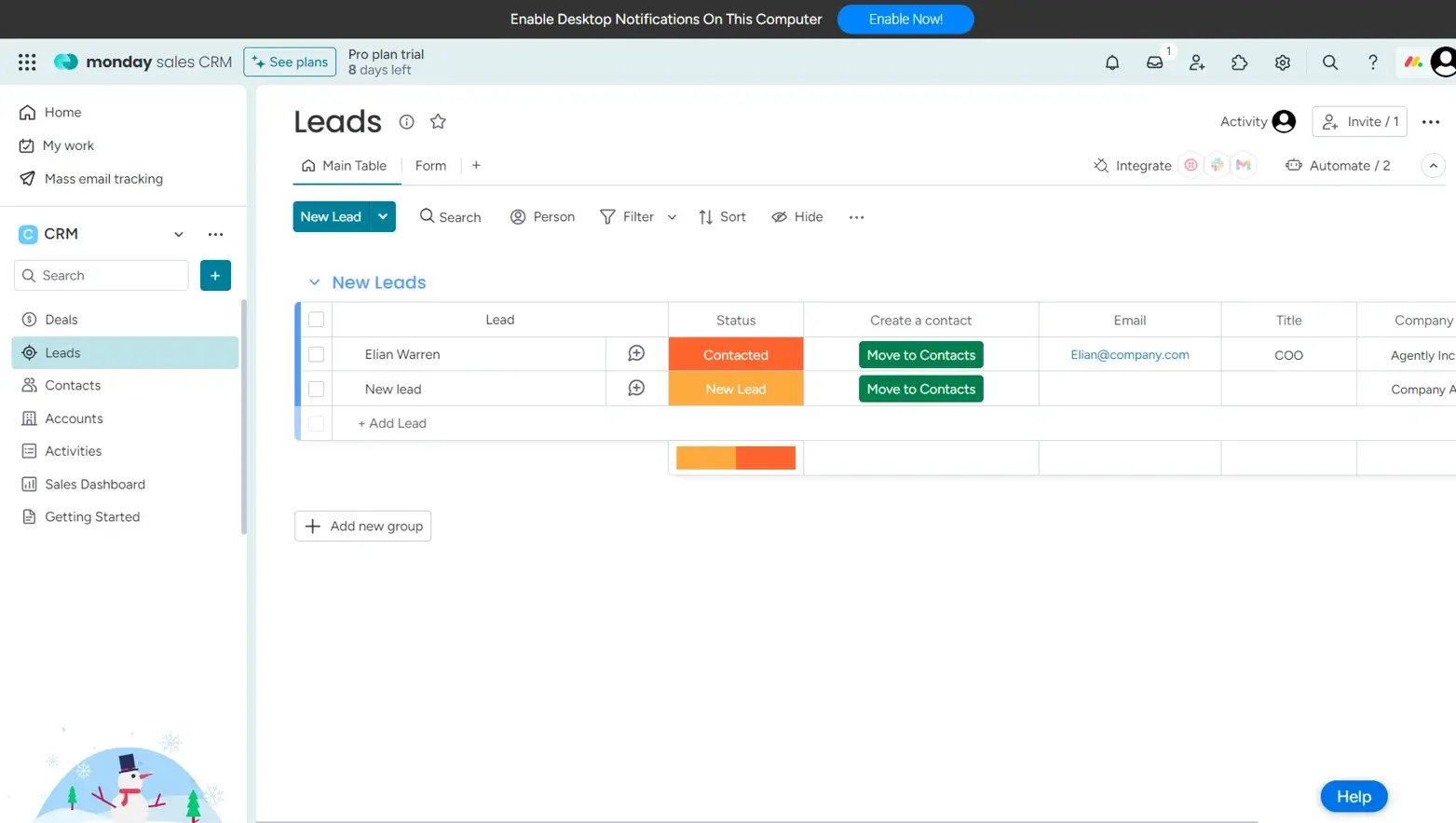
Monday offers the following sales services:
After a deal is closed, Monday.com supports post-sales activities and management. You can track customer interactions, manage ongoing relationships, and handle post-sales support and services.
Overall, Monday Sales CRM provides a collaborative platform for managing leads, sales processes, contacts, and post-sales activities, contributing to improved team efficiency and communication.
? Verdict
- HubSpot CRM wins for its exceptional sales features. Its Sales Hub covers various services and tools to streamline your processes.
Reading Recommendation: Check the pricing and features of HubSpot Sales Hub now!
2. HubSpot vs Monday: Automation
Automation has transformed the way businesses operate and manage their activities. As per Harvard Business Review, 90% of users said automation solutions have helped increase their productivity. So, let’s explore how HubSpot and Monday help organizations automate their repetitive processes.
HubSpot: Automate workflows to streamline tasks
HubSpot CRM provides automation features to streamline processes and save time. Automation enhances the efficiency of sales and marketing activities.
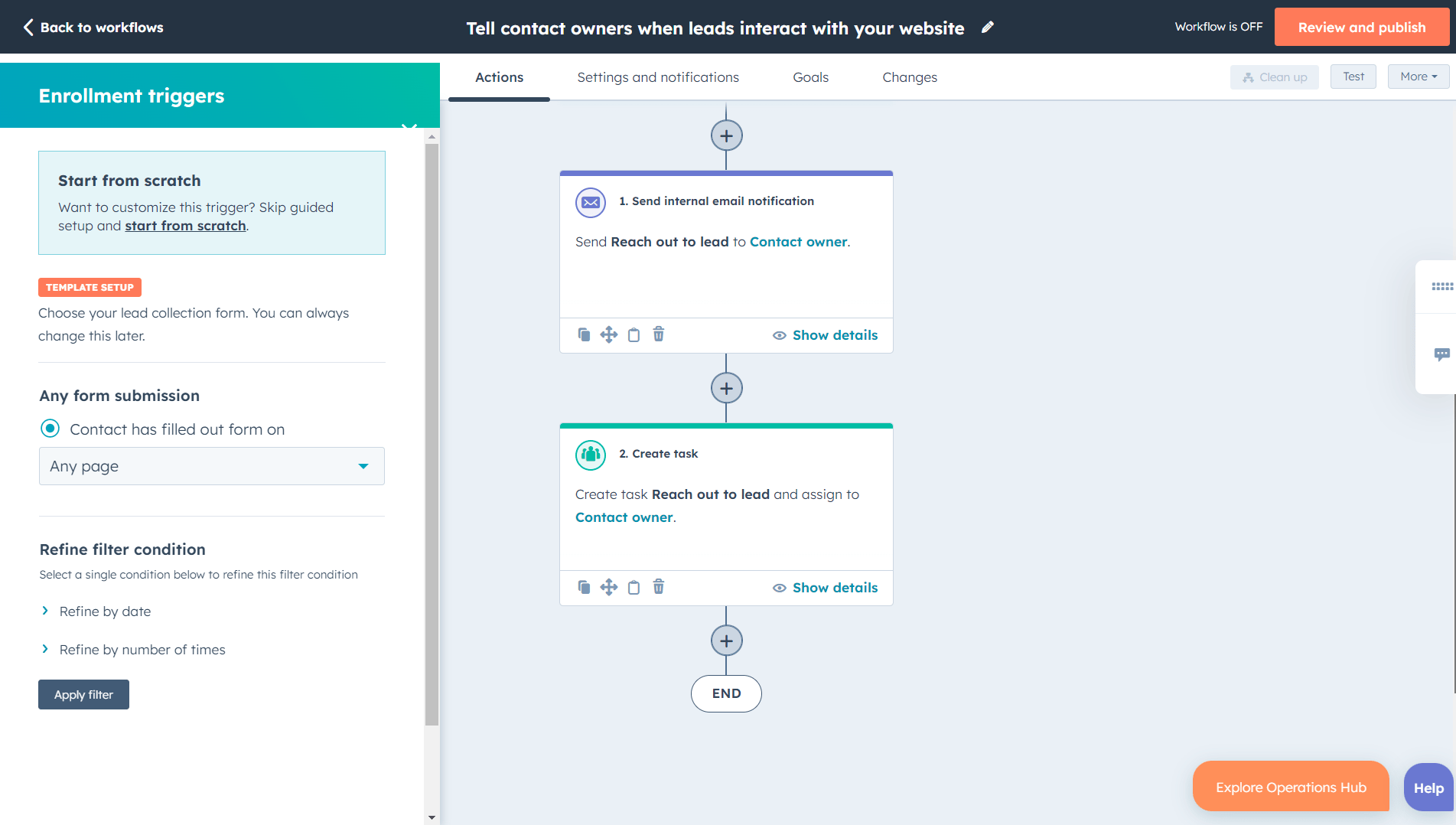
Some of the key automation features are:
To explore more automation features, you can integrate with HubSpot Operations Hub. Free and paid versions of this Hub offer various operational activities.
With these automation features, HubSpot CRM empowers you to create more efficient and personalized workflows. This allows sales and marketing teams to focus on building relationships and driving business growth.
Monday: Automate your tasks effortlessly
Monday.com CRM helps your teams automate various processes to increase their efficiency. These automation are code-free and can be set easily.
The image below displays the automation center of Monday. You can use basic templates to set the task status automatically.
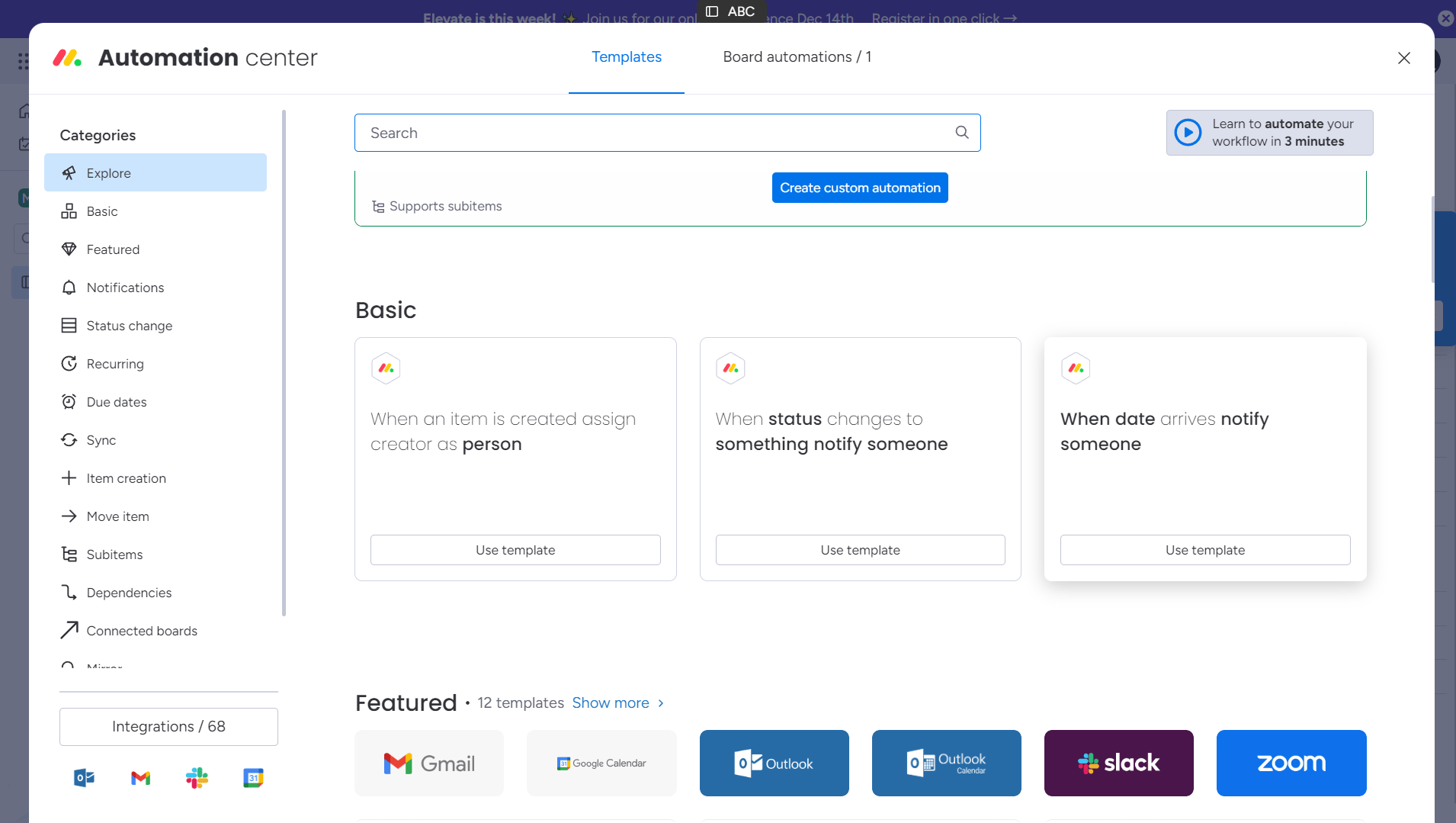
Key features:
These automation features in Monday help you streamline your operational activities and increase team efficiency.
? Verdict
- HubSpot has a great hold on automation. With its automation capabilities, you can streamline tasks and save manual efforts.
You might be wondering, with the plethora of features, are these platforms easy to use? Let’s check it out!
3. HubSpot vs Monday: Ease of Use
As a user, we always look for platforms that are easy to use. So, let’s identify which platform is easier to navigate.
HubSpot: Easy and intuitive interface
HubSpot is recognized for its ease of use, making it a popular choice for businesses of all sizes. The platform is designed with a user-friendly dashboard and a range of features that contribute to its ease of use.
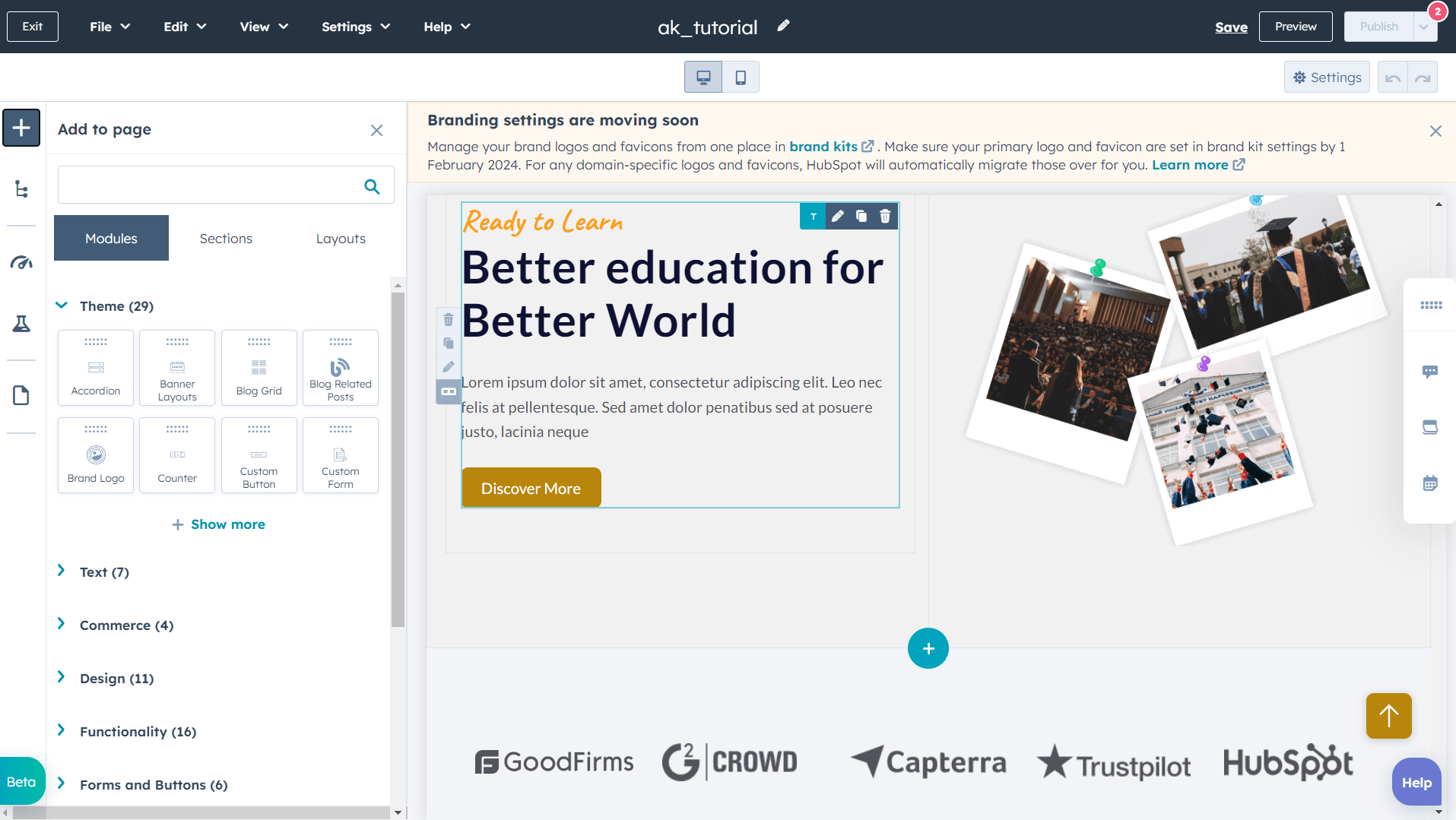
Here are key aspects that make HubSpot easy to use:
HubSpot, with its wide range of features, offers a slightly steep learning curve for beginners. But with the abundant tutorial videos and its knowledge base, you can quickly learn to set up and access its features.
Monday: User friendly interface
Monday.com is known for its user-friendly interface and intuitive design. It is widely used by small businesses, according to user reviews on the G2 platform.
Even the beginner can quickly set up and access Monday’s dashboard. Take a look at Monday CRM’s dashboard.
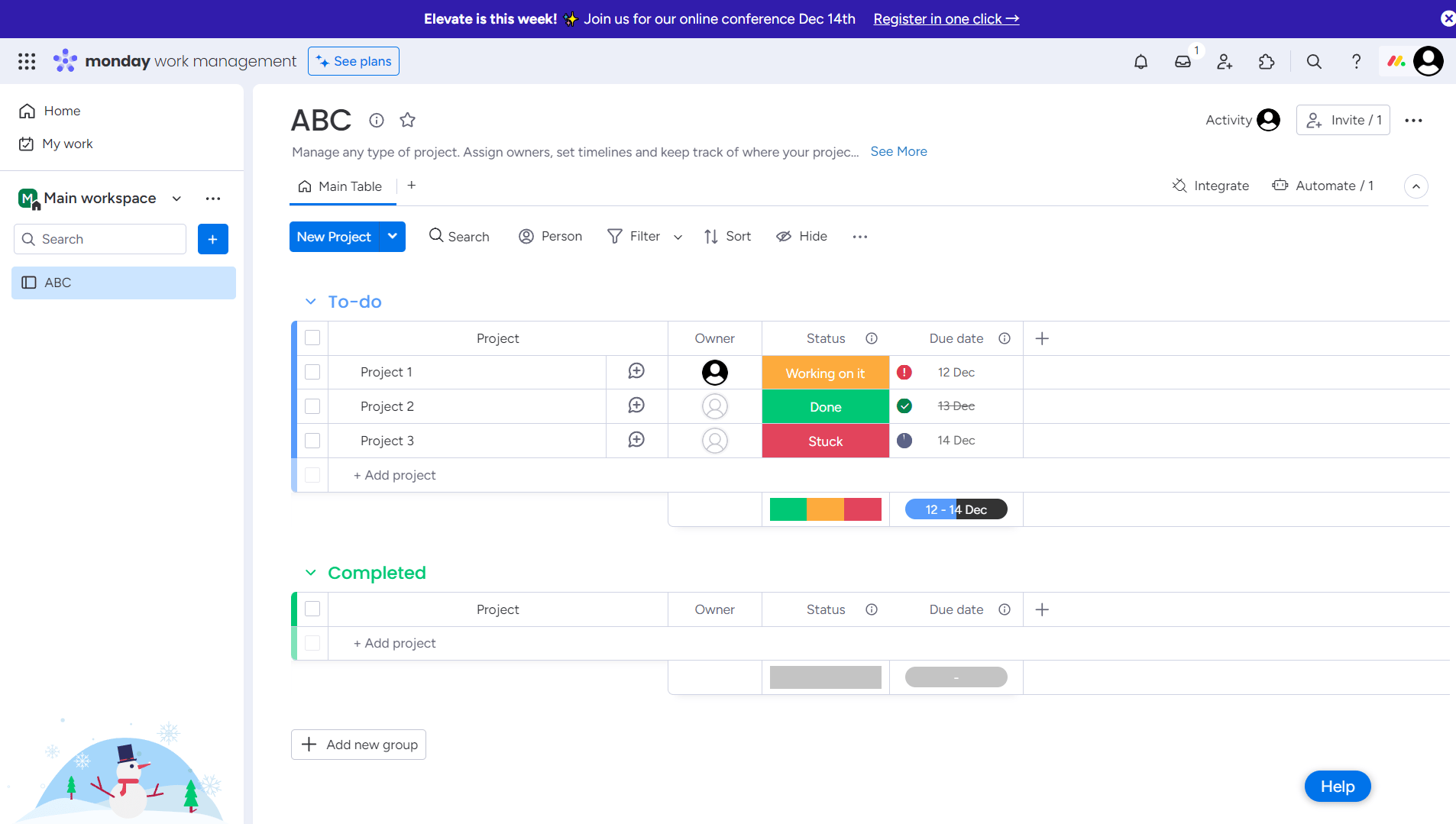
Here are some of the features that make Monday.com easy to use:
To assist you in getting started and maximizing the platform’s capabilities, Monday.com provides built-in tutorials. These tutorials help users learn how to use various features of the platform effectively.
? Verdict
- Monday wins for its user-friendly and easy-to-use interface. It has received an average rating of 9.1/10 based on its ease of use for businesses.
The next important feature of comparison is customer support. So, without further delay, let’s dive into their features.
4. HubSpot vs Monday: Customer Support
We believe customer support is crucial for any business, whether it’s B2B or B2C. Monday and HubSpot, which are well-known CRM platforms, have various ways to help users.
They provide dedicated support, helpful documents, community support, tutorials, and more. Let’s take a look at the features they offer to customers.
HubSpot: Get support through multiple channels
HubSpot provides various customer support features to assist you in utilizing its tools effectively.
HubSpot also provides video training courses and certification programs through HubSpot Academy. Users can watch video tutorials to learn how to use HubSpot effectively or become certified in HubSpot tools, demonstrating their proficiency.
Monday: 24/7 Dedicated support
Monday CRM offers robust features when it comes to providing customer support. It provides support through various channels like community, email, live chat and help center.
Let’s explore the support channels:
Monday also provides additional helpful resources, including articles, educational resources, video tutorials, and technical documentation.
? Verdict
- Both platforms offer robust support, but HubSpot offers more responsive and dedicated customer support.
Now, let’s compare the two platforms based on the artificial intelligence tools.
5. HubSpot vs Monday: AI Tools
Artificial Intelligence (AI) tools have emerged as powerful allies for businesses. It helps you to reshape your operations and strategies in an efficient way. Now, lets explore how HubSpot and Monday empower businesses with AI Tools.
HubSpot: Explore the powerful AI tools
HubSpot features powerful AI (Artificial Intelligence) tools to enhance various aspects of marketing, content creation, and website management.
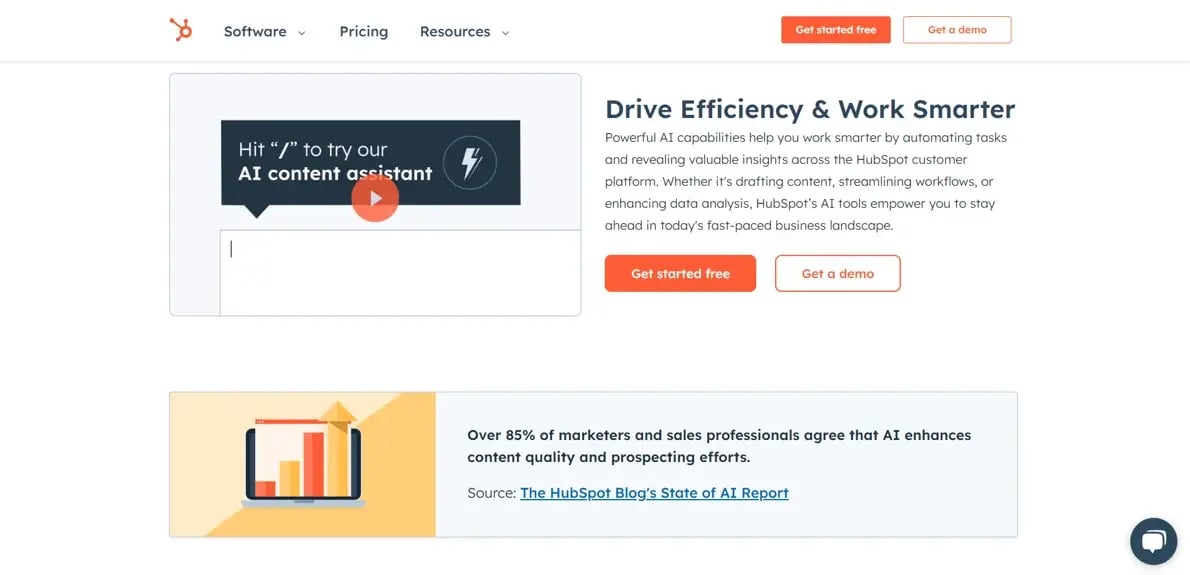
Some of the key features are:
With HubSpot AI, you can simplify tasks and align your resources in a better way to enhance efficiency.
Overall, HubSpot’s AI tools contribute to a streamlined and data-driven approach, empowering businesses to make informed decisions and achieve better results in their marketing efforts.
Monday: Streamline your tasks with AI
Monday.com provides AI tools to streamline various sales, marketing, project management, product design, and operations processes.
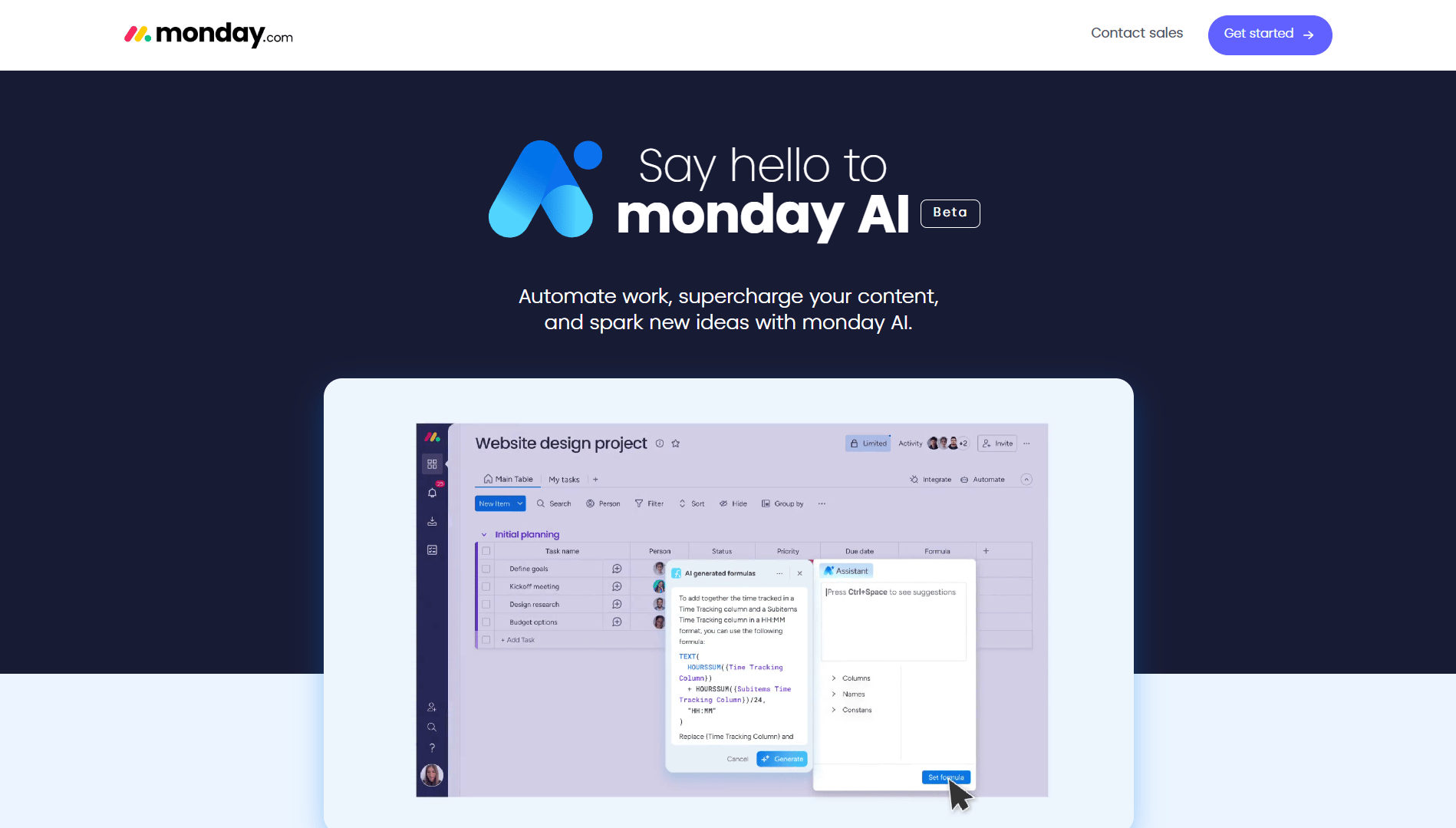
Here are some of the AI tools:
Make your complex task a breeze with the help of Monday AI tools. Its AI assistant is smart enough to create and manage tedious tasks.
By leveraging AI within Monday, teams can experience increased efficiency, improved decision-making, and a more streamlined approach to project management.
? Verdict
- Monday is the winner when it comes to using AI tools. These tools make your tasks easier and more efficient.
Are you struggling to toggle apps for different tasks? So, let’s compare the integration features of HubSpot and Monday and check which platform offers the best solution.
6. HubSpot vs Monday: Integrations & APIs
Connecting different tools and making them work together better is made possible by integrations, APIs, and add-ons. HubSpot, for example, supports over 1500 integrations, allowing you to link up with many tools for improved efficiency.
Similarly, Monday also provides hundreds of integrations and add-ons to enhance business capabilities. Let’s take a closer look at the specific integrations each platform offers.
HubSpot: More than 1500 Apps to integrate
HubSpot offers a variety of features related to integrations and APIs (Application Programming Interfaces) to help users connect HubSpot with other tools and customize their workflows.
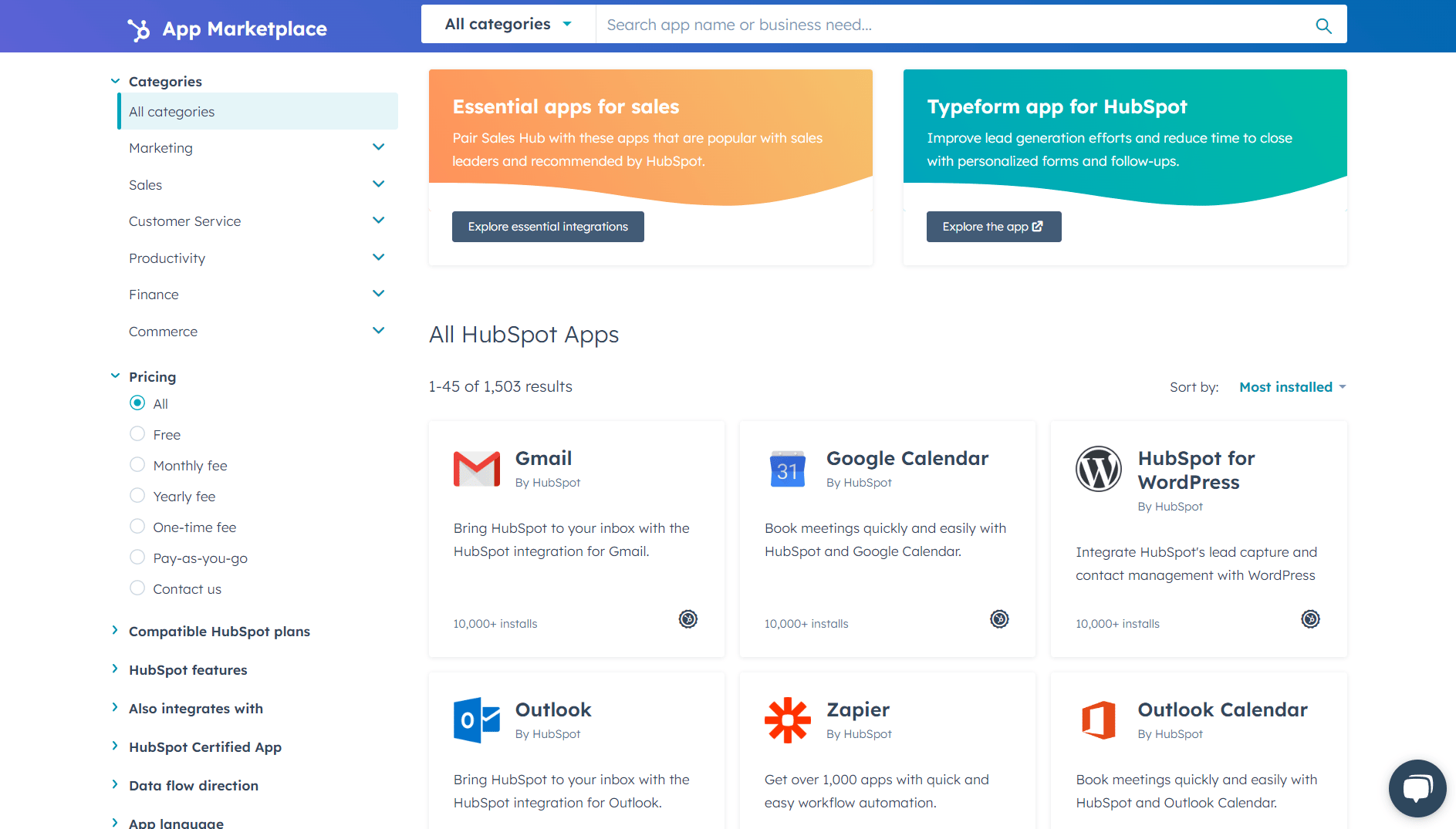
Here’s an explanation of the features mentioned:
HubSpot’s robust integrations and APIs play an important role in transforming the platform into a dynamic hub for businesses. By connecting diverse tools and systems, HubSpot empowers users to drive more impactful marketing, sales, and customer service strategies.
HubSpot’s user-friendly approach to integration ensures that businesses can optimize their processes and fulfil their dynamic requirements within a single platform.
Monday: Enhance collaboration & boost productivity
Monday.com provides users with access to a wide array of integrations and add-ons to extend its capabilities. With the help of integrations, you can increase business productivity by utilizing the features of integrated apps.
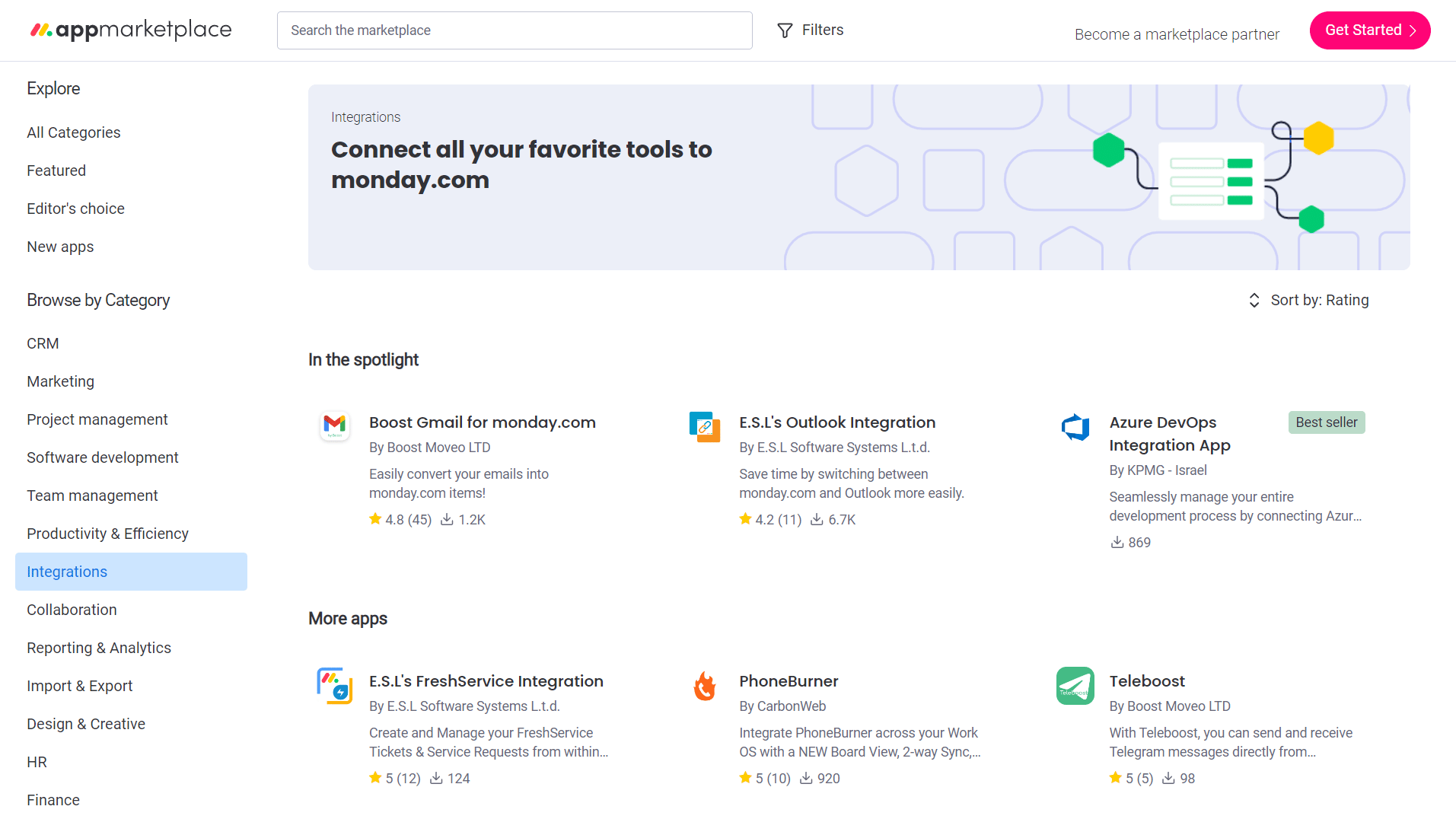
Key features:
Monday’s extensive array of integrations and add-ons significantly amplifies its capabilities as a versatile work operating system.
The seamless connectivity with a wide array of third-party tools enhances collaboration and efficiency within diverse workflows.
? Verdict
- HubSpot is the clear winner when it comes to integrations. More than 1500 HubSpot integrations are listed in various categories to help you streamline your tasks.
Reading recommendation: Why switch to HubSpot? Have a look at these in-depth HubSpot reviews
7. HubSpot vs Monday: Project Management
Project management is a strategic approach to planning, organizing, executing, and controlling resources to achieve business goals.
HubSpot: Plan your projects efficiently
HubSpot offers project management features within its CRM platform. It offers tools to plan, collaborate, and execute projects efficiently.
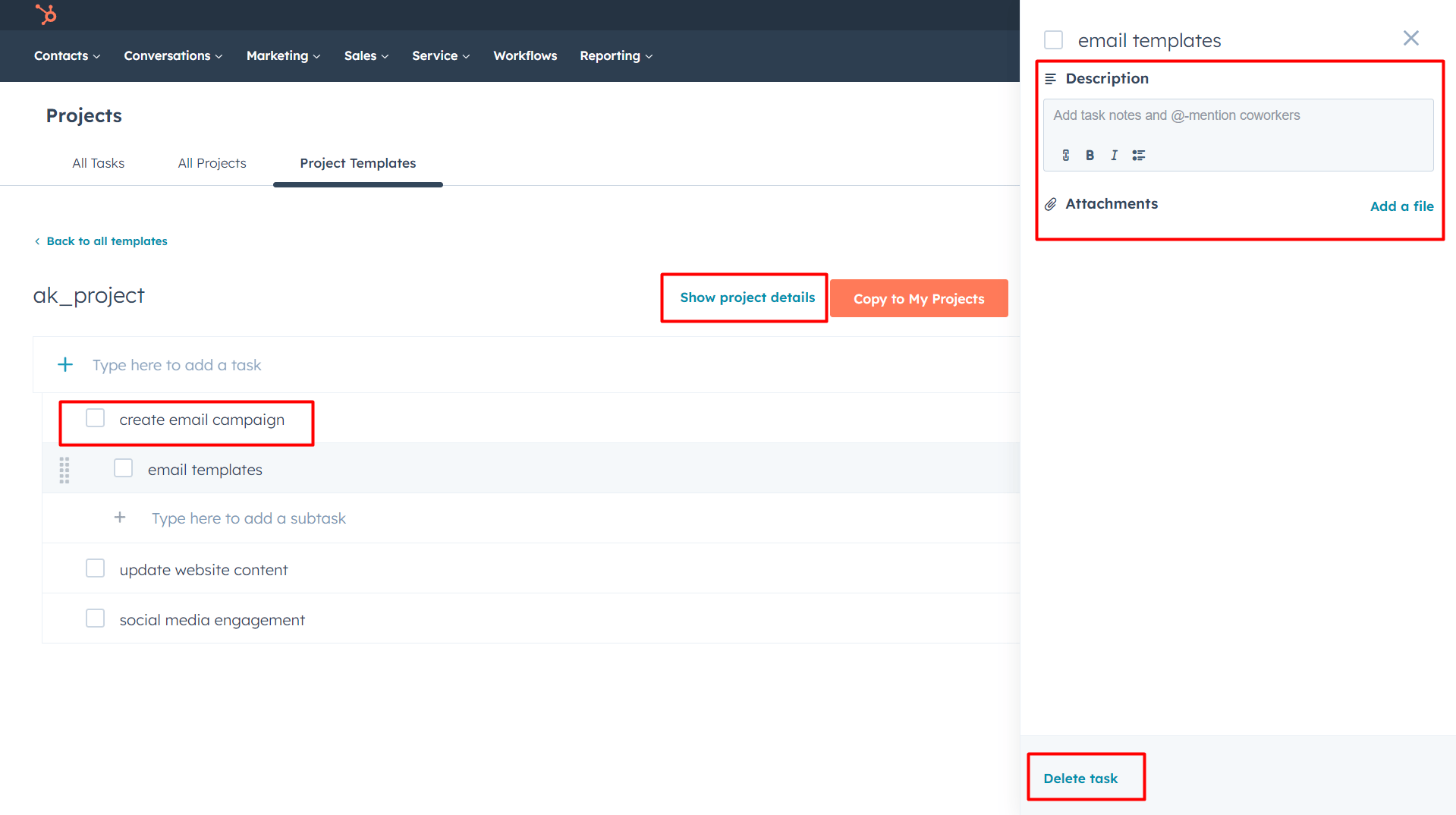
Here’s an overview of HubSpot’s project management capabilities:
HubSpot’s project management capabilities serve as a cornerstone for businesses seeking efficient and collaborative task execution. It makes teamwork easier and more successful!
Overall, HubSpot’s project management features offer a user-friendly and organized solution for businesses. With tools that facilitate collaboration, task tracking, and timeline management, HubSpot simplifies the complexities of project coordination.
Monday: Effortless project management
Monday is widely recognized for its project management capabilities. It offers many features that empower teams to plan, track, and execute projects effectively.
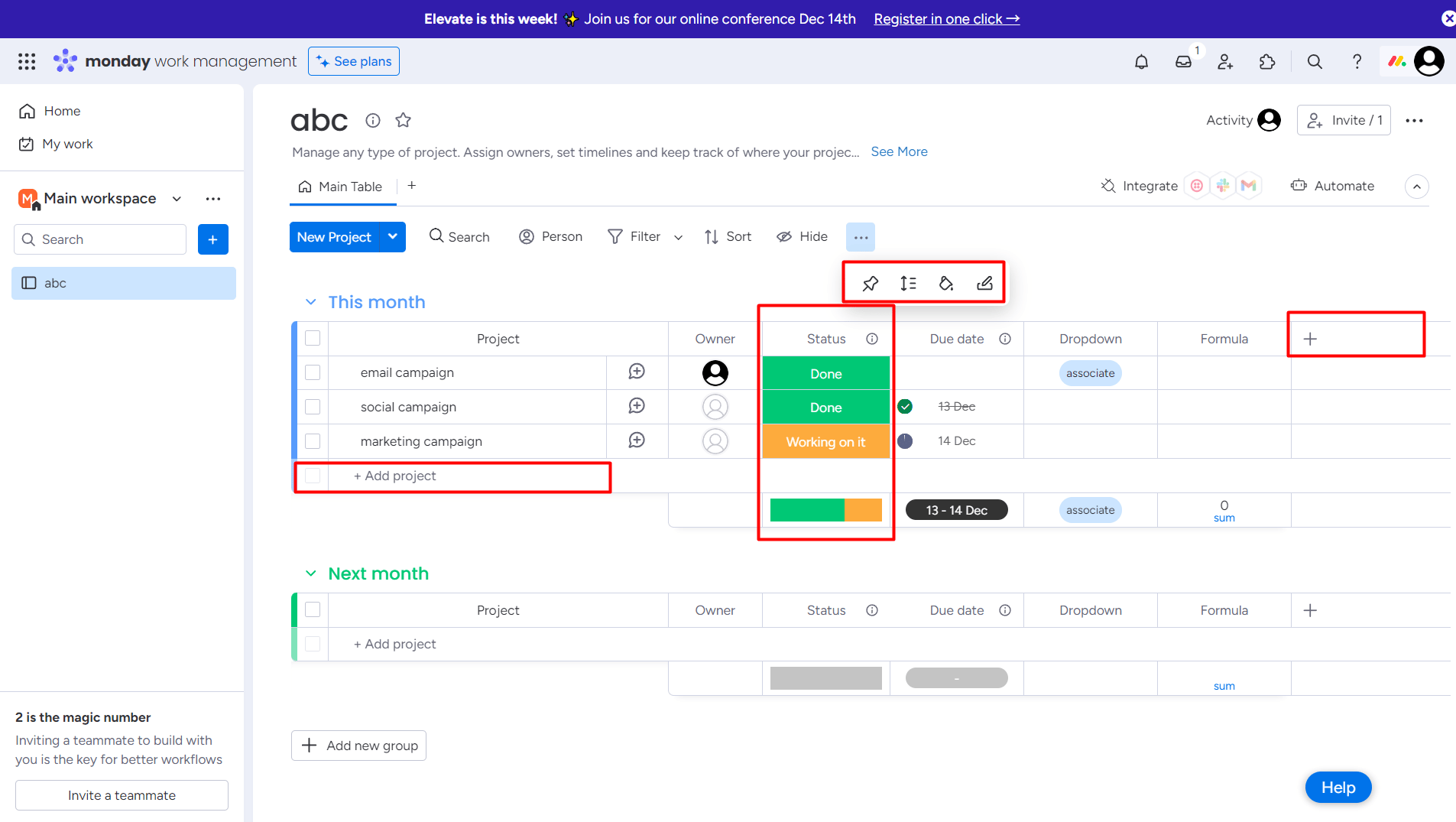
Key features:
Whether managing simple tasks or complex projects, Monday.com provides many tools and features to streamline project workflows.
It serves as a robust solution for project management, offering a user-friendly platform that streamlines collaboration and task organization.
? Verdict
- Monday stands out as the project management winner. Its visual planning, dynamic tools, and user-friendly interface give it the edge.
Let’s explore how HubSpot and Monday help users with reporting and analysis features.
8. HubSpot vs Monday: Reports & Analysis
Now let’s compare HubSpot and Monday based on their reporting and analyzing capabilities.
HubSpot: Measure your sales efforts
Reports and analyses provide businesses with valuable insights to measure the effectiveness of their marketing efforts.
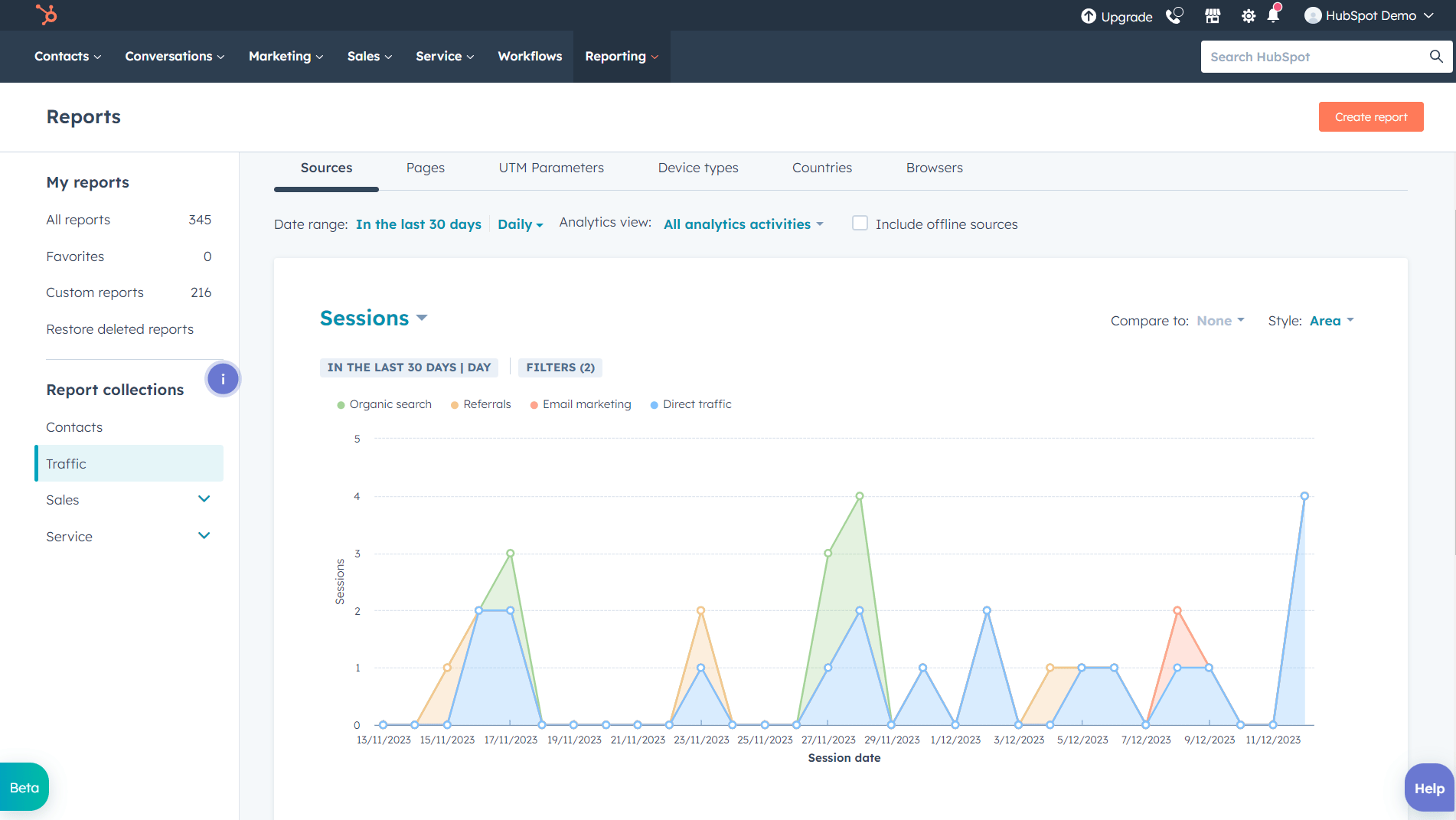
Let’s explore the key aspects of reports and analysis in HubSpot:
HubSpot’s reports and analysis capabilities allow businesses to measure, analyze, and refine their marketing and sales efforts. The platform’s user-friendly interface and customizable reporting options make it a valuable resource for businesses.
Monday: Detailed reports to track projects
Monday.com is a powerful platform that offers robust tools for tracking projects through detailed reports and analysis.
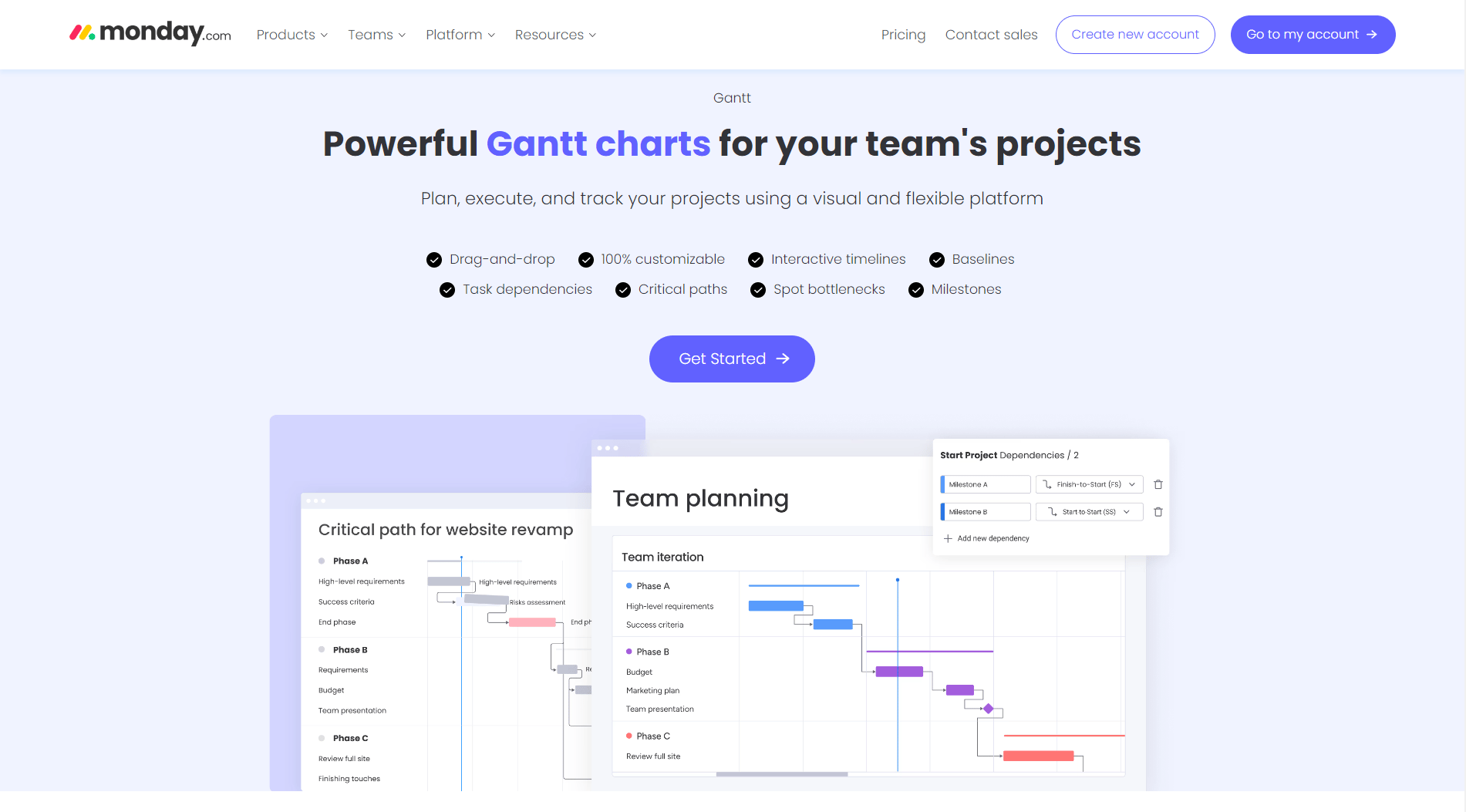
Here are the key features:
Monday’s reports and analysis tools empower organizations to make informed decisions, enhance collaboration, and drive project success. They are essential tools for teams aiming to gain valuable insights into their work processes.
? Verdict
- HubSpot is better than Monday in reporting and analytics because it offers customizable insights and clear ways to show data. This makes the user experience better.
Now, let’s check the pricing plans offered by HubSpot on Monday.
9. HubSpot vs Monday: Pricing
HubSpot: Pricing plans
HubSpot offers various pricing plans based on its suite and Hubs (Sales, Marketing, Service, Operations, CMS, Commerce). Let’s take a look at the CRM suite pricing plan for individuals & small teams.
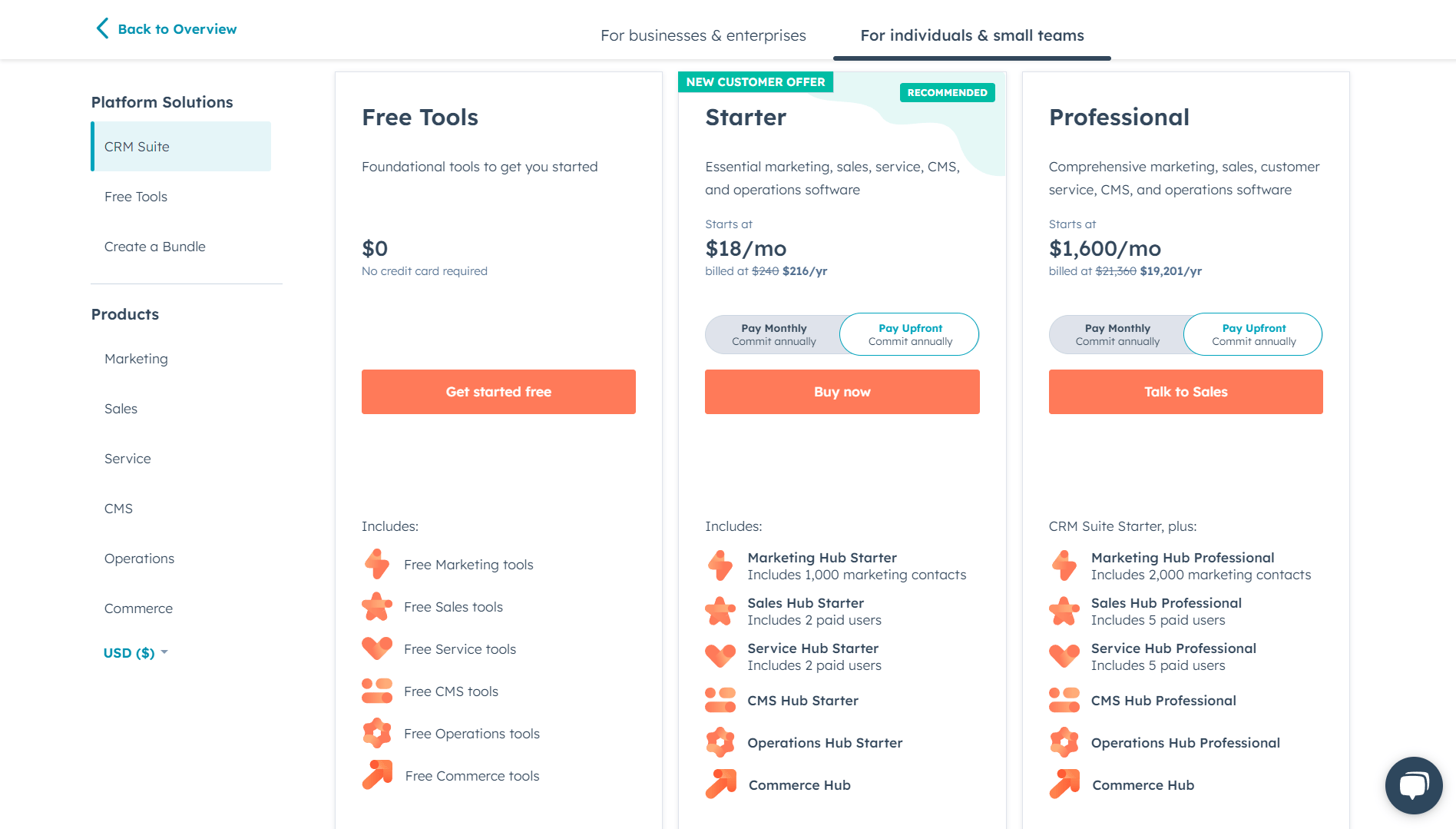
This is just one of the pricing plans available through HubSpot, and the platform offers several other options. Explore these plans to determine which one aligns best with your business goals and requirements.
Monday: Pricing plans
Monday offers a flexible pricing structure to cater to a variety of needs. The pricing plans are designed to offer scalability and customization, making Monday a suitable choice for diverse organizational needs.
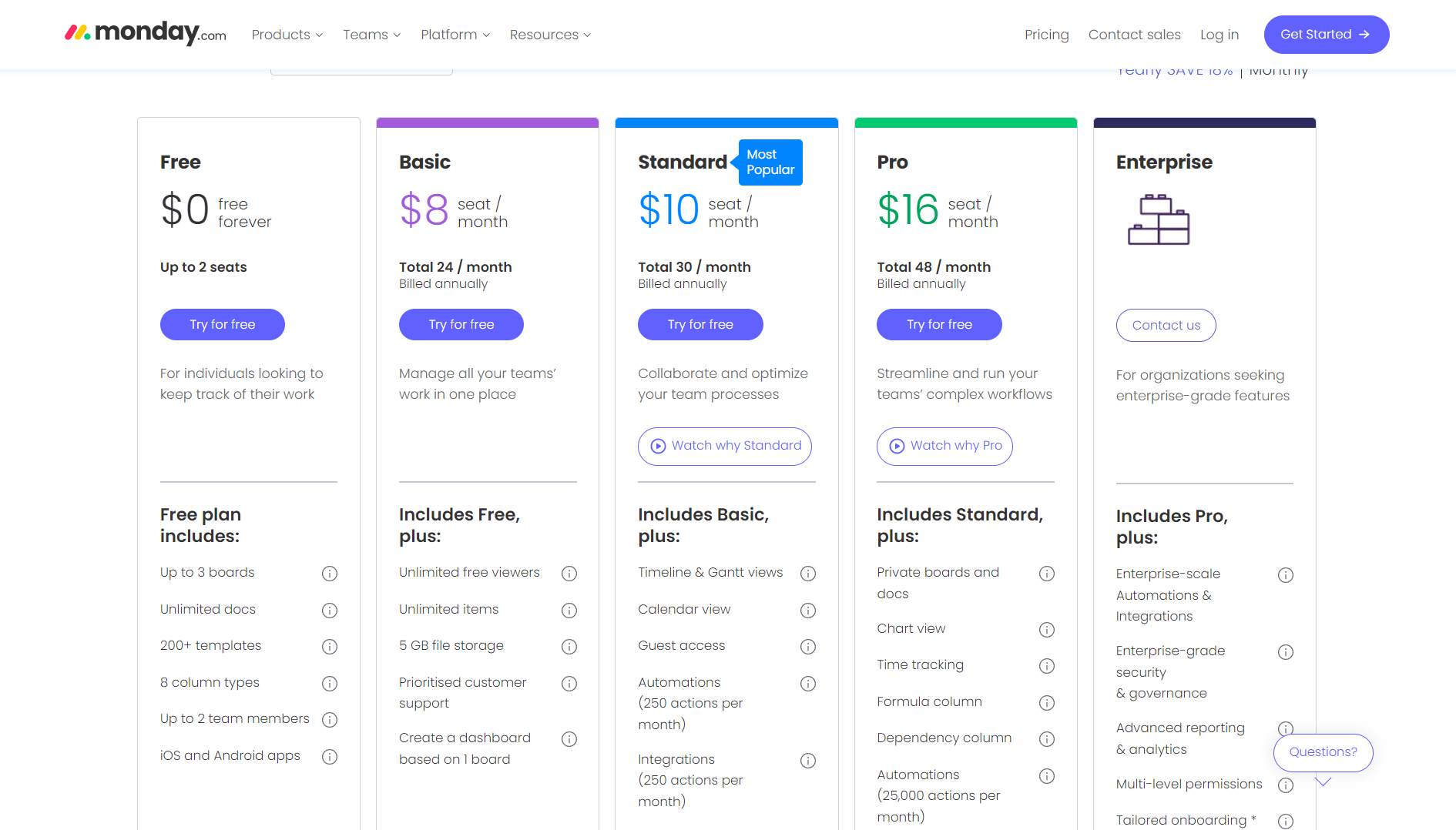
With plans like Basic, Standard, Pro, and Enterprise, Monday ensures that teams of all sizes can manage their work and collaborate seamlessly on its platform.
? Verdict
- Both platforms offer the best pricing plans. HubSpot might cost a bit more, but it gives you awesome functions and features. Monday could be better for small businesses.
Before we conclude, it’s important to weigh the features discussed for both HubSpot and Monday against your specific business requirements. Understanding the unique needs of your team will guide you in making an informed decision.
Which platform better aligns with your goals?
HubSpot stands out with its integration, automation, sales and marketing, reporting, and analysis capabilities. On the other hand, Monday has its strengths in managing projects, using AI tools, and being easy to use.
Deciding the right platform comes down to what your business wants to achieve. So, which CRM solution suits your business goals? Let us know in the comments!
You can also contact us if you have questions or are interested in HubSpot services.
Related blogs:
HubSpot Alternatives: Which CRM reigns supreme in 2023?
HubSpot vs Act-On: The Battle of Leading Marketing Automation Giants
HubSpot vs Hootsuite: The Battle of the Leading Social Media Titans
Dive Into our Client Testimonials
Listen to business owners like you share how we’ve helped them grow. Your story could be next!






The webdew team is very supportive, they provide us with thoughtful suggestions.
We contracted webdew to build our new website. And let me tell you, they did a fantastic job. Their team was really easy to communicate with.”
The webdew team is very supportive, they provide us with thoughtful suggestions.
We contracted webdew to build our new website. And let me tell you, they did a fantastic job. Their team was really easy to communicate with.”
The webdew team is very supportive, they provide us with thoughtful suggestions.
We contracted webdew to build our new website. And let me tell you, they did a fantastic job. Their team was really easy to communicate with.”
“We worked with Chehak over the past several months to create a series of animated videos for an academic planner that we produce. And from the very beginning, she was absolutely professional and a pleasure to work with.”


6x
We helped clients multiply their website conversion rates through strategic design and UX optimization.
20%
Our marketing campaigns led to a 20% uplift in customer engagement across digital channels.
2K+
Delivered over 2,000 qualified leads through targeted funnels and smart automation.
120+
Our video content has earned 120,000+ views, driving brand awareness and audience retention.
“I recently had the pleasure of working with Chehak on a video demo project, and I was thoroughly impressed with her services.”


Additional Resources
Access expert tips, trends, and strategies designed for small businesses. Stay ahead of the curve and make informed decisions with our comprehensive resources!