

 We typically respond the same day

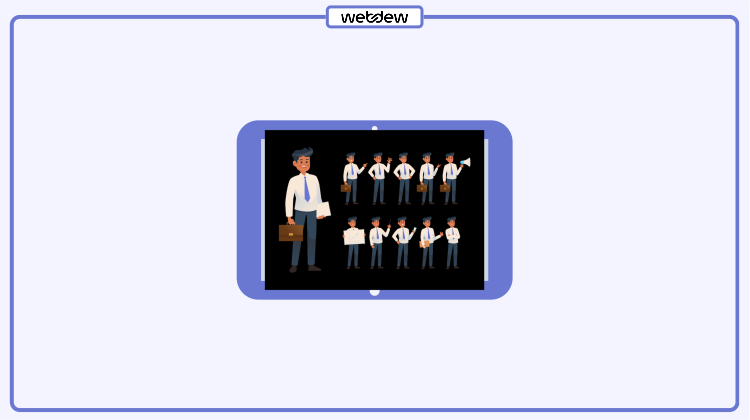
Table of contents
Working with characters is a big game now. Animated characters are used widely and very popular in today’s graphic requirements, be it an ad on the internet or simple carousels, posters, banners, and, most importantly, explainer videos.
Animated videos are rising and are setting a new trend in this era of advertising and marketing through videos. Many businesses leverage explainer videos with animated characters to explain their product or service.
One of the first steps in these animated videos is to make a storyboard. The storyboards are a series of continuous and relative visuals, created in alignment or according to the scripts, that form a story in Adobe Illustrator.
After the storyboard is ready, you can animate it in After Effects. Sometimes, there is a need of making character poses for animation when you make a character in a continuous story in these visuals.
Knowing how to make character animation video without character poses seems incomplete. In this blog, I will tell you how to design these character poses easily and quickly for your character animation video. These are the basic things you need to remember while making character poses for animation.
Character Poses for Animation
If you are a designer and working on a storyboard for an animated video, there are chances that you are facing difficulties during character making. It would be best to have a character in different poses like standing, sitting, back pose, side pose, and so on, so you can use it to show any situation.
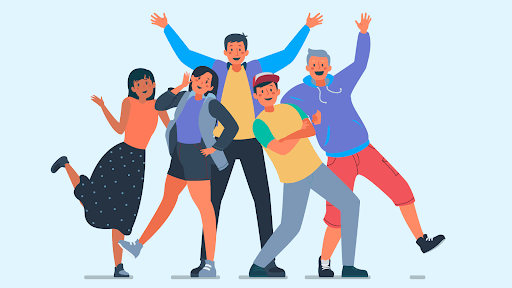
Online resources are limited with their character poses. You can find many characters, but not the same character with different poses. There is only one way to design them: with your design tools, which can be challenging at times. However, it is not as hard to design these poses of characters.
Let us start with simple character poses.
Take a simple character standing facing front from any vector file. You can download it from any source, such as Freepik or Vecteezy. I have taken a character from the website stroryset.com.
Let’s dive into designing a character with different poses.
1. Front Pose
Take a look at this image below. It shows the character I chose facing you. As the character’s front view is what you see, this pose is called a front pose.
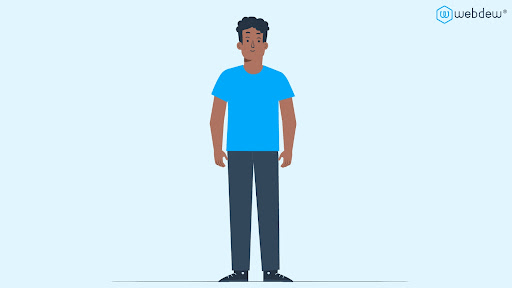
In this front view, the character mostly looks straight at you, and all the features, such as hands, face, etc., are shown clearly.
2. Side pose
You can see how the character’s side proportions are proportioned in the side pose. Let’s look at some aspects you would have to make while developing a side view of a character.
In the side pose of a character, there are two possible positions. One is appropriately gazing to the left or right, and the other is some figure moving into the front, as depicted in the image below. The character is shown in two different stances when he turns to the left in this image.
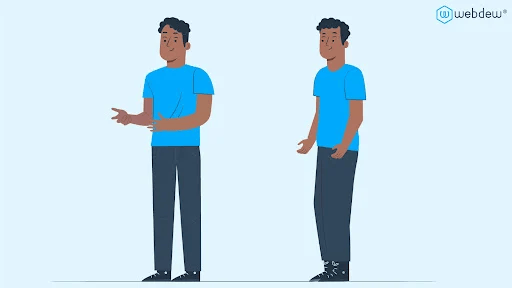
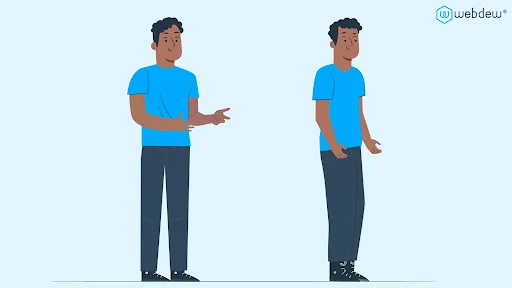
If you take a closer look at the character’s posture, there are key aspects to bear in mind.
- The character’s ear should be hidden behind the character’s skull in the first place.
- If you are creating the feet, the character’s shoulder and bicep should be placed below the torso of the figure.
- The character’s respective leg should be slightly hidden below the front leg layer of the body.
The same points are to be kept in mind during the design of the character’s right side. But this time, the figure must be designed towards the character’s right side.
3. Back pose
Sometimes, you might need characters to show that the character is focusing on the things you are, that is, the character and you are facing the same direction.
For example, if you are a student and a teacher writing something on the blackboard, you can directly see the back pose of the teacher. In such scenarios, you will need the back pose of the character.
Here again, we have two poses of the character in the back pose
- Turn Around back
- Straight back
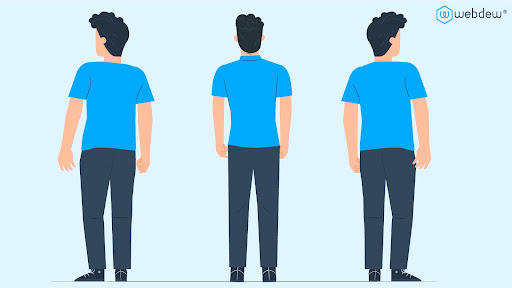
Here, I have some points for you to keep in mind while you are designing the back pose of your characters.
When developing the turn-around back position, keep the following points in mind:
- One ear should be concealed behind the head.
- One leg should be hidden behind the front leg to do this. (Front leg: varies depending on whether the relevant side is to the left or the right.)
- Instead of showing facial features such as eyes, mouth, nose, and so on, hairs from the rear of the head should be presented.
When developing the straight-back position, the following should be considered:
- Both ears should be presented with some outside part of the ear.
- Both legs should be depicted in a straight line, with the shoes portrayed from the rear perspective.
- It is preferable to reveal hair on the back of the head rather than facial features such as the eyes, nose, or lips.
All set to choose the character poses wisely?
When working as a designer, you must always improve your illustration skills. In addition, this form of a lesson or, to put it another way, a rapid study of the illustrations will give you more confidence in your design skills as you learn more about illustration creation.
Most designers are concerned that they would be unable to show the character or any other views of any representation of this nature. These are just the basic and simple poses. There are even more poses that designers create, which include the character doing many things facing various directions.
It is, of course, a time-consuming job as character-making requires a detailed eye. It can be, however, used in various types of videos, including 2D animation, explainer videos, etc.
In webdew, we have a team of skilled designers who understand character illustrations and have made several videos. If you want to make character animation videos for your product or service, webdew can assist you. Visit our website www.webdew.com or contact us to know more.
Editor: Amrutha
Dive Into our Client Testimonials
Listen to business owners like you share how we’ve helped them grow. Your story could be next!






The webdew team is very supportive, they provide us with thoughtful suggestions.
We contracted webdew to build our new website. And let me tell you, they did a fantastic job. Their team was really easy to communicate with.”
The webdew team is very supportive, they provide us with thoughtful suggestions.
We contracted webdew to build our new website. And let me tell you, they did a fantastic job. Their team was really easy to communicate with.”
The webdew team is very supportive, they provide us with thoughtful suggestions.
We contracted webdew to build our new website. And let me tell you, they did a fantastic job. Their team was really easy to communicate with.”
“We worked with Chehak over the past several months to create a series of animated videos for an academic planner that we produce. And from the very beginning, she was absolutely professional and a pleasure to work with.”


6x
We helped clients multiply their website conversion rates through strategic design and UX optimization.
20%
Our marketing campaigns led to a 20% uplift in customer engagement across digital channels.
2K+
Delivered over 2,000 qualified leads through targeted funnels and smart automation.
120+
Our video content has earned 120,000+ views, driving brand awareness and audience retention.
“I recently had the pleasure of working with Chehak on a video demo project, and I was thoroughly impressed with her services.”


Additional Resources
Access expert tips, trends, and strategies designed for small businesses. Stay ahead of the curve and make informed decisions with our comprehensive resources!