

 We typically respond the same day

Most failed CRM migrations don't fail at the import step. They fail months earlier, in the export file nobody bothered to open. A SaaS company moves 80,000 records from an aging Salesforce org into HubSpot, the load completes, dashboards light up, and three weeks later, the RevOps lead is staring at duplicate companies, workflows firing on contacts who left their jobs a year ago, and a sales team that has quietly stopped trusting the data.
The software did its job. The data was the problem before it ever moved.
That gap, between a technically clean migration and a usable one, is where this guide lives. For B2B SaaS teams, legacy data is rarely a single tidy database. It's a primary CRM, two spreadsheets the SDR team maintains on the side, a billing system with its own version of the truth, and a marketing automation platform holding contacts the CRM never saw. Moving all of that without a plan doesn't give a team a fresh start. It gives them every old problem, replicated into a system they're now paying more for.
Webdew has run enough of these projects, mostly into and out of HubSpot, to have a strong opinion on the sequence: clean, deduplicate, map, then migrate. Skipping or reordering those steps is the single most reliable way to turn a four-week project into a four-month one. Here's how each phase works, and where the decision points about hiring a CRM service partner actually matter.
Why legacy CRM data is worse than teams assume
The first obstacle is denial. Teams consistently overestimate how clean their data is, mostly because the legacy system never enforced the standards that the new one will. A free-text field that quietly accepted "Acme," "Acme Inc," and "ACME Incorporated" for years looks fine until HubSpot or Salesforce tries to associate those three against one company domain and creates three records instead.
The numbers behind the decay are worse than most leaders expect. B2B contact data goes stale at roughly 2.1% per month, which compounds to about 22.5% annually. In faster-moving sectors, it's steeper. The average B2B contact changes roles every 18 months, and in SaaS and fintech, that number is closer to 12. So a legacy database that hasn't been actively maintained isn't just messy in format. A meaningful share of it points at people who no longer hold the job, the email, or the company attached to the record.
This is why B2B SaaS CRM data cleaning can't be treated as a janitorial task bolted onto the end of a migration. The condition of the source data determines the timeline, the cost, and whether the new platform earns the team's trust in its first month. There's a hard financial case for doing it upfront, too: post-migration cleanup reportedly runs three to ten times more expensive than cleaning the same records beforehand, because duplicates carry forward into the target as duplicated associations, activity histories, and consent records that are far harder to untangle once they've replicated across objects.
.png?width=1672&height=941&name=ChatGPT%20Image%20Jun%2023%2c%202026%2c%2008_36_48%20PM%20(3).png)
The order matters because the steps depend on each other. Cleaning before deduplication means standardizing records that later get merged away, wasted effort. Mapping before deduplication means designing a schema around a record count that's about to drop. Each phase sets up the next.
Step 1: Audit and clean before anything moves
Before a single record is exported, someone needs to know what's actually in the system. That starts with a count, every source that holds customer data, not just the CRM. The side spreadsheets and the billing export count. They're usually where the worst inconsistencies hide.
A useful audit produces a few specific things rather than a vague sense that the data is "pretty good":
- Field completion rates. Which properties are populated, and which are blank on half the records? A lead-source field that's empty 60% of the time can't drive attribution reporting no matter how good the new platform is.
- Formatting inconsistencies. Company names in three formats, phone numbers with and without country codes, and job titles entered as free text. These break segmentation and deduplication downstream.
- Stale records. Bounced emails, contacts with no activity in two years, deals closed-lost in 2022 that no longer inform anything.
- Compliance gaps. Records missing consent documentation, which becomes a real exposure under GDPR and CCPA, the moment they land in a system that sends email.
Cleaning then means making decisions, not deleting in bulk. Standardize the high-impact fields first: company name structure, phone format (international, e.g. +1 for US numbers), a controlled list of job titles instead of free text, consistent address formatting. Split combined fields, a single "Full Name" property should become First Name and Last Name before it ever hits the target, because most modern CRMs expect them to be separate and personalization breaks otherwise.
The harder cleaning decision is what to leave behind. The instinct to migrate everything is almost always wrong. Migrating everything increases complexity, slows adoption, and drags forward records that add no value. A focused dataset, core contacts, companies, deals, and the activity history that actually matters, gets the team productive faster than a complete-but-cluttered copy of the old system. Unused custom fields, dead workflows, and abandoned leads are exactly the legacy structures a migration is supposed to be an excuse to drop.
One practical guardrail: deactivate any automation in the source system that updates records during export. Salesforce workflows and HubSpot automations have a habit of overwriting field values mid-extraction, which introduces inconsistencies that look like migration errors but were self-inflicted before the data left.
Step 2: Deduplicate with business context, not bulk rules
Deduplication is where most teams either under-invest or over-automate. Both fail differently.
Effective data deduplication combines a few matching strategies rather than relying on one. Exact matching on email, phone, or domain catches the obvious cases. Fuzzy matching handles the near-misses, "Acme Inc" against "Acme Incorporated," or two contacts with the same name and slightly different email formatting. Relationship-based detection catches duplicates that only reveal themselves through linked records, like two company entries that share the same set of contacts.
The part automation can't do alone is deciding which record survives. Effective deduplication needs business context, not bulk deletion. When two records describe the same contact, the right primary isn't the older one or the more complete one by default; it's the one tied to the most relevant engagement or revenue. And the merge has to preserve history: activity logs, email threads, and deal associations from the losing record need to fold into the survivor, or the team loses the context that made the data worth keeping.
This is also where the source of the duplicates tells a team something about the future. Integrations and web forms produce duplicates at a far higher rate than CSV imports, sometimes by a factor of four. If a legacy system is full of integration-created duplicates, the same integration will keep producing them in the new platform unless the dedup logic is rebuilt during setup, not just run once at migration.
Pre-migration deduplication beats post-migration cleanup for a structural reason, not just a cost one. HubSpot and Salesforce both offer native deduplication, but once duplicates enter the system, they spread across objects, a duplicate contact becomes duplicate associations, duplicate activity, and duplicate consent records. Resolving 5,000 duplicates in a staging file is a contained task. Resolving them after they've replicated across five object types in production is a project.
Step 3: Map fields and objects deliberately
Field mapping is where structural differences between platforms stop being abstract. This is the step that quietly determines whether reporting works on day one or three months in.
The classic example is the model mismatch between platforms. HubSpot is contact-centric; Salesforce organizes around an account-contact-opportunity hierarchy. Moving between them, every relationship between records has to be explicitly rebuilt, not assumed to carry over. Salesforce Accounts map to HubSpot Companies, Opportunities map to Deals, Leads, and Contacts both land as Contacts and then need lifecycle stages and deduplication to sort out. Going the other direction, a contact-centric export has to be decomposed back into an account hierarchy with deliberate transformation logic.
A few mapping decisions cause more trouble than the rest:
- Property types, not just property names. A field that was free text in the legacy system should often become a dropdown or controlled list in the target. Mapping it text-to-text preserves the mess; mapping it to a structured type is a chance to fix it. Map the field type to how the data will actually be used.
- Multi-select and boolean fields. These are the most error-prone during import. Multi-select fields in particular tend to fail or mangle values when the source and target handle delimiters differently. They deserve a test import before the full load.
- Picklist alignment. Standardize picklist values across systems before export. A deal stage called "Negotiation" in the source and "Negotiating" in the target won't map automatically, and unmapped stages quietly break pipeline reporting.
- Import sequence. Companies first, then contacts with their company associations, then deals associated with both. Loading contacts before companies orphan the associations, and rebuilding them afterward is tedious.
A staging environment is where mapping decisions get validated cheaply. A secure intermediate layer, a sandbox, a clean section of the target portal, or a dedicated ETL environment lets extracted data be inspected and transformed before it gets anywhere near production. Webdew's standard practice is a representative sample load first: 100 to 200 contacts, a handful of companies, a few deals, run through the full mapping into a sandbox to catch the property-type and association problems while they're still trivial to fix.
Step 4: Migrate, validate, and reconcile
The technical import is the fast part. A clean migration of 5,000 to 20,000 records typically runs two to four weeks from audit to validated go-live; messy source data or a heavily customized legacy system pushes that to four to eight. Notice that the import itself isn't what eats up the time. The audit, mapping, and validation phases are.
Validation isn't a formality at the end; it's a reconciliation against the source. After each object type loads, the count should match the expected number from the staging file, and a manual spot-check of around 5% of records confirms that associations, field values, and history actually came across. The most common silent loss in these migrations is activity history, meeting notes, call logs, and email threads frequently don't map cleanly without a dedicated tool or a manual re-import, and nobody notices until a rep goes looking for context that isn't there.
Two things deserve a final check before declaring the migration done. First, API limits and import caps shift between platform releases and editions, so the rate-limiting plan that worked on a previous project may not hold; the current docs are worth re-checking before scripting a bulk load. Second, the integrations and automations that will keep the data clean going forward need to be live and tested, because data hygiene is an operating model, not a one-time event. A perfectly clean migration decays at the same 22.5% a year as any other database if nothing maintains it. Continuous validation at the point of entry, scheduled deduplication, and trigger-based enrichment are what keep the new system from looking exactly like the old one within 18 months.
When to bring in a CRM service partner
Not every migration needs outside help. A SaaS team with a clean source system, a few thousand records, and in-house RevOps capacity can run a straightforward move themselves, especially with native tools like HubSpot's Smart Transfer handling standard objects. The decision to hire a partner should hinge on specific risk factors, not on the size of the company.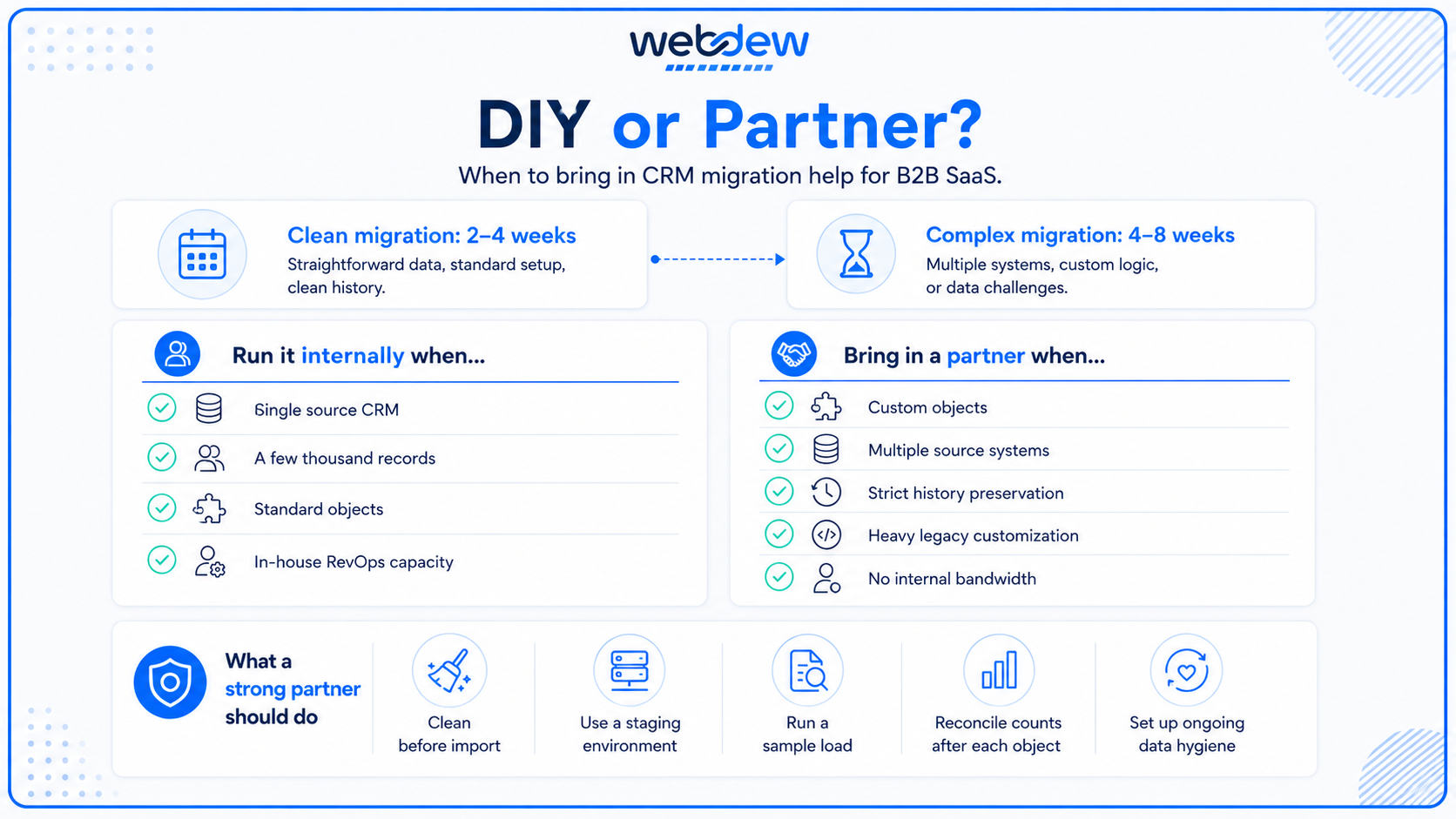
A few signals that point toward a partner:
- Custom objects and non-standard relationships. Native migration tools handle standard objects well. Custom objects, complex relationship types, and unusual data models often need custom API work that's faster and safer with specialists.
- Multiple source systems. Consolidating a CRM, a billing platform, and marketing automation into one target is a different problem than a single CRM-to-CRM move. Reconciling conflicting versions of the same contact across systems is where in-house projects tend to stall.
- Activity and history preservation requirements. If losing call logs and email threads is unacceptable, and for most SaaS sales teams it is, the migration needs tooling and a tested process that goes beyond a standard import.
- Heavy customization in the legacy system. Years of accumulated workflows, validation rules, and custom fields take expertise to untangle and decide what's worth carrying forward.
- No internal RevOps bandwidth. A migration done on the side of a full-time job is a migration that gets rushed through the validation steps that shouldn't be.
When evaluating a partner among the various B2B SaaS CRM platforms and the agencies that service them, a few questions separate the capable from the merely available. Does the partner clean and deduplicate before the move, or do they import first and clean later? The first answer is the correct one. Do they work in a staging environment with a sample load, or do they go straight to production? Do they reconcile record counts and spot-check after each object loads, or do they call it done when the import finishes without errors? And critically, do they set up the ongoing hygiene and CRM integration logic that keeps the data clean, or do they hand over a clean snapshot that starts decaying the day they leave?
The honest version of partner selection is that the value isn't in the import, which is mostly mechanical. It's in the judgment calls, what to leave behind, which record wins a merge, how a free-text field should become structured, and how to rebuild an integration so it stops generating duplicates. Those decisions are where a legacy data migration either sets up years of clean operation or quietly recreates the mess it was supposed to fix.
The takeaway
Legacy CRM migration for B2B SaaS isn't a data-transfer problem. It's a data-quality problem that happens to involve a transfer. The teams that treat it that way, cleaning, deduplicating, and mapping before they move a single record, go live with a system their sales team trusts. The teams that treat it as a copy-paste between platforms spend their first quarter on the new CRM, fixing problems that were visible in the export file all along.
The sequence is the strategy: clean first, deduplicate with context, map deliberately, then migrate and reconcile. And because clean data decays whether or not it just moved, the migration only counts as finished when the hygiene processes that maintain it are running. For teams weighing whether to run that themselves or bring in help, Webdew's view is simple: the import is the easy part, and the judgment around it is what's worth paying for.
Dive Into our
Client Testimonials
Listen to business owners like you share how we’ve helped them grow. Your story could be next!





.svg)

“Recently we reached out to Webdew for a website inside of HubSpot and they also did some mocking automation for us.”

“Webdew team was quite honest and quite easy to work with in terms of taking feedback implementing it, showing that it doesn’t happen again and things like making sure that it meets our expectations.”

“We worked with webdew to help us build our HubSpot website and they did an amazing job with it. They were very quick.”

“webdew has helped us optimize the sales and marketing processes, and this is automating a lot of processes.”

“Hi everyone my name is Kara and I work as a channel consultant at HubSpot Singapore. I’ve been working closely with webdew agency”

“Hi my name is Christian from OpenDoors Mortgage team and I’m in the mortgage business and just trying to work on new projects and kind of incorporating HubSpot for my operations”

“I’m one of the technology directors for Travelopia. We are the largest experiential travel company in the world. We’ve engaged webdew recently, not recently, it’s been about a couple of quarters now.”
“We worked with Chehak over the past several months to create a series of animated videos for an academic planner that we produce. And from the very beginning, she was absolutely professional and a pleasure to work with.”


6x
We helped clients multiply their website conversion rates through strategic design and UX optimization.
20%
Our marketing campaigns led to a 20% uplift in customer engagement across digital channels.
2K+
Delivered over 2,000 qualified leads through targeted funnels and smart automation.
120+
Our video content has earned 120,000+ views, driving brand awareness and audience retention.
“I recently had the pleasure of working with Chehak on a video demo project, and I was thoroughly impressed with her services.”
.svg)

Additional Resources
Access expert tips, trends, and strategies designed for small businesses. Stay ahead of the curve and make informed decisions with our comprehensive resources!