

 We typically respond the same day

.webp?width=630&name=Salesforce%20to%20HubSpot%20Migration%20A%20Complete%20Guide%20(1).webp)
If your team spends more time managing your CRM rather than using it to make sales, you're not alone. Many mid-market and high-growth firms are moving from Salesforce to HubSpot. The reason usually isn't due to any single feature difference; it's because of everyday issues with the current system. You know the drill: clunky admin work, pricey licenses, low usage, and complicated report-building.
Shifting CRMs is a huge deal. It affects your data, processes, and everyone who uses it daily. If done wrong, migrations could mess up pipelines, erase history, and piss off the team. But when done right, the change results in the cleanest data in years and gets your sales, marketing, and service departments finally using a unified system.
This blog covers everything important when transitioning from Salesforce to HubSpot: reasons for changing, the actual process, mapping and transferring data, costs and timelines, plus common risks. Whether you want to handle a DIY project or pick a migration partner, you'll end up with a solid understanding of a successful move.
|
Quick Answer: A Salesforce to HubSpot migration typically takes 6–12 weeks and costs between $5,000 and $50,000, depending on data volume, custom objects, integrations, and automation complexity. Most businesses switch to reduce CRM costs, improve user adoption, and simplify revenue operations while maintaining data integrity and reporting capabilities. |
Why companies move CRM from Salesforce to HubSpot
Before getting into the how, it helps to be honest about the why. Most teams do not abandon Salesforce because it is a bad product. They leave because the platform they are paying for no longer matches the way they actually work.
A few patterns show up again and again:
Cost that keeps climbing. Salesforce pricing scales steeply, especially once you add the marketing tools most teams need. Salesforce Enterprise sits at roughly $165 per user per month, and a separate Marketing Cloud subscription can run well over a thousand dollars a month on top of that. When teams add up licenses, admin salaries, and add-ons, the total cost of ownership often runs two to three times higher than a comparable HubSpot setup over a three-year window.
Underused complexity. A recurring story is the company that grew up on Salesforce, inherited it from early leadership, and now uses a fraction of what it pays for. A ten-person sales team rarely needs Apex triggers and Lightning components. It needs a clean CRM that reps will actually open every day.
Low adoption. The most powerful CRM in the world delivers nothing if your team avoids it. HubSpot's reputation for usability is its single biggest draw. A marketer can build an automated email campaign, a rep can update a deal, and a manager can pull a report without filing a ticket to an administrator.
Fragmented tooling. Many teams do not switch because they dislike Salesforce in isolation. They switch because the stack around it keeps growing: Salesforce plus Pardot or Marketo plus a separate sales engagement tool. Consolidating onto one platform removes the seams where data and money leak out.
If any of this sounds familiar, you are likely past the question of whether to move and into the question of how to do it well.
A few patterns show up again and again:
Cost that keeps climbing. Salesforce pricing scales steeply, especially once you add the marketing tools most teams need. Salesforce Enterprise sits at roughly $165 per user per month, and a separate Marketing Cloud subscription can run well over a thousand dollars a month on top of that. When teams add up licenses, admin salaries, and add-ons, the total cost of ownership often runs two to three times higher than a comparable HubSpot setup over a three-year window.
Underused complexity. A recurring story is the company that grew up on Salesforce, inherited it from early leadership, and now uses a fraction of what it pays for. A ten-person sales team rarely needs Apex triggers and Lightning components. It needs a clean CRM that reps will actually open every day.
Low adoption. The most powerful CRM in the world delivers nothing if your team avoids it. HubSpot's reputation for usability is its single biggest draw. A marketer can build an automated email campaign, a rep can update a deal, and a manager can pull a report without filing a ticket to an administrator.
Fragmented tooling. Many teams do not switch because they dislike Salesforce in isolation. They switch because the stack around it keeps growing: Salesforce plus Pardot or Marketo plus a separate sales engagement tool. Consolidating onto one platform removes the seams where data and money leak out.
If any of this sounds familiar, you are likely past the question of whether to move and into the question of how to do it well.
Worth a read: If you are still weighing the decision, our team's overview of what HubSpot is and what you can do with it is a useful primer before you commit to a migration plan.
Salesforce vs HubSpot: A Quick Reality Check
A Salesforce-to-HubSpot migration is not a like-for-like copy. The two platforms are built on different philosophies, and understanding that difference upfront saves a lot of pain later.
Salesforce optimizes for the ceiling of what is possible. With enough configuration, Apex code, and a dedicated admin team, it can model almost any business process imaginable. That flexibility is exactly why large enterprises with 500-plus reps and complex requirements stay on it.
HubSpot optimizes for time-to-value. It is opinionated by design, which means fewer dials to turn but a much faster path to a system people will use. Marketing automation is included in every tier rather than sold as a separate cloud, and robust API access comes standard rather than as an upgrade.
The takeaway is not that one platform is universally better. It is that the move trades raw configurability for speed, simplicity, and lower cost. If your team is deep into Service Cloud, advanced analytics, and a heavily customized data model, a full switch may not be the right call, and a HubSpot-for-marketing integration might serve you better. For most growing teams, though, the trade lands firmly in HubSpot's favor.
How to migrate from Salesforce to HubSpot: the phases that matter
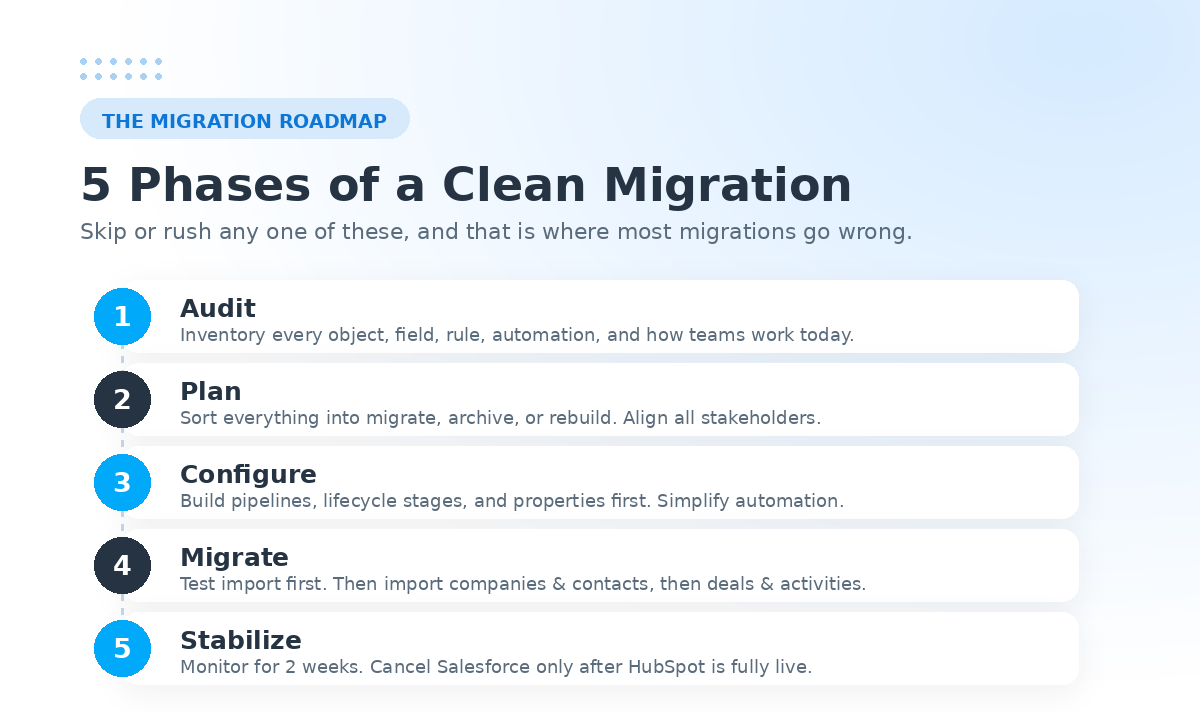
A clean migration follows a predictable arc. The exact wording varies between partners, but nearly every successful project moves through five phases: audit, plan, configure, migrate, and stabilize. Skipping or rushing any one of them is where most failed migrations go wrong.
Phase 1: Audit your current Salesforce setup
You cannot move what you have not inventoried. Start by documenting your Salesforce environment in detail:
- Every object you use, including Leads, Contacts, Accounts, Opportunities, Activities, and any custom objects.
- The fields living under each object, along with their data types, picklist values, and dependencies.
- Validation rules, lead sources, automation (workflows, Apex triggers, flows), and integrations connected to the org.
- How your teams actually work today: sales stages, lifecycle definitions, lead routing rules, and the handoff points between marketing and sales.
This last point is the one teams underrate. Document actual usage, not the original Salesforce design. A field that was set up three years ago and never touched does not need to make the trip.
Phase 2: Plan the migration and decide what moves
With the audit done, decide the scope. A useful framing is to sort everything into three buckets: what migrates, what gets archived, and what gets rebuilt.
This is also where you align stakeholders. Sales, marketing, RevOps, and IT each have a stake in the outcome, and getting them in a room early prevents the mid-project surprises that blow up timelines. Choose your HubSpot tier based on the features you genuinely need, and settle on a migration method: the native connector, CSV import, or a custom API-based migration for complex data.
Phase 3: Configure HubSpot before importing data
Resist the urge to dump data into an empty portal. Build the structure first. Recreate your pipelines and deal stages, define lifecycle stages, set up properties to receive your mapped fields, and rebuild the automation your team relies on.
A key principle here: do not blindly replicate Salesforce. Many Salesforce capabilities should be simplified rather than copied. Complex validation rules often become workflow-based guidance that helps users instead of blocking them. Apex triggers usually translate into simpler HubSpot workflows. Surprisingly, the simpler version is often more reliable.
Phase 4: Migrate the data
Always start with a small test import. Pull a representative sample, review it live, and quality-check it before running the full migration. Extract your Salesforce data using the Data Loader or API, run it through your field mapping, and import it in a sensible order, typically companies and contacts first, then deals and activities, so associations land correctly.
Phase 5: Stabilize after go-live
This is the phase most guides leave out and the one that catches teams off guard. For at least two weeks after go-live, monitor workflow performance, sync behavior, and data quality. Only cancel your Salesforce license after you have confirmed HubSpot is fully operational. Pulling the plug too early is a mistake you cannot easily undo.
Planning resource: Webdew is a HubSpot Diamond Partner, and our HubSpot migration services page outlines how a certified team handles each phase end-to-end.
Common Salesforce to HubSpot migration mistakes
Even teams that follow the five phases tend to stumble on the same handful of errors. Knowing them in advance is half the battle, because almost all of them are avoidable with a little discipline up front. Here are the ones that derail migrations most often.
Migrating duplicate records. Salesforce instances accumulate duplicates over years of use, and importing them as-is simply moves the mess into a clean system. Deduplicate before you export, not after, so HubSpot starts with one accurate record per contact and company rather than three near-identical ones your reps have to reconcile later.
Skipping field mapping validation. Building the field map is only half the job; confirming it actually works is the other half. Teams that import without validating their mapping discover too late that picklist values landed in the wrong property, dates shifted format, or a field mapped to nothing at all. Run your test import specifically to check that every mapped field arrives where it should, in the format you expect.
Forgetting activity history. Emails, calls, notes, and logged tasks are easy to overlook because they are not headline objects like contacts or deals, yet losing them erases the context your sales team relies on. Decide explicitly which history matters, confirm it carries over in the test import, and do not assume it will come along automatically.
Migrating unused custom fields. A migration is the best chance you will get to shed dead weight. Carrying over fields no one has touched in years clutters HubSpot, slows adoption, and makes reporting harder. If a field did not earn its place during the audit, leave it behind rather than recreating it out of habit.
Cancelling Salesforce too early. This is the most expensive mistake on the list because it is often irreversible. Keep Salesforce live and accessible until you have confirmed, beyond doubt, that HubSpot is fully operational and every critical workflow behaves as expected. A few extra weeks of overlapping licenses costs far less than discovering a gap after the old system is gone.
Steer clear of these five, and you have already avoided the failure modes that catch the majority of teams off guard.
Salesforce to HubSpot data mapping: The technical core
If migration has a heart, it is data mapping. This is the exercise of deciding exactly where each piece of Salesforce data lands in HubSpot, and it deserves real attention because the two systems do not share the same structure.
Mapping standard objects
The most important conceptual shift is how the two platforms treat people. Salesforce separates Leads and Contacts into distinct objects. HubSpot does not. The widely recommended approach is to map both Salesforce Leads and Contacts into the single HubSpot Contacts object, then use lifecycle stage and lead status properties to preserve the distinction.
A typical standard mapping looks like this: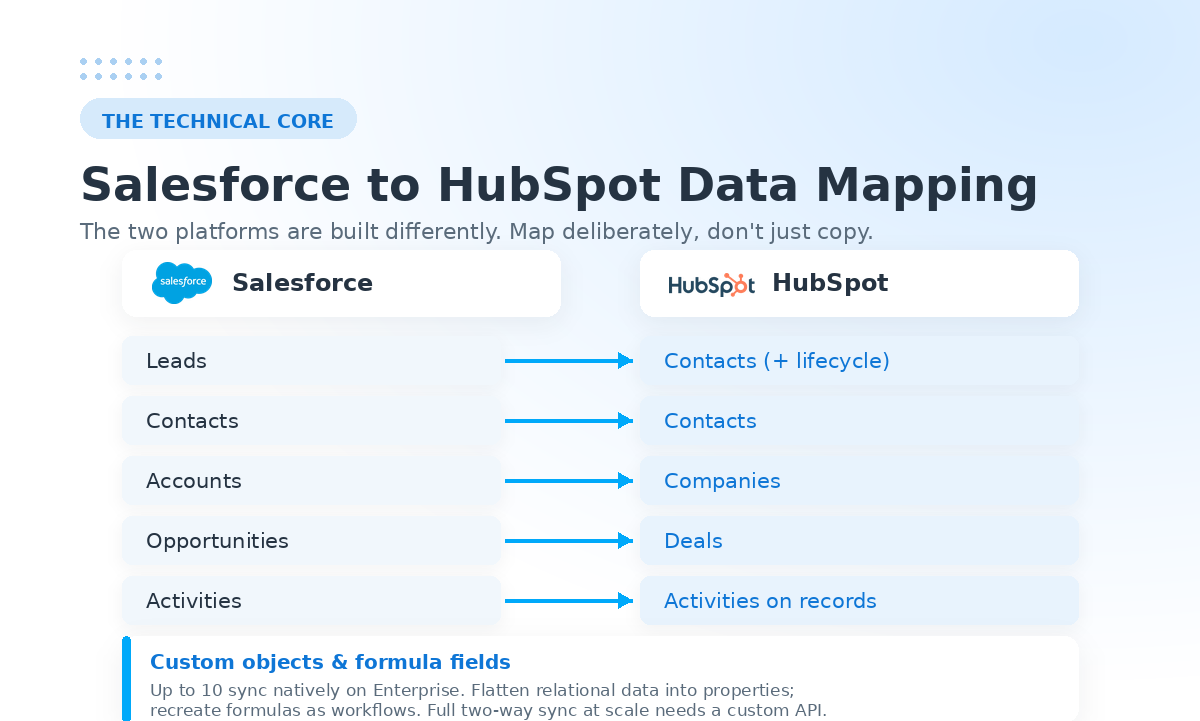
Mapping Salesforce custom fields to HubSpot
For every field you decided to keep in the audit, you create a corresponding HubSpot property and map it. Watch for type mismatches: a Salesforce picklist needs a matching set of options on the HubSpot side, date formats must align, and formula fields generally need to be recreated as workflows or recalculated on import since HubSpot does not carry Salesforce formulas across directly.
This is detailed, unglamorous work, and it is precisely where rushing causes the most damage. A field mapped to the wrong place is far harder to untangle after import than before.
Can I migrate my Salesforce custom objects to HubSpot?
Yes, with some important nuance. HubSpot supports custom objects on Enterprise plans, and you can sync up to ten custom objects per account through the native Salesforce connector. You can also import existing custom object data from Salesforce into HubSpot.
The nuance is that the native connector has limited support for fully bidirectional custom object sync, and it cannot map Salesforce lookup fields on custom objects directly (those are handled through association settings instead). For deeply relational custom data, a common and often better approach is to flatten certain objects into properties on the Contact, Company, or Deal record. This improves both reporting and adoption. When you genuinely need real-time, two-way custom object sync at scale, that usually calls for a custom API integration built on both platforms.
Sync and integration: when you keep both systems
Not every company does a clean break. Some run HubSpot for marketing and keep Salesforce as the system of record for sales, at least during a transition. In that case, the HubSpot-Salesforce integration becomes central.
The native connector, available on HubSpot Professional and Enterprise plans, synchronizes Contacts, Companies, Deals, and activities in near real time. Setting it up well comes down to a few decisions:
- Pick a source of truth per field. For each shared field, decide whether Salesforce or HubSpot wins a conflict, and set your conflict resolution rule accordingly.
- Choose sync direction. Two-way sync keeps both systems current; one-way sync is simpler and safer where one platform should never be overwritten.
- Use inclusion lists. Control which records sync rather than syncing everything, which keeps API usage and noise down.
- Monitor sync errors. Build a habit of reviewing the sync errors section and setting up alerts so problems surface before they compound.
A standard object sync typically takes one to three weeks to configure, with extra time for each custom object cluster. When the native connector cannot handle a requirement, bidirectional custom object sync being the most common example, a custom integration on both platforms' APIs fills the gap.
Related case study: For a real example of connecting the two systems, see how Webdew integrated HubSpot and Salesforce for Maropost.
How much does a Salesforce to HubSpot migration cost?
Cost is the question everyone asks first and the one with the least satisfying answer, because it genuinely depends. That said, the market has settled into recognizable ranges, and you can estimate where you will land based on a few drivers.
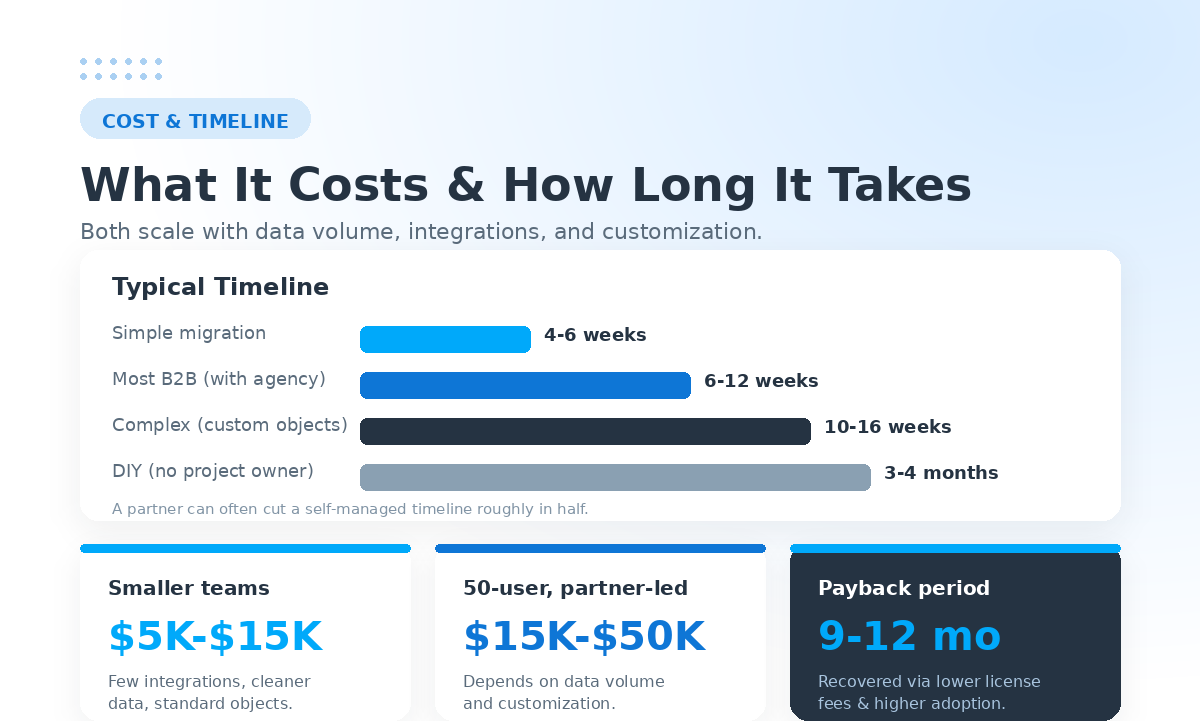
For most growing B2B companies, a migration handled by an experienced agency runs somewhere between $5,000 and $50,000. Simpler projects for smaller teams can start in the low single-digit thousands, while complex enterprise migrations with custom objects and ERP integrations climb to the higher end and occasionally beyond. A partner-led migration for a 50-user team commonly lands in the $15,000 to $50,000 range, depending on data volume and customization.
The factors that move the number are predictable:
- Data volume. More records and more history take more time to clean, map, and validate.
- Integration count. Each connected system you need to rebuild or re-point, adds scope.
- Custom object complexity. Relational, heavily customized data models are the single biggest cost driver.
- Automation complexity. Rebuilding intricate Salesforce automation in HubSpot takes effort, even when the result is simpler.
- Training. Whether team enablement is included in the scope changes the total.
Is Salesforce to HubSpot migration expensive?
It is an investment, but the better question is what it returns. Migration is best thought of as a one-time cost paid back through lower ongoing license fees and higher adoption. The short-term expense is typically recovered within roughly nine to twelve months through reduced software spend alone. One commonly cited mid-market example saw annual platform costs drop sharply after switching, with the savings covering a $35,000 migration within about five months. When you weigh the project cost against a three-year total cost of ownership that can be a multiple of HubSpot's, the math usually favors the move.
Compare your options: It helps to see the migration cost alongside the ongoing platform cost. Reviewing HubSpot CRM features gives a sense of what is included out of the box versus what Salesforce charges extra for.
Risks of migrating from Salesforce to HubSpot (and how to avoid them)
A migration is not risk-free, but nearly every risk is manageable with planning. The ones worth your attention:
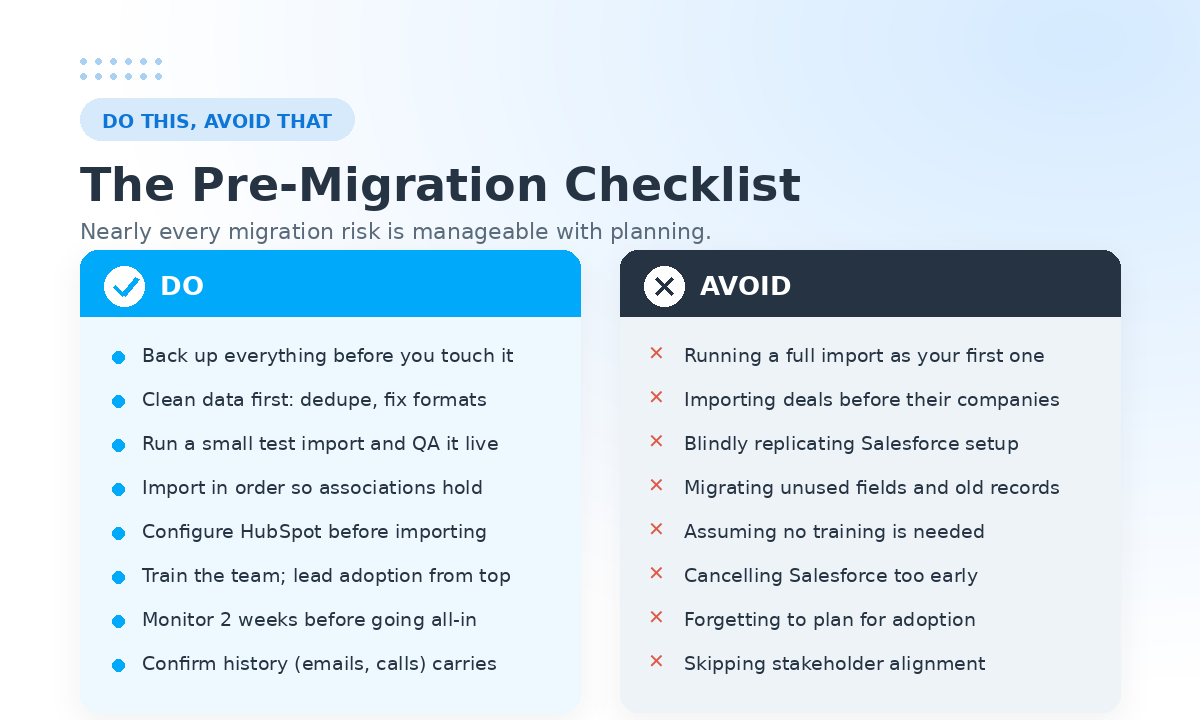
Data loss or corruption. The antidote is a full backup before you touch anything, plus the test-import-first discipline mentioned earlier. Never run a full migration as your first import.
Broken associations. If you import deals before the companies they belong to, the relationships break. Sequence your imports deliberately.
Lost history. Activity history (emails, calls, notes) is easy to overlook and painful to lose. Decide explicitly what history matters and confirm it carries over in your test import.
Low adoption after go-live. A technically perfect migration still fails if no one uses the new system. Executive participation matters here: when sales leadership runs the business in HubSpot from day one, the team follows. Pair that with proper training rather than assuming HubSpot's friendlier interface means no enablement is needed.
Cancelling Salesforce too soon. Keep the old system live until you have confirmed everything works. The cost of a few extra weeks of overlapping licenses is trivial next to the cost of discovering a gap after the data is gone.
A practical Salesforce to HubSpot migration checklist
Use this as a working checklist you can adapt to your data size and complexity:
- Pre-migration cleanup. Remove duplicate records, delete unused fields, standardize picklist values, and validate emails, phone numbers, and location fields in Salesforce first. Clean data in equals clean data out.
- Inventory and audit. Export a full inventory of objects, fields, validation rules, lead sources, and dependencies.
- Define scope. Sort everything into migrate, archive, or rebuild.
- Align stakeholders. Get sales, marketing, RevOps, and IT to agree on goals and timeline.
- Choose a tier and a method. Select your HubSpot plan and your migration method (native, CSV, or API).
- Map your data. Build the field-by-field mapping, resolving type mismatches before import.
- Configure HubSpot. Build pipelines, lifecycle stages, properties, and rebuild automation.
- Run a test import. Validate a representative sample live before going further.
- Execute the full migration. Import in the right order so associations hold.
- Stabilize. Monitor for two weeks, then retire Salesforce once HubSpot is confirmed operational.
Step-by-step help: A detailed look at how a partner handles onboarding and setup lives on the webdew HubSpot services page.
Do I need a consultant for a CRM migration?
You can run a migration in-house, and plenty of teams do. The honest trade-off is time and risk. Do-it-yourself migrations without a dedicated project owner commonly stretch to three or four months, and they carry more risk of the mistakes above simply because the people running them are doing it for the first time.
A partner-led migration typically completes in six to twelve weeks, and an experienced agency can often cut a self-managed timeline roughly in half. The value of a consultant is less about moving data, which is the easy part, and more about the judgment calls: how to fit Salesforce's messy custom fields into HubSpot's cleaner schema, what to simplify, what to leave behind, and how to drive adoption once the system is live.
If your migration is simple, your data is clean, and you have internal HubSpot expertise, doing it yourself is reasonable. If you have custom objects, multiple integrations, a large team, or a revenue operation you cannot afford to disrupt, a certified partner is usually money well spent. webdew has handled exactly these projects, from a CRM setup and migration for Royal Vending to integrations between HubSpot and Salesforce, as a HubSpot Diamond Partner.
Ready to make the switch?
A Salesforce to HubSpot migration is not a copy-and-paste exercise, and the teams that treat it like one are the teams that struggle. Approached as a chance to clean your data, simplify your processes, and rally everyone around a single source of truth, it becomes one of the highest-leverage projects your revenue team can take on this year.
The path is clear: audit honestly, plan deliberately, map carefully, migrate in the right order, and stabilize before you let go of the old system. Whether you run it in-house or bring in a certified partner, the principles are the same.
If you would rather not learn the hard parts on your own data, Webdew is a HubSpot Diamond Partner with a track record of CRM migrations, onboarding, and Salesforce-HubSpot integrations. Talk to our HubSpot team about scoping your migration and getting it done right the first time.
Dive Into our
Client Testimonials
Listen to business owners like you share how we’ve helped them grow. Your story could be next!





.svg)

“Recently we reached out to Webdew for a website inside of HubSpot and they also did some mocking automation for us.”

“Webdew team was quite honest and quite easy to work with in terms of taking feedback implementing it, showing that it doesn’t happen again and things like making sure that it meets our expectations.”

“We worked with webdew to help us build our HubSpot website and they did an amazing job with it. They were very quick.”

“webdew has helped us optimize the sales and marketing processes, and this is automating a lot of processes.”

“Hi everyone my name is Kara and I work as a channel consultant at HubSpot Singapore. I’ve been working closely with webdew agency”

“Hi my name is Christian from OpenDoors Mortgage team and I’m in the mortgage business and just trying to work on new projects and kind of incorporating HubSpot for my operations”

“I’m one of the technology directors for Travelopia. We are the largest experiential travel company in the world. We’ve engaged webdew recently, not recently, it’s been about a couple of quarters now.”
“We worked with Chehak over the past several months to create a series of animated videos for an academic planner that we produce. And from the very beginning, she was absolutely professional and a pleasure to work with.”


6x
We helped clients multiply their website conversion rates through strategic design and UX optimization.
20%
Our marketing campaigns led to a 20% uplift in customer engagement across digital channels.
2K+
Delivered over 2,000 qualified leads through targeted funnels and smart automation.
120+
Our video content has earned 120,000+ views, driving brand awareness and audience retention.
“I recently had the pleasure of working with Chehak on a video demo project, and I was thoroughly impressed with her services.”
.svg)

Additional Resources
Access expert tips, trends, and strategies designed for small businesses. Stay ahead of the curve and make informed decisions with our comprehensive resources!