

 We typically respond the same day

What a Landing Page Does and Why Design Is the Variable
A landing page is a standalone web page built around a single action. Unlike your homepage, which serves multiple audiences and purposes at once, a landing page focuses one visitor on one offer. If you're unclear on that distinction, this breakdown of the difference between a landing page and a homepage covers the key differences well.
The offer could be a free trial, a downloadable guide, a demo booking, or a consultation. Design determines whether the visitor takes it.
HubSpot's landing page builder gives you control over every element research links to conversion: above-the-fold layout, form length, CTA color and copy, trust signals, and image placement. Teams that test and refine these elements convert more of the same traffic. Teams that don't pay more per lead or leave pipelines sitting idle.
Semantic triples:
- HubSpot landing pages capture visitor data through embedded forms.
- The drag-and-drop editor adjusts layout without touching code.
- Smart content changes page copy based on visitor properties.
The Builder: Faster Pages, Fewer Bottlenecks
HubSpot's drag-and-drop landing page editor lets marketers build and publish pages without waiting on a developer. Pick a template, drop in your sections, swap copy and images, and publish. The whole process can take under an hour.
That speed matters for lead generation. When a campaign goes live, the landing page needs to be ready. HubSpot removes the bottleneck between "we have an offer" and "we're collecting leads."
The editor also enforces design consistency. Templates stay on-brand by default — fonts, colors, and button styles match your global theme settings. This isn't cosmetic. Consistent design builds trust. A visitor who lands on a mismatched page is more likely to leave before converting.
If you want to see what well-structured pages look like in practice, these landing page examples show different layouts and formats across industries. For a deeper look at the tools available to build them, this guide on landing page creators compares the main options on the market.
Key Points:
- The template library provides tested layouts for different offer types.
- Brand theme settings apply fonts and colors across every page automatically.
- Published pages connect directly to HubSpot CRM contact records.
Forms: Length, Placement, and Friction
Forms are where leads actually happen. The design decisions around your form, how many fields it has, where it sits on the page, what happens after submission shape your conversion rate more than almost any other single element.
HubSpot's form builder connects every field directly to CRM contact properties. When a visitor submits the form, HubSpot either creates a new contact or updates an existing one. Sales teams see the submission immediately: no export, no spreadsheet, no delay.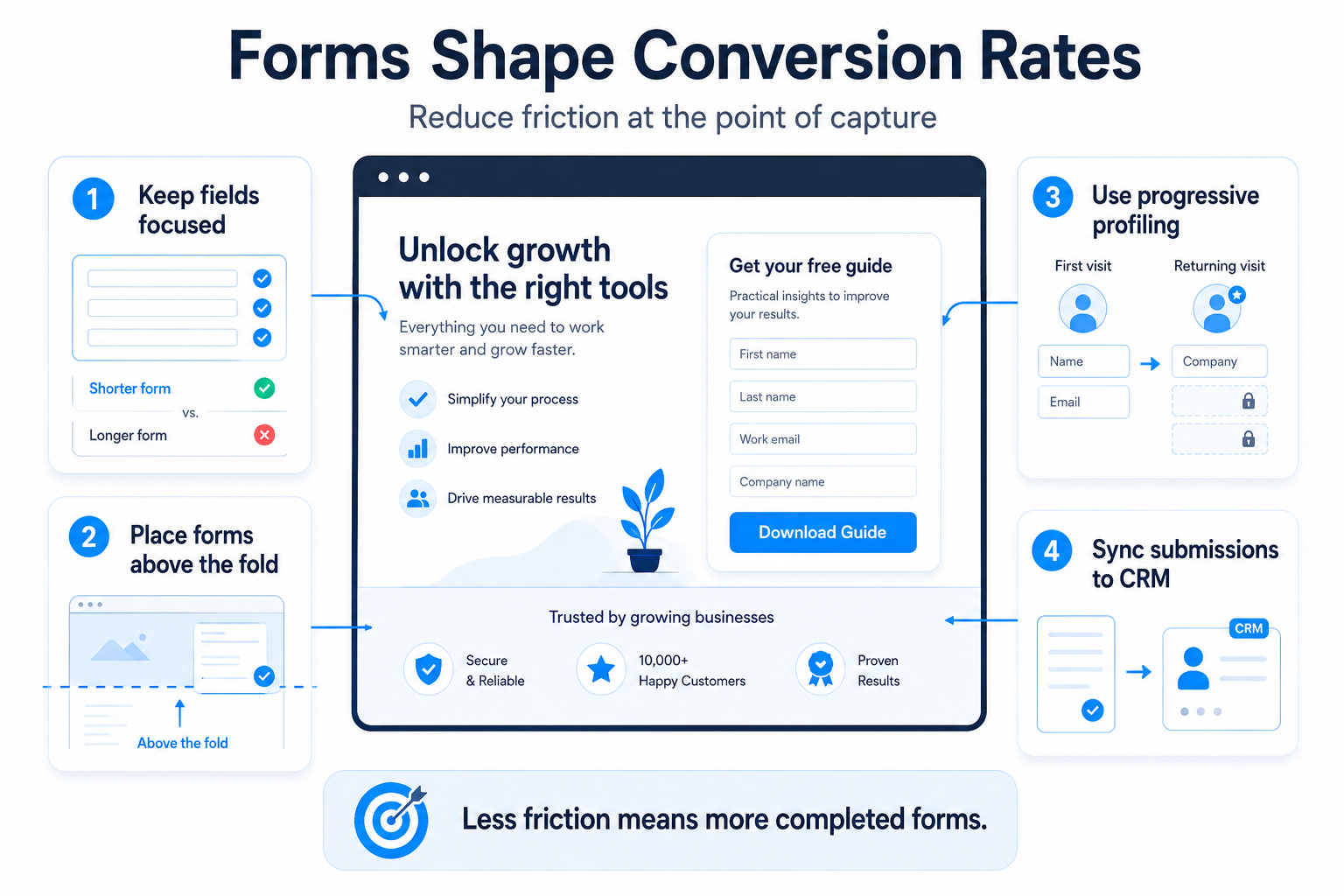
Progressive profiling takes this further. HubSpot forms show new fields to returning visitors once existing properties are already known. A contact who gave you their email last month sees a form asking for their company size this time. You collect more data over multiple visits without making any single form feel long or demanding.
Placement matters too. Pages that put the form above the fold visible without scrolling typically outperform pages that bury it below several paragraphs of copy. HubSpot's editor makes it easy to test both approaches.
Key Points:
- Progressive profiling collects new contact data on each return visit.
- Form submissions create or update records in HubSpot CRM instantly.
- Inline forms on landing pages reduce the clicks required to convert.
Smart Content: One Page, Multiple Audiences
HubSpot Smart Content changes what a visitor sees based on their properties lifecycle stage, location, device type, referral source, or list membership.
A visitor who found you through a LinkedIn ad sees different headline copy than one who came from an organic Google search. A contact already in your CRM sees a page that acknowledges they're not a first-time visitor. A mobile user gets a layout built for their screen. These aren't minor tweaks, they're the difference between a page that feels relevant and one that feels generic.
This matters for lead generation because personalization closes the gap between what a visitor came looking for and what the page delivers. A generic page converts at a generic rate.
For SaaS companies, smart content helps distinguish between a self-serve trial user and an enterprise buyer, two audiences who need completely different framing. These SaaS landing page examples show how companies structure pages for different buyer segments.
Key Points:
- Smart Content displays different headlines based on the visitor lifecycle stage.
- Device-specific layouts show mobile-optimized forms to phone users.
- CRM list membership triggers personalized CTAs for known contacts.
CTAs: Copy, Placement, and Contrast
Your call-to-action button is the last thing a visitor sees before converting. The copy on it, where it sits, and how it contrasts visually against the background all affect whether it gets clicked.
HubSpot lets you test CTA variations without leaving the platform. You run two versions of a page: "Get the Guide" on one, "Download Now" on the other and measure which drives more conversions. That data replaces opinion with evidence..png?width=1536&height=1024&name=ChatGPT%20Image%20Aug%2028%2c%202026%2c%2007_07_27%20PM%20(3).png)
CTA placement follows a simple logic: put it where visitors are ready to act. For short pages with low-commitment offers, that's often near the top. For longer pages explaining a complex product or service, the CTA makes more sense after the key value has been laid out. HubSpot's A/B testing tool lets you validate which placement actually works for your specific audience.
For teams running sales-focused campaigns, these sales landing page examples show how high-converting pages handle CTA placement and button copy in sales contexts.
Key Points:
- A/B testing runs two page variants simultaneously and tracks conversions.
- CTA modules let you change button copy without rebuilding the entire page.
- Conversion data from each variant feeds directly into HubSpot analytics.
Mobile Design and Page Speed
More than half of web traffic comes from mobile devices. A landing page that looks sharp on a desktop but breaks on a phone loses those visitors before they ever read the offer. HubSpot landing page templates are mobile-responsive by default, which means the layout adjusts automatically to fit the screen.
You can preview both mobile and desktop views before publishing. If something looks off on mobile, a form field that's too small, a headline that wraps awkwardly you fix it before anyone sees it live.
Page speed also feeds into lead generation directly. Slow pages lose visitors before they read a single line. HubSpot hosts landing pages on its own CDN, which keeps load times low without requiring configuration on your end.
For a stronger foundation on what makes a landing page work across all devices and contexts, this overview of landing pages covers the essentials.
Key Points:
- Responsive templates reflow layout automatically for mobile screens.
- CDN hosting reduces page load time without manual optimization.
- Mobile preview mode shows the page exactly as a phone user sees it.
Analytics: Knowing What to Fix
HubSpot's landing page analytics show views, submissions, and conversion rate for each page. You can filter by date range, traffic source, and device type. The data makes clear which pages are working and which ones need work.
The value is in the specificity. You're not looking at a blended bounce rate you're seeing that visitors from paid search convert at 4.2% while organic visitors convert at 1.8%. That's a signal worth acting on.
Connected to the rest of HubSpot, landing page data flows into contact timelines, campaign reports, and revenue attribution. A lead that came in through a specific page can be traced all the way to a closed deal. That loop closes the gap between marketing effort and actual business result.
Key Points:
- Landing page reports show conversion rate by traffic source and device.
- Contact timelines record which page each lead originally converted on.
- Campaign attribution links page conversions to pipeline and revenue.
The Design-Lead Connection Is Direct
Every element on a landing page either helps or hurts conversion. HubSpot gives you the tools to control those elements and measure what's actually working.
Good design isn't about looking polished. It's about making the right ask, at the right moment, in an easy way to say yes to. HubSpot landing page design connects those decisions directly to lead generation outcomes. The teams that treat design as a conversion variable not just a visual one get more from every campaign they run. Your landing page should do more than look good it should create opportunities. Get expert help optimizing your HubSpot landing pages for better engagement and higher conversions. Contact us now.
Dive Into our
Client Testimonials
Listen to business owners like you share how we’ve helped them grow. Your story could be next!





.svg)
“Recently we reached out to Webdew for a website inside of HubSpot and they also did some mocking automation for us.”
“Webdew team was quite honest and quite easy to work with in terms of taking feedback implementing it, showing that it doesn’t happen again and things like making sure that it meets our expectations.”
“We worked with webdew to help us build our HubSpot website and they did an amazing job with it. They were very quick.”
“webdew has helped us optimize the sales and marketing processes, and this is automating a lot of processes.”

“Hi everyone my name is Kara and I work as a channel consultant at HubSpot Singapore. I’ve been working closely with webdew agency”

“Hi my name is Christian from OpenDoors Mortgage team and I’m in the mortgage business and just trying to work on new projects and kind of incorporating HubSpot for my operations”

“I’m one of the technology directors for Travelopia. We are the largest experiential travel company in the world. We’ve engaged webdew recently, not recently, it’s been about a couple of quarters now.”
“We worked with Chehak over the past several months to create a series of animated videos for an academic planner that we produce. And from the very beginning, she was absolutely professional and a pleasure to work with.”


6x
We helped clients multiply their website conversion rates through strategic design and UX optimization.
20%
Our marketing campaigns led to a 20% uplift in customer engagement across digital channels.
2K+
Delivered over 2,000 qualified leads through targeted funnels and smart automation.
120+
Our video content has earned 120,000+ views, driving brand awareness and audience retention.
“I recently had the pleasure of working with Chehak on a video demo project, and I was thoroughly impressed with her services.”
.svg)

Additional Resources
Access expert tips, trends, and strategies designed for small businesses. Stay ahead of the curve and make informed decisions with our comprehensive resources!

.svg)