

 We typically respond the same day

.svg)
TL;DR: HubSpot adaptive testing automatically distributes traffic across multiple page variations, learns which version performs best, and shifts visitors toward the winner without manual intervention. It reduces bounce rates, increases conversions, and removes the guesswork from CRO decisions.
Most marketers know A/B testing. Fewer know that HubSpot's adaptive testing goes further: it doesn't just split traffic and wait. It actively adjusts as it learns, compressing the time between test and result.
This guide explains what HubSpot adaptive testing is, how it differs from standard A/B testing, how to set it up in HubSpot CMS, and what kinds of results it produces in practice.
What is adaptive testing in HubSpot CMS?
HubSpot adaptive testing is a multivariate website optimization feature built into HubSpot CMS (now HubSpot Content Hub). It allows marketers to test up to five page variations simultaneously, then automatically reallocates traffic toward the best-performing version in real time.
HubSpot adaptive testing uses a machine learning algorithm to identify winning variations faster than traditional split tests. Traffic allocation starts roughly even across all variants, then the algorithm begins redirecting more visitors to whichever version shows the strongest conversion signal. The weakest performers receive progressively less traffic until the system converges on a winner.
The key distinction from classic A/B testing: adaptive testing does not hold a fixed traffic split until a predetermined sample size is reached. It learns and adjusts continuously throughout the experiment.
Key Points:
- HubSpot adaptive testing distributes traffic across up to five page variations.
- The algorithm reallocates visitors toward higher-converting variants automatically.
- Conversion signals inform the traffic shift in real time.
How does HubSpot adaptive testing differ from standard A/B testing?
HubSpot CMS supports both adaptive testing and traditional A/B testing. The differences matter for how you plan and run experiments.
In standard A/B testing, traffic splits evenly and stays fixed. You define a winner manually after reaching statistical significance, typically by reviewing results in your analytics dashboard. This approach works well when you have one clear hypothesis and enough monthly traffic to generate a clean sample.
Adaptive testing fits better when you want to test multiple variants at once, when traffic volume is limited, or when you need to minimize the cost of sending visitors to underperforming pages. Because adaptive testing shifts traffic dynamically, fewer visitors land on your worst-performing variant. That matters most when the page in question is tied to revenue.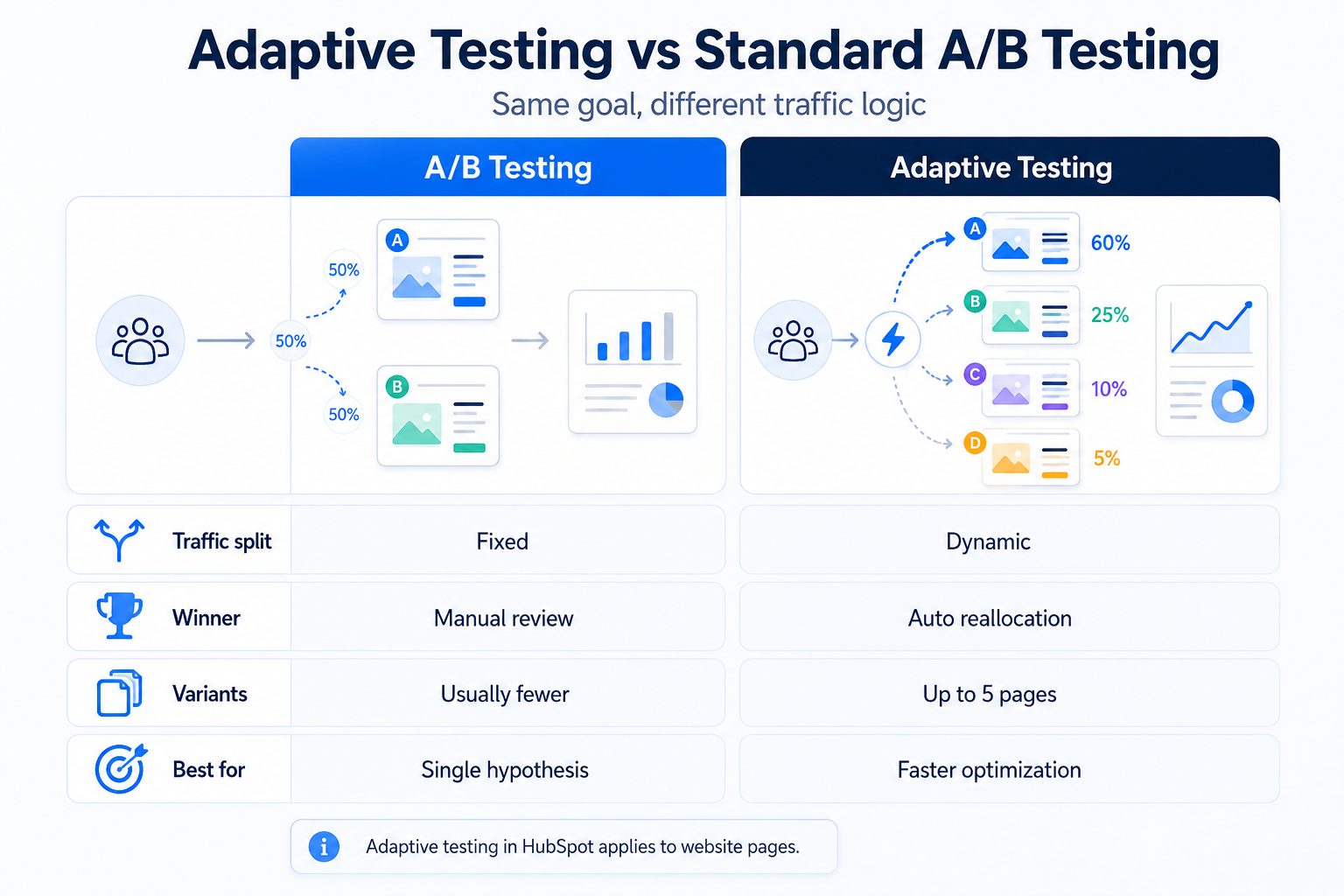
One trade-off: adaptive testing is harder to analyze with traditional statistical methods because the traffic split is not fixed. HubSpot handles the statistical modeling internally, so the results are interpretable inside the platform, but exporting raw data for external analysis is more complicated.
A/B testing on HubSpot also supports testing in email, landing pages, and CTAs. Adaptive testing applies specifically to website pages.
Key Points:
-
Standard A/B testing holds a fixed traffic split until manual review.
-
Adaptive testing shifts traffic automatically based on real-time conversion signals.
-
Adaptive testing in HubSpot applies to website pages specifically.
How to set up adaptive testing in HubSpot CMS
Setting up an adaptive test in HubSpot CMS takes under ten minutes if your page is already live.
Go to your website pages in the HubSpot dashboard. Open the page you want to test, click the "Run a test" option, and select "Adaptive test" from the test type options. HubSpot will prompt you to name your test, then create variation pages from your original. You can create up to four additional variants, each cloned from the original and editable in the drag-and-drop editor.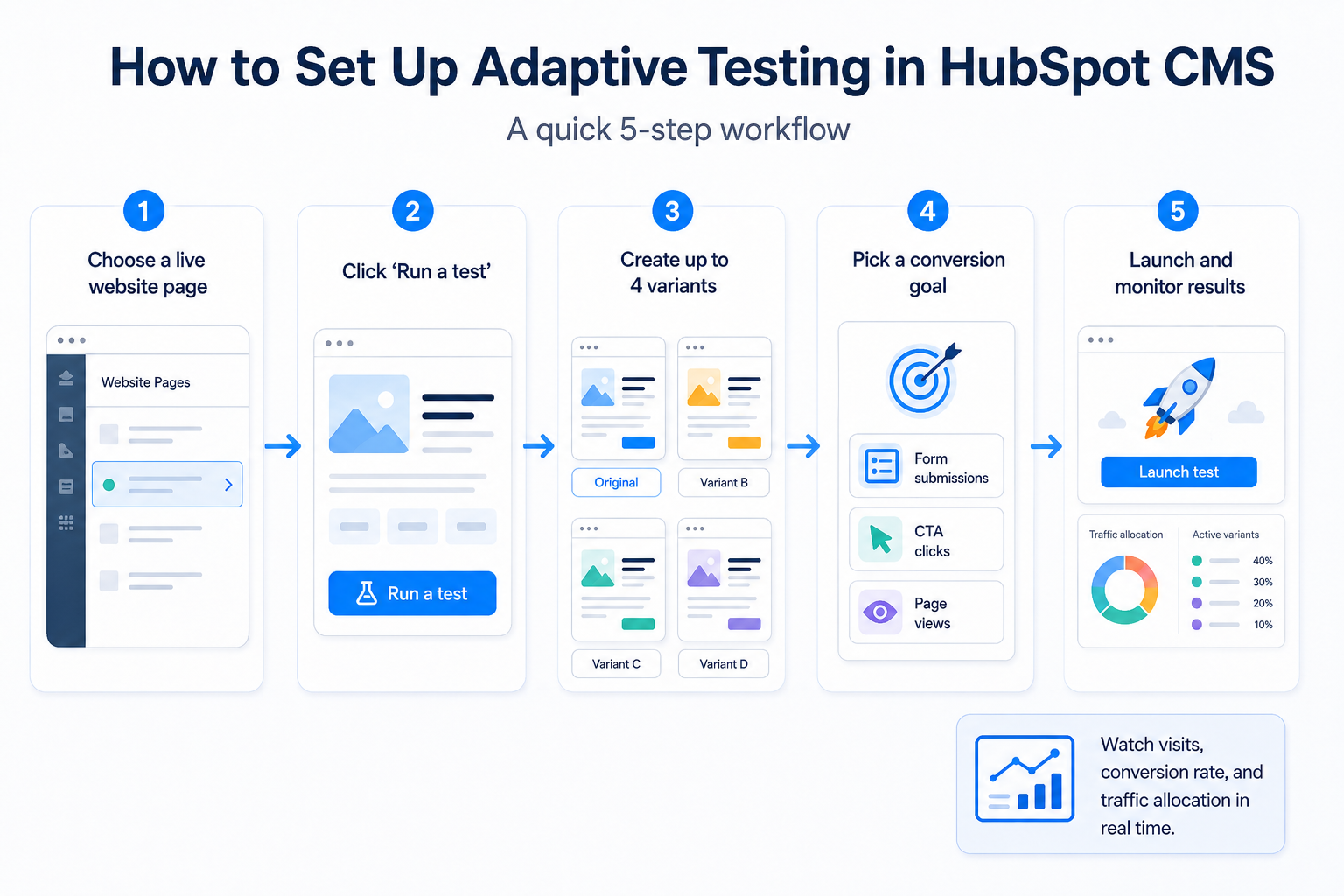
Define what you are testing before building variants. Common test elements include the hero headline, primary CTA copy and color, page layout, lead form length, and imagery. Testing one major element per variant keeps results interpretable.
Select your conversion goal: page views, form submissions, or CTA clicks. HubSpot uses this goal to calculate which variant is winning. Set the test to run for at least two weeks to account for weekday or seasonal traffic patterns.
Once launched, HubSpot begins distributing traffic and reporting results inside the A/B testing dashboard. You can monitor each variant's conversion rate, visits, and traffic allocation percentage in real time.
To learn more about how HubSpot CMS handles page management and testing environments, see What is HubSpot Content Hub.
Key Points:
-
Adaptive tests in HubSpot support up to five page variations including the original.
-
Conversion goals in HubSpot adaptive testing include form submissions, CTA clicks, and page views.
-
HubSpot reports traffic allocation and conversion rate per variant in real time.
What elements should you test with HubSpot adaptive testing?
The best candidates for adaptive testing are high-traffic pages with measurable conversion goals and meaningful differences between variants.
Homepage hero sections work well because they drive significant traffic and a small improvement compounds quickly. Test headline phrasing, subheadline length, or the primary CTA. Pricing pages are another strong candidate, especially if you're unsure whether a free trial CTA or a "talk to sales" CTA converts better for a given audience segment.
Service or solution pages where visitors arrive from paid campaigns deserve testing too. Paid traffic is expensive, so even a two-point improvement in conversion rate changes the economics of a campaign.
For pages you haven't tested before, start with the headline and primary CTA. These two elements typically account for the largest share of conversion variance. Once you've found a winning combination, run a follow-up test on a secondary element like form length or social proof placement.
A related walkthrough of website testing concepts and methodologies is available at What is website testing.
Key Points:
- Homepage hero sections, pricing pages, and service pages are strong adaptive testing candidates.
- Headlines and primary CTAs account for the largest share of conversion variance.
- Paid traffic pages benefit most from adaptive testing because conversion improvements affect campaign economics.
How does adaptive testing improve website performance?
Adaptive testing improves website performance in three ways: it finds winning variants faster than fixed-split tests, it reduces revenue lost to underperforming pages during the test period, and it produces conversion data tied to specific page elements rather than overall traffic trends.
Speed matters in CRO because website traffic is seasonal and audience behavior shifts. A test that takes three months to reach significance under a fixed A/B protocol may produce outdated conclusions by the time it ends. Adaptive testing converges faster because it concentrates traffic on the leading variant, generating conversion data more quickly.
Revenue protection is the second advantage. In a traditional 50/50 split test with a losing variant, half of all visitors during the test period land on the weaker page. Adaptive testing limits that exposure. As the algorithm identifies the underperforming variants, traffic to those pages shrinks, so fewer visitors experience a suboptimal page.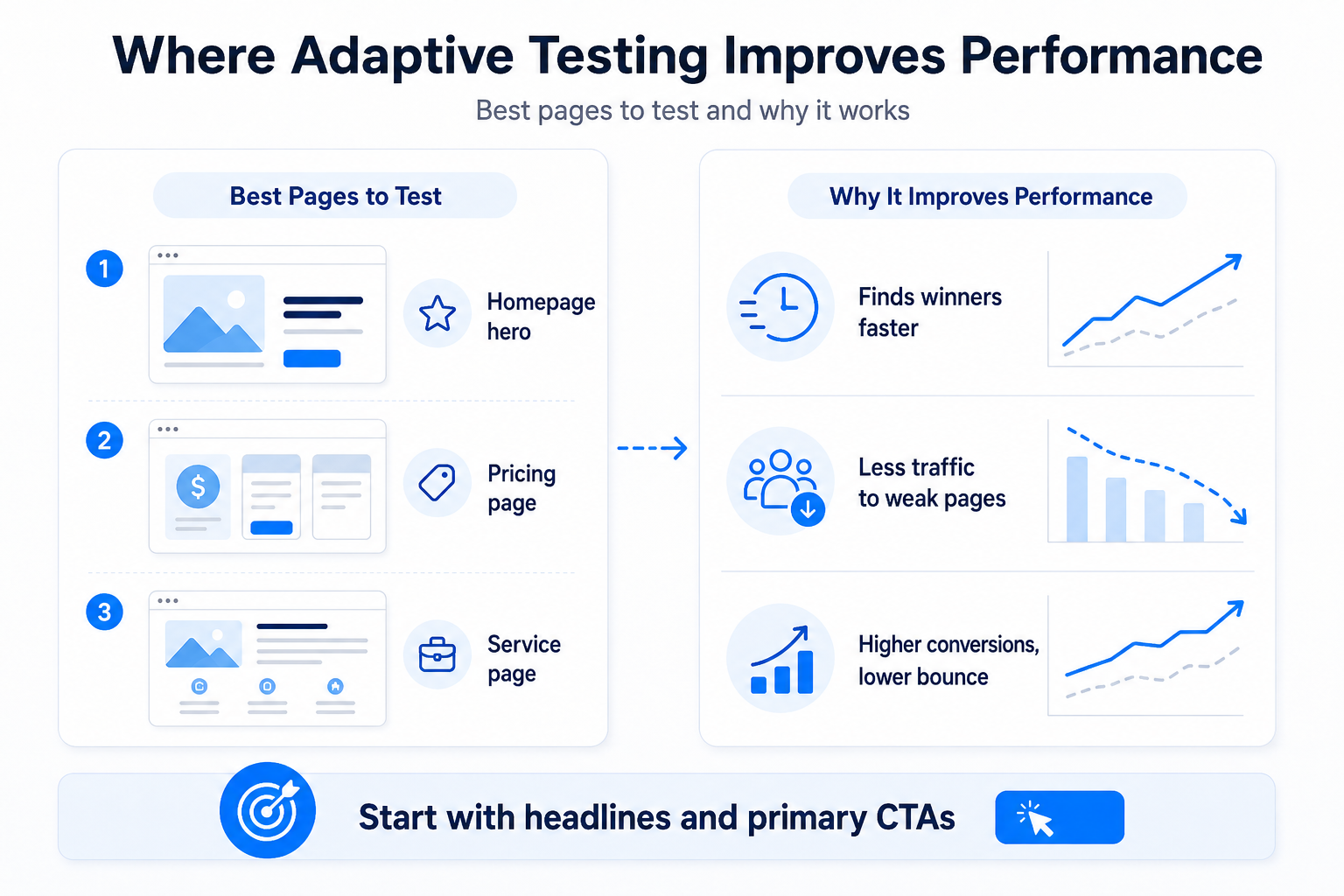
The third benefit is specificity. Because adaptive testing ties performance data to individual page variations, you learn which specific changes drove improvement, not just that one month's traffic outperformed another. That knowledge carries forward to future tests.
Key Points:
- Adaptive testing finds winning variants faster by concentrating traffic on leading pages.
- Traffic reallocation reduces conversion losses from underperforming variants during the test.
- Variant-level data shows which specific page elements drove conversion improvement.
What results can HubSpot adaptive testing produce?
Results from adaptive testing depend on what you test, how much traffic the page receives, and how meaningfully your variants differ from each other.
Pages with low traffic need longer testing windows. HubSpot recommends running adaptive tests for at least two weeks and ideally longer for pages receiving fewer than 1,000 monthly visitors. Below that threshold, the algorithm has less signal to work with and convergence takes more time.
Pages with high traffic and meaningful variant differences can show results in days. A B2B SaaS company running a pricing page test with 10,000 monthly visitors and four distinct CTAs may see the algorithm begin shifting traffic noticeably within the first week.
The practical floor for a useful adaptive test is a page with a clear conversion goal, at least a few hundred monthly visitors, and variants that differ on something consequential. Testing button color alone rarely produces results that change strategy. Testing headline framing, value proposition, or CTA copy tends to produce results worth acting on.
For a broader look at how HubSpot CMS has changed and what it supports today, see What's new in HubSpot CMS.
Key Points:
- HubSpot recommends adaptive test durations of at least two weeks for reliable results.
- High-traffic pages with meaningful variant differences may show traffic shifts within the first week.
- Clear conversion goals and substantive variant differences produce the most actionable adaptive test results.
Adaptive testing in HubSpot vs. Google Optimize alternatives
Google Optimize was deprecated in September 2023, which pushed many marketing teams to evaluate native testing tools inside their CMS. For HubSpot users, adaptive testing fills much of the gap that Google Optimize once occupied for website page experimentation.
HubSpot adaptive testing runs without requiring a third-party tag or JavaScript snippet inserted into your pages. The test is managed entirely within HubSpot CMS, which means fewer implementation dependencies and no conflict with your existing HubSpot tracking setup.
For teams already on HubSpot who were using Google Optimize for website page tests, adaptive testing is the clearest direct replacement. Teams that also tested emails, pop-ups, or non-HubSpot pages will need to evaluate other tools for those surfaces.
Key Points:
- Google Optimize was deprecated in September 2023, removing a widely used A/B testing option.
- HubSpot adaptive testing requires no third-party JavaScript tag for website page experiments.
- HubSpot adaptive testing covers website pages and does not extend to email or non-HubSpot pages.
How webdewhelps teams run HubSpot CMS testing programs
Running adaptive tests consistently requires more than enabling a feature. It requires a testing roadmap, variant hypothesis development, and result interpretation tied to broader CRO goals.
webdew works with B2B SaaS companies and digital service providers to build and manage HubSpot CMS implementations, including structured testing programs that compound over time. If your team wants to extract more conversion performance from existing HubSpot traffic, a systematic testing approach is where to start.
Talk to webdew about your HubSpot CMS setup to see whether a structured adaptive testing program fits your current situation.
Dive Into our
Client Testimonials
Listen to business owners like you share how we’ve helped them grow. Your story could be next!





.svg)

“Recently we reached out to Webdew for a website inside of HubSpot and they also did some mocking automation for us.”

“Webdew team was quite honest and quite easy to work with in terms of taking feedback implementing it, showing that it doesn’t happen again and things like making sure that it meets our expectations.”

“We worked with webdew to help us build our HubSpot website and they did an amazing job with it. They were very quick.”

“webdew has helped us optimize the sales and marketing processes, and this is automating a lot of processes.”

“Hi everyone my name is Kara and I work as a channel consultant at HubSpot Singapore. I’ve been working closely with webdew agency”

“Hi my name is Christian from OpenDoors Mortgage team and I’m in the mortgage business and just trying to work on new projects and kind of incorporating HubSpot for my operations”

“I’m one of the technology directors for Travelopia. We are the largest experiential travel company in the world. We’ve engaged webdew recently, not recently, it’s been about a couple of quarters now.”
“We worked with Chehak over the past several months to create a series of animated videos for an academic planner that we produce. And from the very beginning, she was absolutely professional and a pleasure to work with.”


6x
We helped clients multiply their website conversion rates through strategic design and UX optimization.
20%
Our marketing campaigns led to a 20% uplift in customer engagement across digital channels.
2K+
Delivered over 2,000 qualified leads through targeted funnels and smart automation.
120+
Our video content has earned 120,000+ views, driving brand awareness and audience retention.
“I recently had the pleasure of working with Chehak on a video demo project, and I was thoroughly impressed with her services.”
.svg)

Additional Resources
Access expert tips, trends, and strategies designed for small businesses. Stay ahead of the curve and make informed decisions with our comprehensive resources!