

 We typically respond the same day


Most marketing teams don't have a content problem. They have a tool problem. One app writes the blog, another rewrites it for LinkedIn, a third handles translation, and a fourth tracks whether any of it worked. By the time a single campaign ships, the content has passed through five logins and lost a little of itself at every handoff.
HubSpot built Content Hub to close that gap. It's an AI-powered content marketing platform that brings creation, publishing, personalization, and reporting under one roof, all sitting directly on top of HubSpot's CRM. If you've been asking what HubSpot Content Hub actually is, whether it's worth the price, and how it differs from the old CMS Hub, this guide walks through all of it, plus the questions buyers ask most before committing.
|
Quick Answer: Is HubSpot Content Hub Worth It?If your team uses multiple tools for content creation, SEO, website management, and reporting, HubSpot Content Hub can help centralize those workflows in a single platform connected directly to your CRM. The biggest value comes from its AI-powered content tools, built-in analytics, and personalization capabilities, though most advanced features require the Professional or Enterprise plan. |
What is HubSpot Content Hub?
HubSpot Content Hub is HubSpot's all-in-one content management and content marketing platform. Think of it as the evolution of CMS Hub, except it now reaches well beyond website pages. It handles blogs, landing pages, podcasts, case studies, videos, and gated assets, and it layers AI across the whole thing so teams can produce more without hiring more.
The shift wasn't cosmetic. HubSpot didn't just rebrand CMS Hub and slap on some AI tools. It built Content Hub to reflect the fundamental shift in how content is created, personalised, distributed, and analysed. The reasoning was simple: marketers were cobbling together tools, one for blogs, another for AI writing, something else for translation or audio, and that fragmentation slowed everyone down.
What makes the platform different from a standalone CMS or a standalone AI writer is the data underneath it. Content Hub is built on top of HubSpot's free CRM. That means every piece of content, from blog posts to landing pages, is directly tied to customer data. A landing page isn't just a page anymore. It knows who's reading it.
The core tools inside Content Hub
At its foundation, Content Hub gives you the building blocks any content team expects:
- A drag-and-drop website and page editor with prebuilt themes and templates
- A full blogging engine with SEO settings built in
- Landing pages and forms tied directly to your CRM
- Managed hosting with a CDN, SSL, and content scheduling
- Multi-language content support
- Analytics and reporting on every asset you publish
From there, the AI layer and the advanced marketing features are what separate Content Hub from a basic website builder, and that's where most of the value lives.
Best HubSpot Content Hub features for SEO and beyond
The feature list is long, but a handful of tools are doing the heavy lifting. These are the ones that change how a team actually works day to day.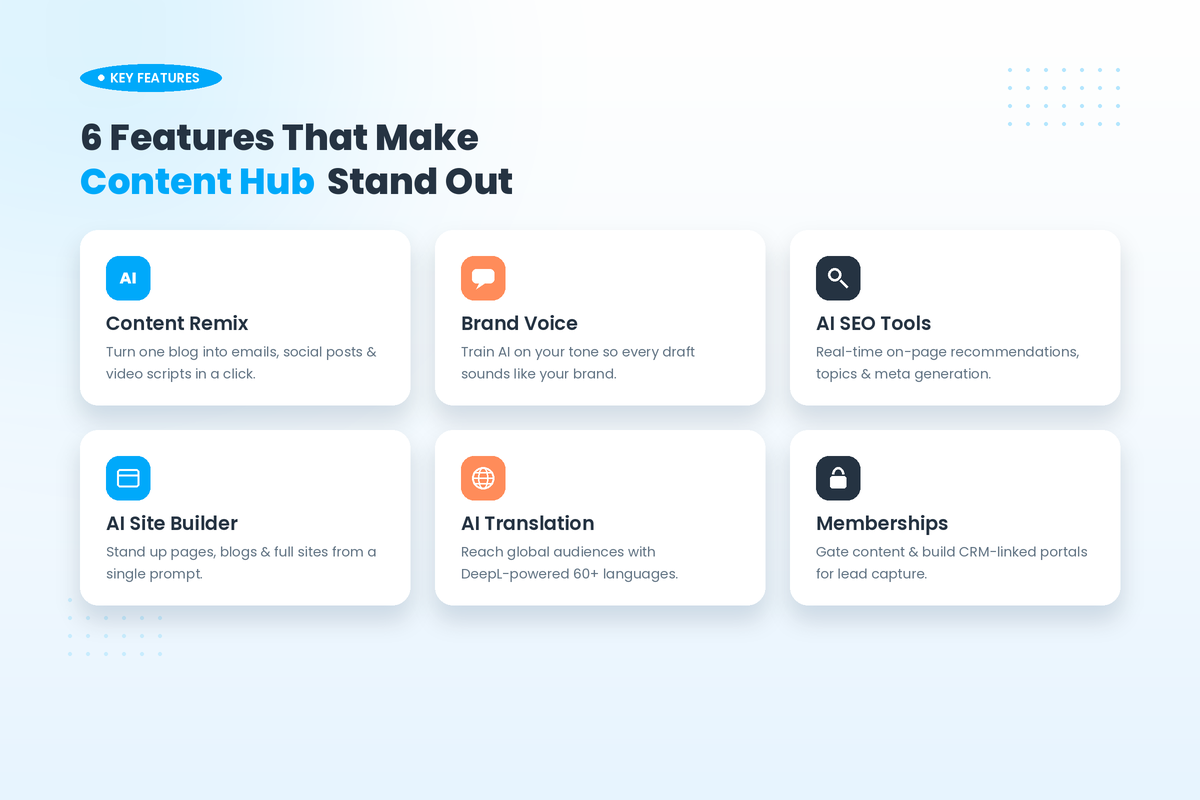
Content Remix
This is the standout. Content Remix is a standout feature that embodies the spirit of Content Hub. This innovative tool allows you to take an existing piece of content and effortlessly repurpose it for another platform. Publish a long-form article, run it through Remix, and you get a LinkedIn post, an email teaser, and a short-form video script, none of which you wrote from scratch. For teams producing content at volume, this is genuinely useful, not just as a curiosity, but as a workflow change.
Brand Voice
Maintaining consistency across AI-generated content can be challenging. Brand Voice helps align generated content with predefined brand guidelines. Brand Voice AI learns your organisation's distinctive tone from a minimum 500-word writing sample, then applies this voice consistently across all AI-generated content. A 2025 update went further, adding a "Brand Identity" capability that automatically extracts tone, visual style, ICP characteristics, and competitive positioning from your existing content.
AI SEO recommendations
This is where the "best Content Hub features for SEO" question gets a real answer. The platform runs continuous on-page checks and surfaces fixes as you write. It suggests improved keyword focus and priorities to boost your rankings. Beyond that, the recommendations feature also helps you identify which pages need updates, receive topic suggestions based on relevance and competition, and refine your SEO strategy over time. On-page elements like meta titles and descriptions can be generated with AI, and the whole thing ties back to traffic and ROI tracking in one dashboard.
AI content creation and the website builder
Content Hub includes an AI blog writer that takes you from title to outline to full draft, plus an AI website builder that can stand up a site from a prompt. There's AI image generation through a built-in tool, and even blog post narration that converts written posts into audio for accessibility. None of these replace a skilled writer, but they remove the blank-page friction that slows content teams down.
Memberships and gated content
For lead generation, this one earns its keep. Content Hub Professional includes membership functionality with two access groups, enabling password-protected resource centres, partner portals, and tiered content libraries tied directly to CRM data. And unlike a simple form gate, memberships create individual login credentials with personalised experiences based on purchase history, company size, or lifecycle stage.
Multi-language content with AI translation
Reaching a global audience used to mean a translation budget. Content Hub folds it in. Multi-language content management supports 60+ languages with DeepL-powered translation built into HubSpot's AI, so a campaign can go from one market to a dozen without leaving the platform. If you're weighing HubSpot for multi-language content, this is the feature that makes the case.
HubSpot Content Hub vs Marketing Hub: the difference
This confuses a lot of folks, so let's make it clear. Although the two hubs overlap, they solve different issues. Marketing Hub zeroes in on lead generation and automation, whereas Content Hub is all about creating and managing content.
With Content Hub, you can build and publish everything on your site, blog, landing pages, and even podcasts. On the flip side, Marketing Hub takes care of the distribution and automation of that content. It handles email sequences, lead scoring, segmenting audiences, running campaigns, and ad management, too. Essentially, one hub builds the assets while the other puts them to work at a larger scale.
Many content-heavy teams end up using both. The Marketing+ Bundle package throws both hubs at you at a discount, making it a solid option for marketers. Choose Content Hub if you're struggling with creating personalized content. Go with Marketing Hub when your big issue is growing and converting leads at scale.
HubSpot CMS vs Content Hub: what actually changed
If you remember CMS Hub, here's the honest version of what happened. Before Content Hub, CMS Hub was mostly just a website builder and content management system. It was powerful but limited to website content. As content teams started needing omnichannel output and generative AI, that scope got too narrow.
Content Hub kept everything CMS Hub did and added the rest. Content Hub has exclusive features that you won't find in CMS Hub, such as content remixing, a feature to maintain your brand voice consistently across all content, the ability to easily integrate podcasts, embed other content types seamlessly, translate your content with AI for different audiences, and a custom blog post generator.
There's one catch worth flagging, because it confuses people two years on. HubSpot migrated everyone automatically. If you were on CMS Hub, you're now operating inside Content Hub, the platform, the interface, the navigation. But the migration was the platform, not the plan. You might be sitting inside Content Hub right now and still not have access to Content Remix, Brand Voice, or the AI content tools, because those require a Content Hub Professional subscription, not just the platform migration. If you're a legacy CMS Hub customer wondering why the shiny features aren't showing up, that's almost always why.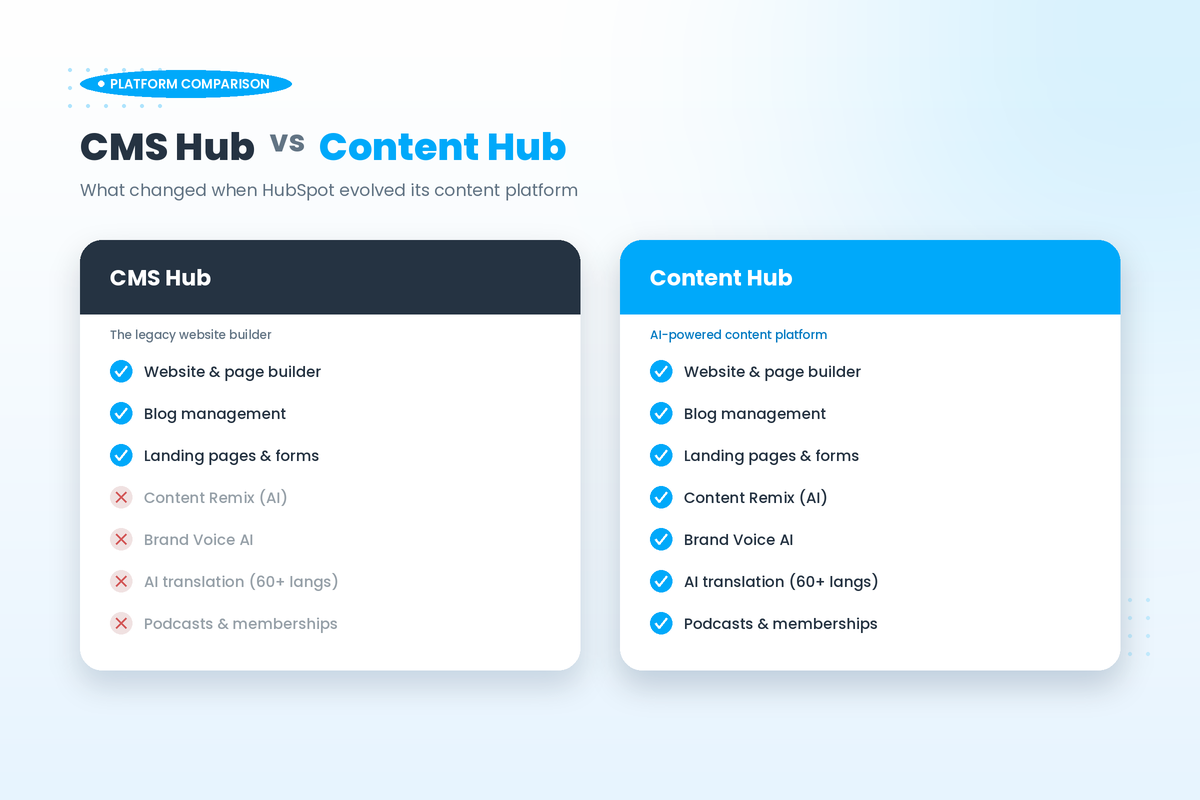
HubSpot Content Hub vs WordPress performance
This is the comparison many teams agonize over, so let's be fair to both sides. WordPress wins on flexibility, plugin ecosystem, and raw cost at the entry level. It's hard to beat for a developer who wants total control and doesn't mind maintaining it.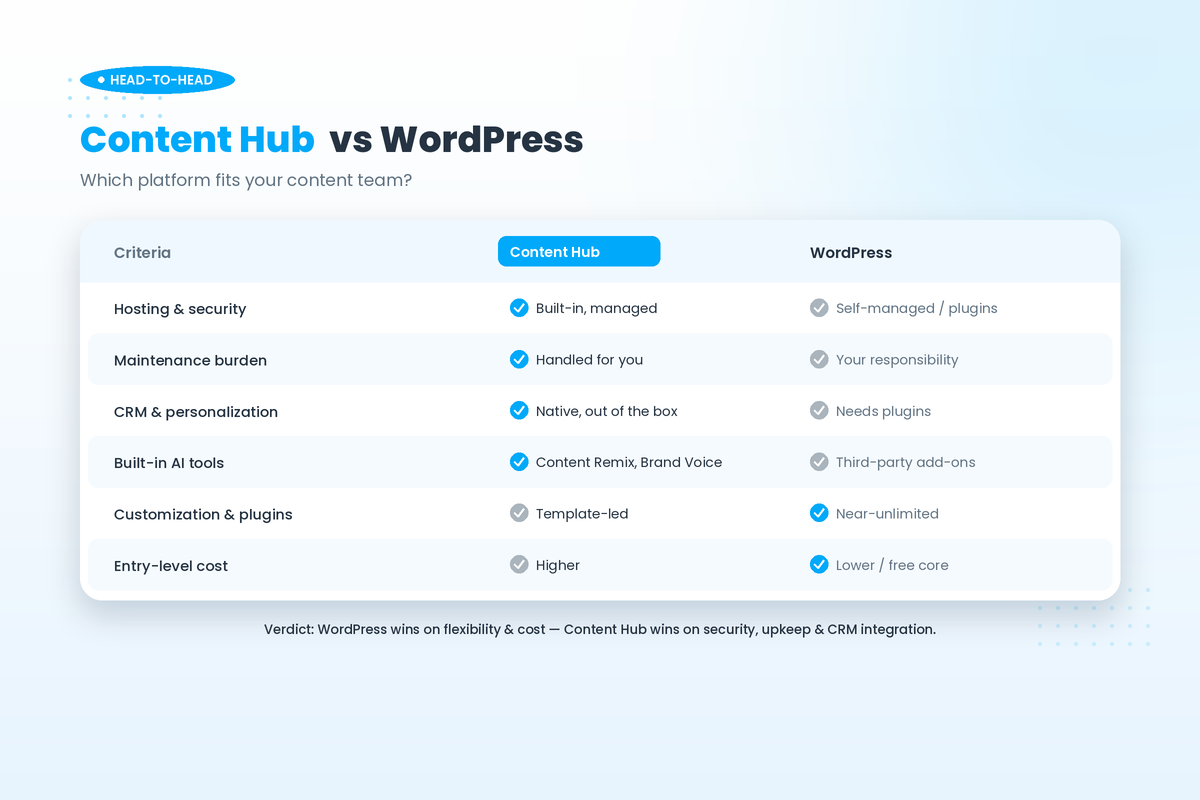
Where Content Hub pulls ahead is the maintenance and security burden you never have to think about. Hosting, the CDN, SSL, and updates are handled for you. With a self-managed WordPress site, that responsibility is yours, and an unpatched plugin is one of the most common ways sites get compromised. The other advantage is integration: on Content Hub, your content, forms, and visitor data live in the same system as your CRM, so personalization and reporting work without stitching together third-party plugins.
The honest takeaway: WordPress is often cheaper and more customizable; Content Hub is more secure out of the box, lower-maintenance, and far better integrated if you're already in the HubSpot ecosystem. The right answer depends on whether you'd rather own the flexibility or offload the upkeep. If your site needs a careful move from one platform to the other, that's exactly the kind of work where a HubSpot development partner can de-risk the migration.
How to integrate Content Hub with your CRM
This is less of a project and more of a default state. Content Hub doesn't bolt onto the CRM; it's built on it. Every form submission, page view, and content interaction flows straight into the same contact records your sales team works from. That means you can personalize a page based on a visitor's lifecycle stage, gate a resource by company size, and then report on exactly which content influenced a closed deal, all without an integration layer.
For external systems beyond HubSpot, the platform connects through its app marketplace and a developer API, so tools like analytics platforms, webinar software, and survey apps plug in cleanly. If you're starting fresh or moving an existing CRM into HubSpot, our definitive guide to getting started with HubSpot CRM walks through the foundation that Content Hub then builds on.
Is HubSpot Content Hub good for a small business?
Short answer: Yes, it could be, but it all comes down to your ability to justify using the particular tier. The free and Starter tiers are actually legitimate choices if you need an efficient, safe, CRM-integrated website and basic blogging. Entry-level Content Hub Starter has most essential CMS features, including a drag-and-drop editor, SSL support, multilingual content creation, and CRM integrations included.
The primary limitation is that many advanced features are restricted to Professional and Enterprise tiers. Most important features, such as A/B testing, SEO recommendations, personalized content, and analytics, are available in higher tiers only. In addition, the cost jumps from the Starter to the Professional tier is significant. This issue is mentioned by almost every reviewer of HubSpot. It should come as no surprise that if you are a single founder or a five-person company, you will most likely opt for the combination of the Starter package and free tools from HubSpot.
If you're a smaller team still deciding between platforms entirely, it's worth comparing HubSpot against alternatives like GoHighLevel before committing.
Cost to upgrade to HubSpot Content Hub Professional
Let's talk numbers, because the pricing gap is the single most discussed thing about this product. As of 2026, Content Hub comes in three paid tiers:
- Starter — around $20/month for one seat (often $15/seat/month on an annual commitment), with core CMS, hosting, SSL, and CRM access
- Professional — $450/month, including three seats, with additional seats around $50/month
- Enterprise — $1,500/month, including five seats, with additional seats around $75/month
Note: Actual pricing may vary based on features, contacts, and required integrations.
The Professional tier is where the platform comes alive. This tier expands capabilities with "Smart content" and dynamic personalization features that let you customize website experiences using CRM data. You'll also get A/B testing for web pages and SEO optimization tools. Enterprise then adds the heavier machinery: adaptive testing, memberships, partitioning, and additional root domains.
One thing to budget for, honestly: multiple G2 reviewers specifically call out the large pricing gap between Starter and Professional as a significant limitation for growing teams. Going from $20 to $500 a month is a real decision, not an incremental bump. The way most teams justify it is by counting the tools Content Hub replaces, the separate AI writer, the translation service, the social scheduler, and weighing that against the single subscription.
Managing blog posts in HubSpot Content Hub
Blogging is where Content Hub feels most natural day to day. You draft in a clean editor, and the SEO panel checks your work as you go, flagging missing meta descriptions, weak keyword focus, and thin sections in real time. The AI blog writer can generate a full draft from a title and outline, though it's a starting point that still needs a human edit before it earns a publish button.
Once a post is live, Content Remix turns it into a content campaign rather than a one-off. That single article becomes an email, a few social posts, and a video script in a couple of clicks. Add scheduling, audience tagging, and built-in analytics, and you've got the full lifecycle, planning, publishing, repurposing, and measuring, in one place. For teams that have outgrown ad hoc publishing, the HubSpot management support side of this, ongoing SEO settings, template work, and blog optimization, is often where an agency adds the most value.
HubSpot Content Hub landing page builder review
The landing page builder warrants a mention separately since it is a choice point often encountered during setup. It is a drag-and-drop solution with predefined and responsive templates, meaning even a non-technical marketer can create a marketing campaign landing page without any coding. The difference between the landing page builder and other similar tools is that it is integrated with a CRM platform; forms will go directly into customer database and dynamic content (Professional subscription or above) will allow personalization of the page for each visitor depending on their identity.
As with many other services reviewed, the drawback here would be that some deep personalization options may require you to choose between pre-built templates or working with a professional developer, while advanced personalization options will not be available unless you are using a Professional account. However, for regular lead generation purposes, this tool should work perfectly fine.
Benefits of using HubSpot for content management
Pulling it together, the case for managing content in HubSpot comes down to a few real advantages:
- One platform instead of five. Content Hub simplifies your tech stack, replacing tools like ChatGPT, WordPress plugins, and Hootsuite with a single, unified platform.
- Content that knows your audience. Because everything sits on the CRM, personalization and ROI tracking are built in, not bolted on.
- More output without more headcount. AI creation plus Content Remix lets a small team produce across channels at a volume that used to require a bigger one.
- Less to maintain. Hosting, security, and updates are handled, which removes a whole category of risk.
- Built-in measurement. A/B testing, SEO insights, and campaign reporting live in the same dashboard as the content itself.
The platform isn't flawless. Costs climb, the learning curve is real, and deep customization can require help. But for a team committed to content as a growth channel, the integration is hard to replicate by gluing point tools together.
Getting started: requesting a Content Hub demo for enterprise teams
A guided demonstration is clearly the way to go when looking into Content Hub as a solution for an entire team. A demonstration can be requested right on the product page of Content Hub at HubSpot, and you can also choose to try out the product via the free trial. If you're making your purchase as an enterprise user, the demonstration is the key thing that will help reveal important features that won't become apparent in just a simple self-service trial: membership, partitioning, adaptive testing, and SSO.
The actual secret of success as an enterprise client, however, does not lie in any of those – even though they are very important for your business operations. Instead, the main point of success lies in the proper installation of Content Hub. This includes migrating your current website, content mapping, configuring Brand Voice, and properly setting up SEO tooling. Webdew does exactly that for its clients.
How do I request a demo for HubSpot Content Hub?
You can request a demo or start a free trial directly from HubSpot's Content Hub product page. For enterprise teams, a guided demo is the better route because it shows higher-tier features like memberships, adaptive testing, and SSO in context. Working with a certified HubSpot partner can also speed up evaluation and implementation, so you see real value faster.
The bottom line
HubSpot Content Hub addresses something many content teams have been wondering secretly over the years: “What if all of this were in one place?” By putting creation, AI, personalization, publication, and reporting under one roof, and using CRM capabilities at its core, it offers everything that content teams looking to boost their business with their content can desire.
The pricing may not be the lowest on the market, and moving from Starter to Professional requires some real commitment. But when compared with the cost of purchasing and maintaining separate tools and losing valuable time switching content between them, it’s a win. The challenge lies in implementation, setting up migration, mapping your CRM, and configuring the AI system.
This is where Webdew can step in, as your official HubSpot partner. We will help you set up Content Hub and ensure it becomes an asset to your company’s content strategy. Ready to make the most of it? Talk to our HubSpot experts and start building.
Dive Into our
Client Testimonials
Listen to business owners like you share how we’ve helped them grow. Your story could be next!





.svg)

“Recently we reached out to Webdew for a website inside of HubSpot and they also did some mocking automation for us.”

“Webdew team was quite honest and quite easy to work with in terms of taking feedback implementing it, showing that it doesn’t happen again and things like making sure that it meets our expectations.”

“We worked with webdew to help us build our HubSpot website and they did an amazing job with it. They were very quick.”

“webdew has helped us optimize the sales and marketing processes, and this is automating a lot of processes.”
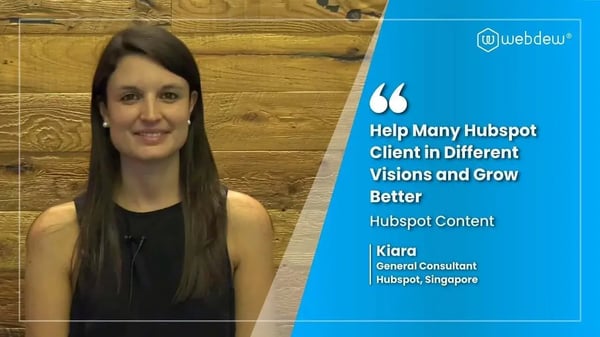
“Hi everyone my name is Kara and I work as a channel consultant at HubSpot Singapore. I’ve been working closely with webdew agency”

“Hi my name is Christian from OpenDoors Mortgage team and I’m in the mortgage business and just trying to work on new projects and kind of incorporating HubSpot for my operations”

“I’m one of the technology directors for Travelopia. We are the largest experiential travel company in the world. We’ve engaged webdew recently, not recently, it’s been about a couple of quarters now.”
“We worked with Chehak over the past several months to create a series of animated videos for an academic planner that we produce. And from the very beginning, she was absolutely professional and a pleasure to work with.”


6x
We helped clients multiply their website conversion rates through strategic design and UX optimization.
20%
Our marketing campaigns led to a 20% uplift in customer engagement across digital channels.
2K+
Delivered over 2,000 qualified leads through targeted funnels and smart automation.
120+
Our video content has earned 120,000+ views, driving brand awareness and audience retention.
“I recently had the pleasure of working with Chehak on a video demo project, and I was thoroughly impressed with her services.”
.svg)

Additional Resources
Access expert tips, trends, and strategies designed for small businesses. Stay ahead of the curve and make informed decisions with our comprehensive resources!