

 We typically respond the same day

TL;DR
Technical SEO for a website redesign is the work of keeping a site crawlable, indexable, and understood while its URLs, HTML, and code change. Lasting ranking loss after a relaunch almost always traces to one of four causes: unmapped URL changes, content stripped out by new templates, staging directives shipped to production, or important copy that only renders client-side.
- Capture a crawl, performance, and link baseline before wireframes are approved.
- Map every old URL to one new URL with a single 301, and leave URLs unchanged where there is no reason to change them.
- Run crawl, render, and structured data QA in staging, not after go-live.
- Hold the build to Google's Core Web Vitals thresholds: LCP at or under 2.5 seconds, INP at or under 200 milliseconds, CLS at or under 0.1.
- Monitor index coverage, 404 spikes, and rankings by template for 30 days against the baseline.
A redesign changes three things search engines depend on at the same time. It changes the URLs, which is where rankings are stored. It changes the HTML, which is where relevance is read. And it changes the internal link graph, which is how authority moves between pages.
Change all three in one deploy with no mapping, and search engines have to relearn the site.
That is why relaunches so often follow the same shape. The design is better, the page speed scores improve, the sales team likes the new demo page, and organic sessions sit 30% below the old baseline for a full quarter while everyone argues about whether the redesign caused it. Nobody can settle the argument, because nobody saved the numbers from before.
Webdew treats technical SEO as a discovery-phase requirement on website engagements rather than a QA ticket in the final sprint. The reason is arithmetic: nearly every problem in this guide costs hours to prevent before launch and weeks to repair afterwards.
What follows is the sequence: what to record before the rebuild starts, how to decide URLs and redirects, what to test in staging, which page experience targets to hold the build to, and what to watch once the site is live.
What is technical SEO for a website redesign?
Technical SEO for a website redesign is the set of controls that preserve crawlability, indexability, and ranking signals while design, content, and code change. It covers URL mapping, redirects, HTTP status codes, canonical tags, robots directives, XML sitemaps, rendering, structured data, and page experience.
Three facts sit underneath all of it:
- Rankings attach to URLs, not to designs.
- A 301 redirect transfers ranking signals from an old URL to a new one.
- Internal links distribute authority to the pages that need to rank.
On-page work sits beside this discipline rather than inside it. A migration can carry over every title tag, heading, and keyword and still lose traffic because the new template blocks crawling or hides body copy behind a script. Title tags are the easy part. Crawl paths decide whether the title tag is ever read.
If the team needs shared language before the project kicks off, the SEO basics for website optimization primer and the on-page SEO guide cover the layer above this one.
Does a website redesign hurt SEO?
A redesign almost always causes short-term volatility, and it causes lasting loss only when URL, content, or crawl signals change without a plan.
The distinction matters because it tells the team when to intervene. Google Search Central's site move documentation states that a move involving URL changes can take a few weeks for Google to process, and longer for large sites. A dip inside that window is reprocessing. A dip that continues past it is a defect with a root cause.
Four failure modes that cause lasting loss
Unmapped URL changes: the old URL returns a 404 or 410, and every ranking signal and backlink pointing at it stops resolving to anything. This is the most common and the most expensive failure, and it is entirely preventable with a spreadsheet.
Content removed by the new template: a page that ranked with 1,200 words of body copy gets rebuilt as a hero image, three feature cards, and a form. The URL survives, the relevance does not.
Staging directives shipped to production: a Disallow: / in robots.txt or a site-wide noindex that protected the staging environment goes live with the new build. Traffic does not decline gradually here. It falls off a cliff within days.
Client-side rendering of important content: the copy, headings, and internal links exist in the browser but not in the initial HTML response. Google renders JavaScript, though rendering is queued and not guaranteed on every crawl, which makes server-side rendering the safer default for anything that needs to rank.
What should a pre-redesign technical SEO audit capture?
A pre-redesign audit should capture enough of a baseline that any post-launch change can be measured instead of debated. Three exports do most of the work.
The crawl baseline
Run a full crawl of the current site with Screaming Frog, Sitebulb, or a similar tool, and export every field the new build could break: URL, status code, indexability, title, meta description, H1, canonical, meta robots, word count, inlinks, outlinks, hreflang, and structured data types.
Save the crawl file itself, not a summary of it. Six weeks later, the question will be "what did this page's canonical tag point to before?" and only the raw export answers it.
If the CMS is changing, keep a password-protected copy of the old site on a staging subdomain for reference.
The performance baseline
Export 16 months of Google Search Console data by query and by page, since 16 months is the maximum retention window and the export is not recoverable later. Pull landing page sessions and conversions from GA4, segmented by page template rather than by individual URL, because template-level segmentation is what identifies the cause when traffic moves.
Record Core Web Vitals field data from the Search Console page experience report. Then add an annotation in GA4 on the planned launch date so the before-and-after comparison is available to anyone who opens the report.
The link and equity baseline
Export the pages that earn the most referring domains, the internal link counts pointing to commercial pages, and the anchor text patterns feeding them. These are the URLs that carry the most risk in a migration, and they set the priority order for the redirect map.
Webdew's SEO team runs this baseline before wireframes go to approval, because the crawl export is also the source file for the redirect map. Teams building on a SaaS site can pair the audit with the SaaS SEO checklist to keep commercial pages in scope alongside the blog.
How do you build a redirect map that does not lose link equity?
Build a redirect map that sends every old URL to the closest matching new URL with a single 301, and change URLs only where there is a technical, structural, or strategic reason to change them.
Preservation is the default. Every URL kept intact is one fewer signal for search engines to reprocess and one fewer chance to introduce a chain.
|
Situation |
Handling |
|
URL unchanged |
Leave it. Confirm it returns 200 after launch |
|
URL changed, same page and intent |
301 to the new URL |
|
Two pages merged into one |
301 both old URLs to the merged destination |
|
Page retired, close topical match exists |
301 to the closest matching page |
|
Page retired, no match, no links, no traffic |
Return 404 or 410 deliberately |
|
Campaign or seasonal page returning later |
Keep the URL live rather than redirecting it |
Four rules keep the map clean.
Use permanent redirects. A 302 signals a temporary move and is a weaker instruction for consolidating signals on the new URL.
Avoid chains and loops. Google Search Central's redirect documentation notes that Googlebot follows a limited number of redirect hops before treating the URL as an error, and every additional hop adds latency for the person waiting on the page. Where a chain already exists from an earlier migration, point the first URL directly at the final destination.
Do not blanket-redirect retired pages to the homepage. Google's documentation treats redirects to irrelevant destinations as soft 404s, which produces the traffic loss the redirect was meant to prevent, plus a worse experience for the visitor who wanted a specific page.
Update the links, not just the redirects. Navigation, footer, in-body links, XML sitemaps, canonical tags, hreflang annotations, and email templates should all point at final URLs. Redirects are a safety net for external links and old bookmarks, not a substitute for internal housekeeping.
Which technical SEO checks belong in staging QA?
Staging QA is the last cheap opportunity to catch a migration defect. Run the crawl against an authenticated staging environment and compare it line by line against the pre-redesign export.
Crawl and index directives
Confirm that robots.txt allows the pages that should be crawled and blocks nothing important. Check that no template carries a leftover noindex or nofollow. Verify that canonical tags are self-referencing on indexable pages and point to the intended target on variants. Confirm status codes match the redirect map: 200 for live pages, 301 for moved ones, 404 or 410 where retirement was intentional.
Then check that the staging environment itself is not indexable, and put a reminder on the launch checklist to remove that block on go-live day. Both halves of that pair fail regularly, in opposite directions.
Rendering and JavaScript
Fetch key templates as Googlebot and compare the rendered HTML against what a browser shows. Body copy, headings, internal links, and structured data should be present in the server response. If the framework is React, Vue, or Angular, server-side rendering or prerendering keeps that content available on the first crawl rather than on a later rendering pass.
Structured data and page-level continuity
Validate schema on every template with the Rich Results Test and Schema.org's validator, and confirm that markup present on the old site survives the rebuild. Article, Organization, Product, FAQPage, and BreadcrumbList markup all tend to disappear when templates are rewritten, because the visible page looks unchanged while the JSON-LD block is gone.
Technical QA and usability QA are separate passes, and a redesign needs both. On the usability side, Jakob Nielsen's 2000 analysis for Nielsen Norman Group found that testing with five users surfaces roughly 85% of a site's usability problems, which keeps the cost of a pre-launch test low relative to the issues it catches.
What page experience targets should the new build hit?
Hold the build to Google's Core Web Vitals thresholds, measured at the 75th percentile of real user visits across mobile and desktop.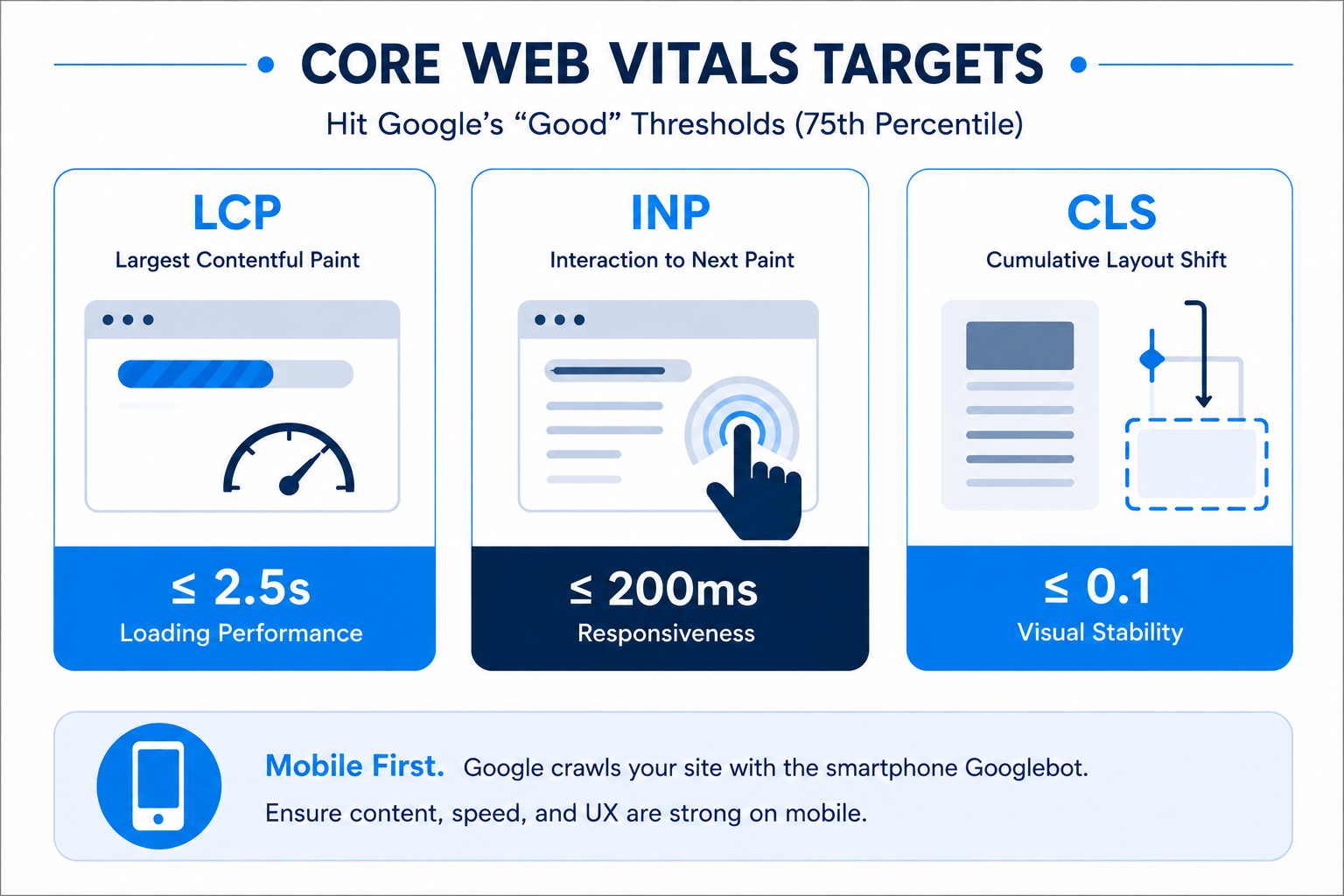
Older redesign briefs often carry one outdated number. Google replaced First Input Delay with Interaction to Next Paint as a Core Web Vital on March 12, 2024, so any specification still asking developers to hit a FID target is measuring a metric Google retired. INP measures the latency of every interaction on a page, not just the delay on the first one. A page that loads fast and then turns sluggish once a visitor starts clicking will pass the old metric and fail the new one.
Mobile parity belongs in the same conversation. Google crawls sites with the smartphone Googlebot under mobile-first indexing, so content and structured data present only on the desktop layout are effectively invisible for ranking purposes. Hiding body copy inside mobile accordions is acceptable when the text is in the HTML. Omitting it from the mobile template is not.
What should you monitor in the first 30 days after launch?
Monitor index coverage, crawl errors, redirect behavior, and rankings by template, comparing each signal against the pre-redesign baseline rather than against a general expectation.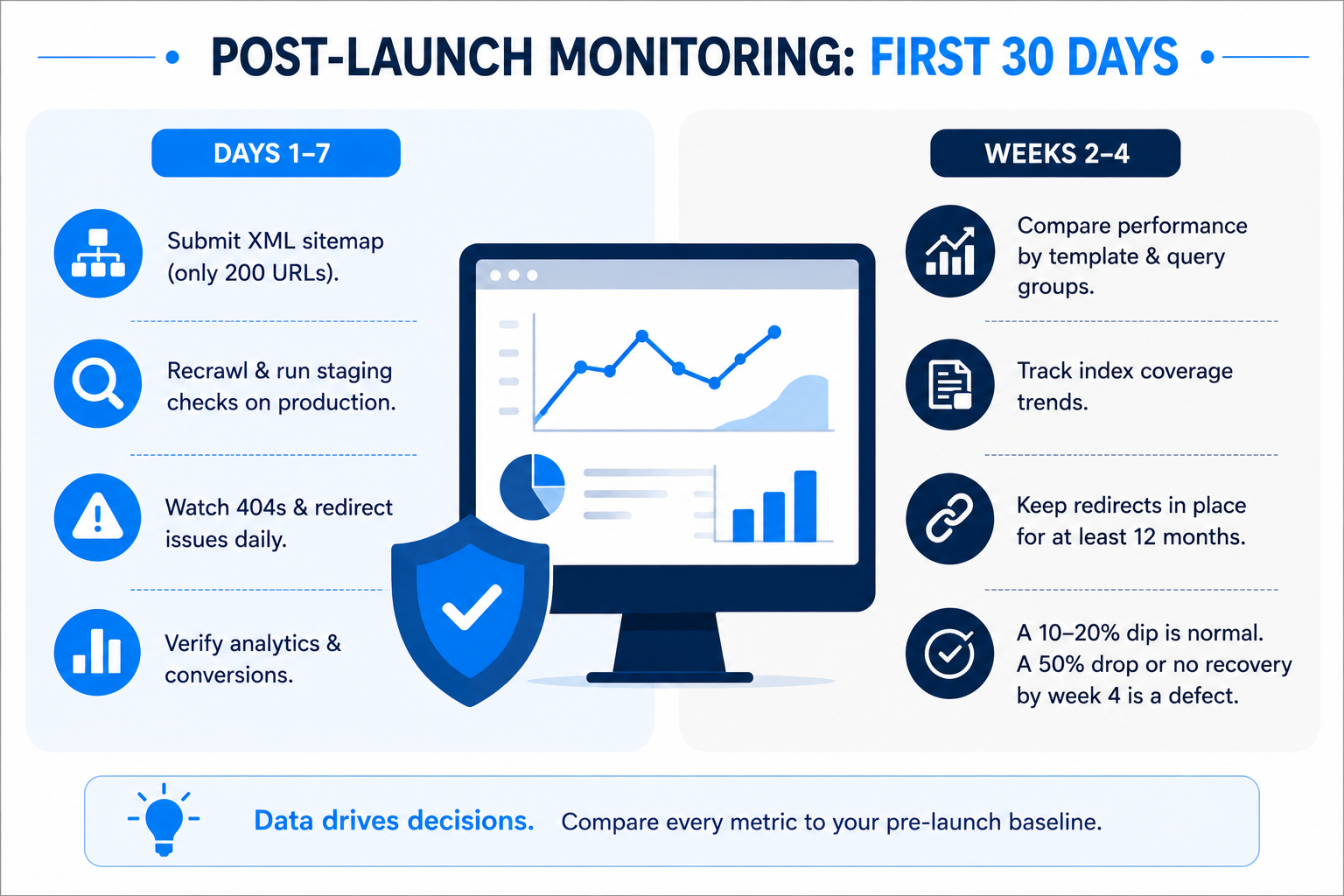
Days one to seven
Submit the updated XML sitemap in Search Console, and confirm it contains only 200-status URLs. Redirected and 404 URLs in a sitemap send crawlers to dead ends.
Recrawl production and re-run the staging checks, since deploy pipelines routinely differ from staging in robots.txt handling, caching, and redirect rules. Use the URL Inspection tool on the highest-value templates to confirm Google can fetch and render them. Watch the 404 report daily: a spike here means a section of the redirect map did not deploy.
Confirm analytics and conversion tracking fire on the new templates before anyone reads a traffic report from them.
Weeks two to four
Move to weekly checks and compare Search Console performance data against the same period before launch, filtered by page template and query group. Template-level analysis separates a sitewide problem from a single broken page type.
Track index coverage trending toward the pre-launch page count. If crawled-not-indexed volumes grow, the usual causes are thin rebuilt templates, canonical conflicts, or duplicate parameter URLs generated by new filtering.
The practical threshold: a 10% to 20% dip in the first two weeks is normal reprocessing. A 50% drop, or any drop that has not started recovering by week four, is a technical defect. Google Search Central recommends keeping redirects in place for at least a year, so an early removal is a separate cause to rule out.
How does a website redesign affect AI search visibility?
A redesign affects AI search visibility through the same signals as classic search, because AI answer engines read the same HTML, schema, and entity data that crawlers do.
Two decisions carry most of the risk.
Entity consistency
Organization, Person, and Product markup describe who the company is and what it sells. When a rebuild changes the organization name string, drops the sameAs references pointing to verified profiles, or removes author markup, it weakens the connections that answer engines use to resolve a brand to a known entity. Keep those values consistent across templates, and check that they still match external profiles after launch.
Answer-shaped content in the HTML
Question-led headings, direct definitions, and specific numbers are the passages most often quoted in AI answers. Redesigns tend to compress exactly this content, because a designer optimizing for a clean page removes the paragraph that answered the question in one sentence.
Keep the definitional copy, keep it in the server-rendered HTML, and keep the FAQ markup that describes it. The guide to AEO covers how answer engines select and cite sources in more detail.
Where technical SEO usually breaks in a redesign
Five patterns account for most post-launch incidents:
- SEO joins the project after the information architecture is signed off, which makes URL and navigation decisions expensive to revisit.
- The redirect map is built from the new sitemap instead of the old crawl, so any URL missing from the new site is missing from the map.
- Internal links keep pointing at redirected URLs, adding a hop to every navigation click.
- Structured data is rebuilt by eye rather than diffed against the previous crawl, and markup silently disappears.
- Nobody owns post-launch monitoring, so a robots.txt or canonical defect goes unnoticed for weeks.
Each of these is a process gap rather than a technical one, which is why the fix is a sign-off gate: no template ships without an SEO review, and no launch happens without a completed redirect map.
Key takeaways
- Rankings live on URLs. Preserve URLs by default and change them only for a stated reason.
- Baseline first. A crawl export, 16 months of Search Console data, and a link profile snapshot make every later diagnosis possible.
- Build the redirect map from the old crawl, one old URL to one new URL, with 301s and no chains.
- Staging QA is the last cheap checkpoint: directives, status codes, rendering, and structured data.
- Google's Core Web Vitals thresholds are LCP at or under 2.5 seconds, INP at or under 200 milliseconds, and CLS at or under 0.1, measured at the 75th percentile. FID was retired in March 2024.
- A 10% to 20% dip for two weeks is reprocessing. A 50% drop, or no recovery by week four, is a defect.
Plan the redesign so search performance survives it
The most expensive redesign is the one that has to be repaired. The repair costs more than the prevention because the diagnosis happens without a baseline, the fix happens under pressure, and the traffic lost in the meantime does not come back on its own.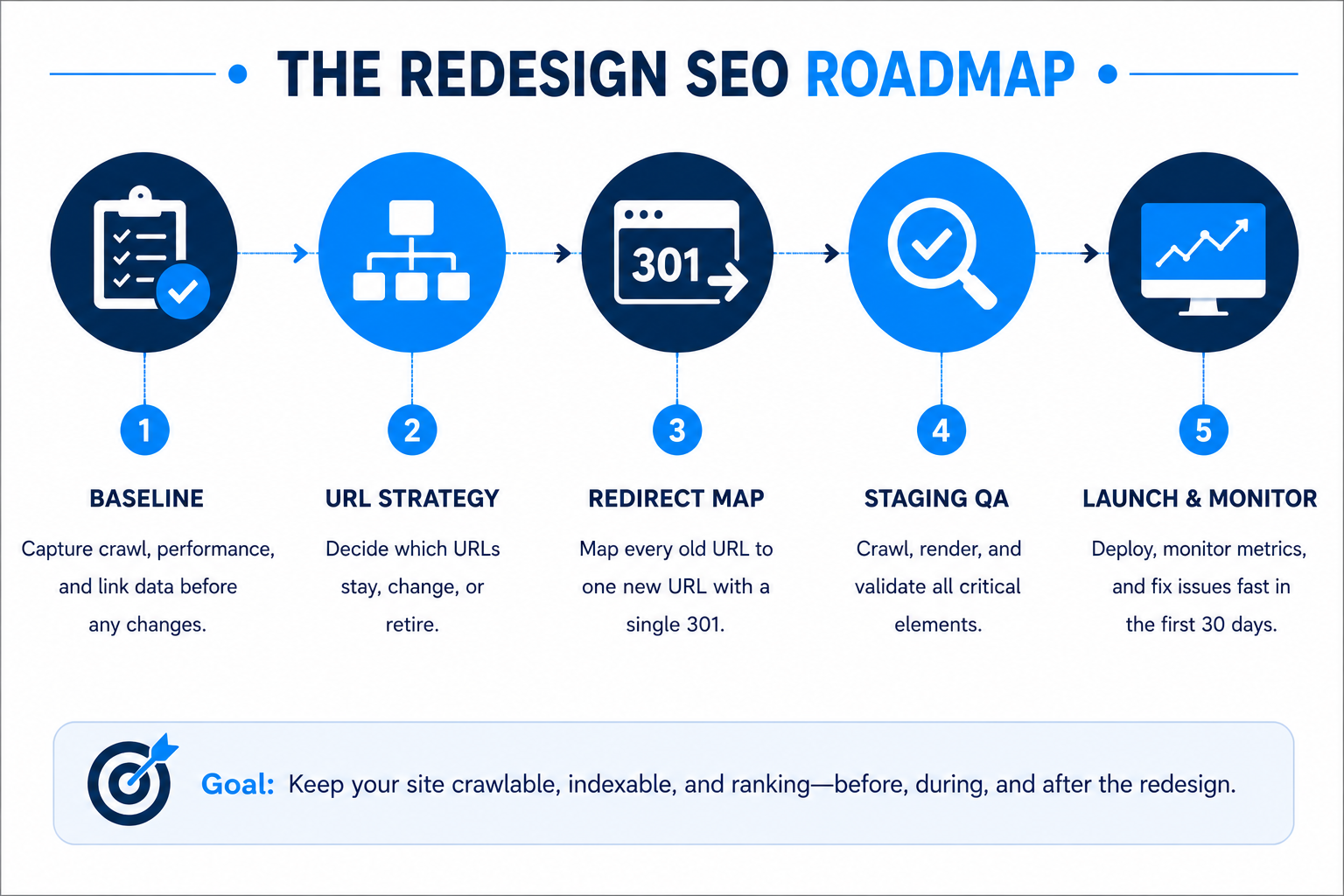
webdew builds and rebuilds websites on HubSpot CMS and WordPress with the baseline audit, URL decision, redirect map, and staging QA written into the project plan from discovery. If a redesign is on the roadmap this quarter, start with the crawl export and the URL question before the first wireframe is approved, and let the design work proceed inside those constraints.
Dive Into our
Client Testimonials
Listen to business owners like you share how we’ve helped them grow. Your story could be next!





.svg)

“Recently we reached out to Webdew for a website inside of HubSpot and they also did some mocking automation for us.”

“Webdew team was quite honest and quite easy to work with in terms of taking feedback implementing it, showing that it doesn’t happen again and things like making sure that it meets our expectations.”

“We worked with webdew to help us build our HubSpot website and they did an amazing job with it. They were very quick.”

“webdew has helped us optimize the sales and marketing processes, and this is automating a lot of processes.”

“Hi everyone my name is Kara and I work as a channel consultant at HubSpot Singapore. I’ve been working closely with webdew agency”

“Hi my name is Christian from OpenDoors Mortgage team and I’m in the mortgage business and just trying to work on new projects and kind of incorporating HubSpot for my operations”

“I’m one of the technology directors for Travelopia. We are the largest experiential travel company in the world. We’ve engaged webdew recently, not recently, it’s been about a couple of quarters now.”
“We worked with Chehak over the past several months to create a series of animated videos for an academic planner that we produce. And from the very beginning, she was absolutely professional and a pleasure to work with.”


6x
We helped clients multiply their website conversion rates through strategic design and UX optimization.
20%
Our marketing campaigns led to a 20% uplift in customer engagement across digital channels.
2K+
Delivered over 2,000 qualified leads through targeted funnels and smart automation.
120+
Our video content has earned 120,000+ views, driving brand awareness and audience retention.
“I recently had the pleasure of working with Chehak on a video demo project, and I was thoroughly impressed with her services.”
.svg)

Additional Resources
Access expert tips, trends, and strategies designed for small businesses. Stay ahead of the curve and make informed decisions with our comprehensive resources!