

 We typically respond the same day

Table of contents
While building a website, what you must prioritize is the user experience. Input element attributes If you are into web development, you must be familiar with the term input element attributes.
In this blog, we are going to discuss just that. I will explain to you the input tag and 5 must-know input attributes that are used for web development.
Input Tag
The input HTML element is a handy tag for creating interactive web-based forms to get data from the user. Depending on the device and user agent, a wide variety of input data control widgets are available.
The input tag is very powerful and complex to a large number of combinations of input types and attributes.
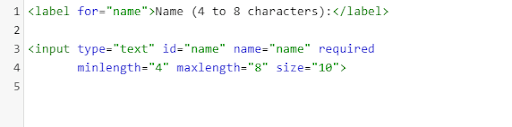
Let’s take an example of an input tag. Here, we took an input tag to enter the name in which the user can fill in a minimum 4 characters of his/her name and a maximum of 8 characters.
The image shown below shows how the HTML code will be displayed in an editor.
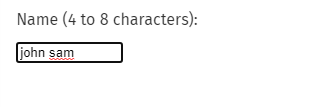
The image below shows how the output above will be displayed in a browser.
So, this is the way you can accept the data from the user. There are many types of input tags. A few of them are text, button, checkbox, radio, datetime-local, range, and search. You should note that the default value of the type attribute is “text.”
It is important to note that the behaviour of a <input> changes significantly depending on the value of its type attribute; as a result, the various kinds are described in their own individual reference pages. If this property is not supplied, the text type will be used as the default value.
Input Attributes
The <Input> element is very powerful because of its attributes. The type attribute is very important in this. Since every <input> element, regardless of type, is based on the HTMLInputElement interface, This is because they both almost share the exact same set of attributes.
However, in reality, it has an effect on a specific type of subset of input type. In addition, some attributes impact an input type but can differ with the different attributes.
Here, we have listed some essential Input-type attributes that a developer should know very well:
1. Minilength
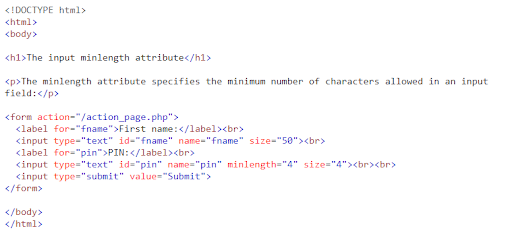
This attribute only works with the text, search, tel, URL, email, or password type in the input element. The minlength attribute specifies the minimum character that is to be entered in the input box, like UTF-16 code units.
This must be a non-negative integer value smaller than or equal to the value specified in maxlength. If there is not a value given to the minlength or an invalid value is specified, then input has no minimum length.
The form submission will fail if there is less number of characters entered in the input box than the minlength.
The image below shows how the HTML code will be displayed in an editor.
The image below shows how the output above will be displayed in a browser.
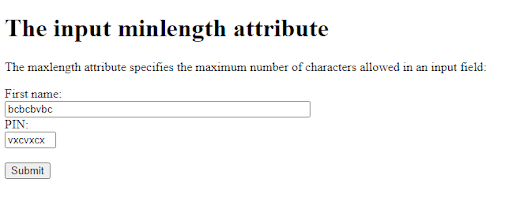
2. Maxlength
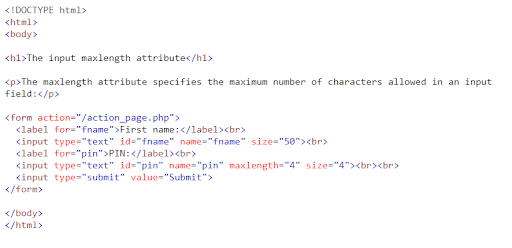
This attribute also only works with the text, search, tel, URL, email, or password type in the input element like minilength. The maxlength attribute specifies the maximum character to be entered in the input box, like UTF-16 code units.
This must be a non-negative integer value greater than or equal to the value specified in minlength. If a value is not given to the maxlength or an invalid value is specified, then the input has no maximum length.
By default, browsers will prevent the user from entering the number of characters in the input box if it is more than the specified maxlength.
The image below shows how the HTML code will be displayed in an editor.
The image below shows how the output above will be displayed in a browser.
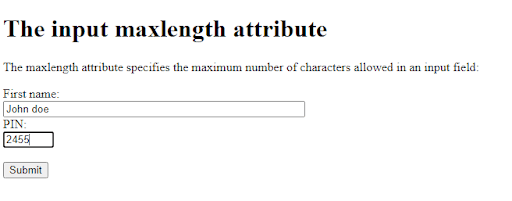
3. Disabled
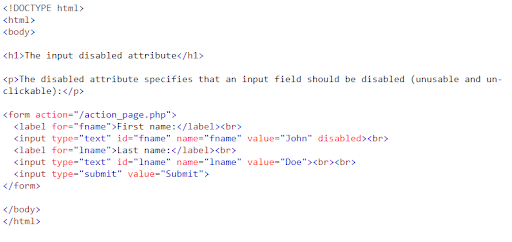
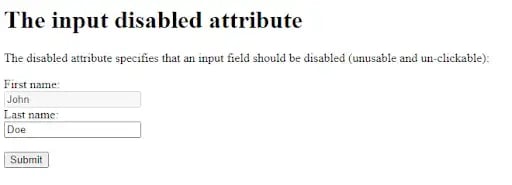
This is a boolean attribute. This attribute indicates that the user should not interact with the input.
Disabled inputs specifically show in a dimmer colour using some other form of indication that it is not available for use. The disabled attribute does not receive the click event, and the value of the disabled form will not submit with the submission of the form.
The image below shows how the HTML code will be displayed in an editor.
The image below shows how the output above will be displayed in a browser.
4. Autofocus
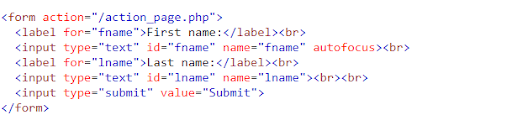
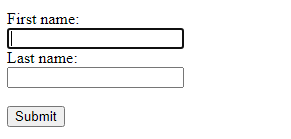
This is also a boolean attribute like the disabled attribute. This indicates that the input box gets into focus when the page completes the loading process. Or when the input element containing the autofocus attribute is displayed.
Not more than one element has gained the autofocus attribute. If put with more than one element, the first one with the attribute will get focused since hidden inputs can not be focused. So, the autofocus attribute can be used with the hidden input types.
The image below shows how the HTML code will be displayed in an editor.
The image below shows how the output above will be displayed in a browser.
5. Placeholder
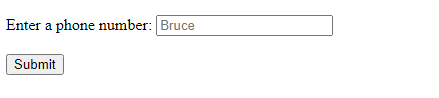
The placeholder is a string attribute. It is an attribute that provides an idea of the data that should be entered in the input field.
It should be a word or a short phrase that hints about the kind of data to be entered into the input field rather than an explanation. So, for example, if a field is expected to capture a user’s first name, and its label is “First Name,” a suitable placeholder might be “e.g., Bruce.”
The image below shows how the HTML code will be displayed in an editor.

The image below shows how the output above will be displayed in a browser.
Wrapping up
In this blog, I have introduced you to a few input element attributes that you should know, especially if you are a web developer. Using these attributes, you can control the input element in different ways in an HTML form or a webpage.
Although there are a lot of new attributes that are getting added day by day, including in the HTML, these are a few of the must-know attributes.
I hope this blog was helpful to you! Need a hand in web development or web design services? Feel free to contact us!
Editor: Amrutha
Dive Into our Client Testimonials
Listen to business owners like you share how we’ve helped them grow. Your story could be next!






The webdew team is very supportive, they provide us with thoughtful suggestions.
We contracted webdew to build our new website. And let me tell you, they did a fantastic job. Their team was really easy to communicate with.”
The webdew team is very supportive, they provide us with thoughtful suggestions.
We contracted webdew to build our new website. And let me tell you, they did a fantastic job. Their team was really easy to communicate with.”
The webdew team is very supportive, they provide us with thoughtful suggestions.
We contracted webdew to build our new website. And let me tell you, they did a fantastic job. Their team was really easy to communicate with.”
“We worked with Chehak over the past several months to create a series of animated videos for an academic planner that we produce. And from the very beginning, she was absolutely professional and a pleasure to work with.”


6x
We helped clients multiply their website conversion rates through strategic design and UX optimization.
20%
Our marketing campaigns led to a 20% uplift in customer engagement across digital channels.
2K+
Delivered over 2,000 qualified leads through targeted funnels and smart automation.
120+
Our video content has earned 120,000+ views, driving brand awareness and audience retention.
“I recently had the pleasure of working with Chehak on a video demo project, and I was thoroughly impressed with her services.”


Additional Resources
Access expert tips, trends, and strategies designed for small businesses. Stay ahead of the curve and make informed decisions with our comprehensive resources!