

 We typically respond the same day

I've run my agency on HubSpot for years, and I also run client accounts inside GoHighLevel every single day. So when people ask me whether a HubSpot-to-GoHighLevel migration is worth the effort, my answer is always the same: it depends on what you're paying for and what you're actually using. If HubSpot's seat-based pricing has outgrown your budget, or you're an agency that wants white-label sub-accounts and built-in SMS, the switch from HubSpot to GoHighLevel can cut your software costs dramatically. But only if you migrate properly.
A rushed migration loses contacts, breaks automations, and tanks email deliverability. A planned one takes two to four weeks and runs so smoothly your leads never notice.
This CRM migration guide for 2026 walks you through the entire process, step by step: exporting contacts from HubSpot, importing your CSV into GoHighLevel, mapping custom fields, rebuilding pipelines and workflows, moving landing pages, setting up DNS, and validating everything before you cancel your HubSpot subscription. I'll also share the mistakes I see businesses make most often, because avoiding them is half the battle.
Before we get into the steps, if you're still weighing the two platforms, watch my breakdown first. I use both tools daily, and this video covers where each one genuinely wins:
And if you want the full written comparison before committing to a migration, read our in-depth GoHighLevel vs HubSpot comparison. This guide assumes you've already made the decision and just need to execute it well.
Quick Answer: How the Migration WorksA HubSpot to GoHighLevel migration follows five phases: audit and backup your HubSpot data; export contacts, companies, and deals as CSV files; import and map that data into GoHighLevel; rebuild your workflows, email templates, landing pages, and forms (these don't transfer automatically); and run both platforms in parallel for one to two weeks before decommissioning HubSpot. Most small businesses complete the move in 2–4 weeks. Agencies with multiple client accounts should budget an extra week or two. |
Why Switch from HubSpot to GoHighLevel in 2026?
I want to be honest here, because I genuinely like HubSpot. It's still the stronger platform for content marketing, attribution reporting, and large RevOps teams. We're a HubSpot Diamond Partner, and plenty of our clients should absolutely stay on it.
But there are three situations where moving to GoHighLevel makes clear financial and operational sense.
1. The cost gap has become impossible to ignore
Here's what the pricing actually looks like in 2026 (verified against both platforms' current published pricing; always double-check before you commit, because both companies adjust rates):.png?width=1200&height=800&name=Untitled%20design%20(18).png)
The structural difference matters more than the sticker prices. HubSpot charges per seat and per marketing contact, so your bill grows with your team and your list. GoHighLevel charges a flat platform fee with unlimited contacts and users, plus usage-based costs for SMS, voice, and email sends (typically $20–$150/month depending on volume).
For a 10-person team with 25,000 contacts on Marketing Hub Professional, it's common to see HubSpot bills in the $1,500–$3,000/month range once contact tiers and extra seats are factored in. The same operation on GoHighLevel's Unlimited plan runs $297/month plus usage. That's the ROI of switching to GoHighLevel in one sentence: many businesses cut CRM costs by 70–80%.
Note: Actual pricing may vary based on features, contacts, and required integrations.
2. You're an agency that resells software
GoHighLevel's Unlimited plan gives you unlimited white-label sub-accounts, one isolated environment per client, with your branding. The SaaS Pro tier goes further and lets you resell the platform under your own name with automated Stripe billing. HubSpot has no equivalent. If that model interests you, I've written a full guide on how GoHighLevel SaaS Mode works, because it changes the economics of running an agency entirely.
3. You need SMS, calling, and appointment booking natively
GoHighLevel includes two-way SMS, a phone dialer, and calendar booking on every plan. In HubSpot, you'd bolt these on through paid integrations. For local businesses and lead-gen agencies, this alone often justifies the move.
If you're a small business comparing GoHighLevel vs HubSpot for small business needs in 2026, the short version: HubSpot wins on polish, reporting depth, and ecosystem; GoHighLevel wins on price, included channels, and agency flexibility.
Before You Migrate: The Pre-Migration Audit
Every painful migration I've seen skipped this phase. Spend two or three days here, and the rest of the project becomes mechanical.
Inventory what you actually use in HubSpot. Open your portal and document:
- Contacts, companies, and deals — total counts, and which properties hold real data
- Custom properties — list every custom field, its data type (text, dropdown, date, number), and whether it's still in use
- Active workflows — name, trigger, every action, delays, and branching logic. Screenshot complex ones.
- Email templates and sequences — which are active and which are dead weight
- Landing pages and forms — URLs, embed locations, and which workflows they feed
- Pipelines and deal stages — exact stage names and the automation tied to stage changes
- Integrations — every third-party tool connected (Zapier, Stripe, Calendly, your website forms)
- Lists and segments — active lists you'll need to recreate as tags or smart lists
Define what's worth moving. A migration is the best data-cleaning opportunity you'll ever get. Contacts who haven't opened an email in two years? Workflows that haven't fired since 2024? Leave them behind. Importing a smaller, cleaner database improves your deliverability on the new platform from day one.
Back everything up. Export complete copies of all records, even the ones you don't plan to migrate — and store them securely. Once you cancel HubSpot, that data is gone.
Set a migration window. Pick a low-activity period. Don't migrate the week before your biggest campaign of the quarter.
Step-by-Step: Migrating CRM Data from HubSpot to GoHighLevel
This is the core of the project, so I'll go granular. GoHighLevel also publishes an official HubSpot to HighLevel migration guide. Keep it open in a tab as your reference for exact menu paths, since the interface evolves.
Step 1: Export Contacts from HubSpot
Here's the HubSpot contact list export process:
- In HubSpot, go to CRM > Contacts
- Click Actions > Export view (or export a specific list)
- Choose CSV format and select all properties — you can trim columns later, but you can't recover what you didn't export
- HubSpot emails you a download link; save the file
Repeat the export for Companies (CRM > Companies > Actions > Export) and Deals (CRM > Deals > Actions > Export). Export each contact list you want to preserve as its own CSV — separate files make segmentation much easier on the GoHighLevel side, where lists become tags.
Two things HubSpot won't bulk-export for you:
- Email templates. There's no one-click template export. Open each template and copy the HTML manually. This is why email migration is partial, not an automatic plan for it.
- Notes and activity history. Individual engagement records (calls, notes, meetings) need the HubSpot API for bulk extraction. For most small businesses, exporting a "notes" property summary is enough; agencies with deep deal histories should script it via API or accept the trade-off.
Step 2: Clean and Prepare Your CSV
Before you import anything, open your contacts CSV and tidy it:
- Remove hard-bounced, unsubscribed, and obviously dead contacts
- Standardize phone numbers (GoHighLevel prefers E.164 format, e.g., +14155551234, especially if you'll use SMS)
- Split any combined "Full Name" columns into First Name and Last Name
- Rename column headers to match GoHighLevel's standard fields where possible (First Name, Last Name, Email, Phone)
- Flag the columns that will need custom fields in GoHighLevel
Twenty minutes of spreadsheet hygiene here saves hours of post-import cleanup.
Step 3: Create Custom Fields in GoHighLevel First
This is the step almost everyone does in the wrong order. If your HubSpot portal uses custom properties, lead source detail, industry, contract value, or onboarding stage, create the matching custom fields in GoHighLevel before you import.
In GoHighLevel: Settings > Custom Fields > Add Field. Match the data type to the HubSpot original: a dropdown should stay a dropdown (recreate the same options), a date field should stay a date field. If you import first and create fields later, your custom data lands in a generic text dump or doesn't import at all, and you'll be re-importing everything.
Step 4: Import Your HubSpot CSV to GoHighLevel
Now the actual import:
- In your GoHighLevel sub-account, go to Contacts > Import Contacts
- Upload your cleaned CSV
- GoHighLevel presents a field mapping screen — this is the moment that decides whether your migration succeeds. Map every HubSpot column to its GoHighLevel field, including the custom fields you created in Step 3
- Apply an import tag (e.g., hubspot-import-june2026) so you can identify, segment, or bulk-fix this batch later
- Run the import, then spot-check 15–20 records against the original HubSpot data. Verify emails, phones, and custom field values landed correctly
Repeat for each list CSV, applying a tag per list. Your HubSpot lists effectively become GoHighLevel tags and smart lists, which can trigger automations the same way list membership did in HubSpot.
Step 5: Rebuild Pipelines — HubSpot Deals Become GHL Opportunities
Terminology shift: What HubSpot calls Deals in a pipeline, GoHighLevel calls Opportunities. The concept is identical.
- Go to Opportunities > Pipelines in GoHighLevel
- Recreate each HubSpot pipeline with the same stage names — Prospect → Qualified → Proposal Sent → Negotiation → Closed Won/Lost, or whatever your structure is. Matching names keeps your before/after reporting comparable
- Import open deals from your Deals CSV using GoHighLevel's opportunity import, mapping deal name, value, stage, and contact association
- For a small number of high-value open deals, consider entering them manually — it's faster than debugging association errors, and it forces a useful review of your live pipeline
Closed historical deals are a judgment call. I usually import the last 12 months for reporting continuity and archive the rest in the backup.
Rebuilding What Doesn't Transfer: Workflows, Emails, Pages
Here's the truth most migration articles soften: no magic button converts HubSpot workflows into GoHighLevel automations. Automated migration from HubSpot to GoHighLevel exists only for structured data (contacts, companies, opportunities via CSV or API). Everything built in HubSpot's editors, workflows, emails, landing pages, and forms gets rebuilt by hand. The good news is that rebuilding is faster than you'd think, and it forces you to throw out automation debt you've been carrying for years.
Moving Email Automations from HubSpot to GHL
The GHL equivalent to HubSpot workflows lives under Automation > Workflows, and once you adjust to the builder, it's arguably more flexible; every workflow can mix email, SMS, voicemail drops, internal notifications, and pipeline updates in a single canvas.
My process for comparing HubSpot and GHL automation and rebuilding cleanly:
- Triage your workflow list. From your audit, sort workflows into three buckets: critical (lead capture, speed-to-lead follow-up, deal-stage notifications), useful (nurture sequences, re-engagement), and dead (everything that hasn't fired in six months). Rebuild bucket one first, bucket two second, and let bucket three die.
- Map triggers. HubSpot enrollment triggers translate directly: form submission → Form Submitted trigger, list membership → Tag Added trigger, property change → Contact Changed trigger, deal stage change → Pipeline Stage Changed trigger.
- Rebuild actions in sequence. Send email, wait steps, if/else branches, internal notifications, field updates — GoHighLevel supports all of them. Recreate delays exactly; timing is usually where rebuilt sequences drift from the original.
- Test before activating. Run a test contact through every critical workflow. Check that emails are sent, tags are applied, and opportunities move. Only then switch it on.
Moving HubSpot Email Templates to GHL
Since HubSpot won't bulk-export templates, this is manual but straightforward:
- For simple text-style emails, copy the content and rebuild in GoHighLevel's email builder (Marketing > Emails) — it takes minutes per template
- For designed HTML templates, copy the HTML from HubSpot's source view and paste it into a custom-code email in GoHighLevel, then fix the merge tags
- Replace every personalization token. HubSpot's There becomes GoHighLevel's format. Miss one and your subscribers get a literal "Hi There," send a test to yourself for every single template before it goes live
Moving Landing Pages from HubSpot to GHL
HubSpot-hosted landing pages stop existing when your subscription ends, so this step has a hard deadline.
- List every live landing page and its traffic source (ads, email links, QR codes, partner sites)
- Rebuild each page in Sites > Funnels/Websites in GoHighLevel. You can reference your HubSpot page in one tab and rebuild in the other; for complex pages, save the HubSpot HTML as a starting reference
- Reconnect every form on those pages to a GoHighLevel form, and wire each form to its workflow
- Set up 301 redirects from old HubSpot page URLs to the new GoHighLevel URLs. Skipping redirects throws away the SEO equity and breaks every ad pointing at the old pages
Can you keep your HubSpot pages? Only while you keep paying for the hub that hosts them. A few businesses keep a slim HubSpot CMS subscription temporarily, but for a clean break, rebuild and redirect.
GoHighLevel DNS Setup for HubSpot Users
This part intimidates non-technical users, but it's a 30-minute job:
- Connect your domain or subdomain. In GoHighLevel, go to Settings > Domains and add the domain you'll use for funnels and pages (e.g., go.yourdomain.com). Add the CNAME record GoHighLevel provides at your DNS host (GoDaddy, Cloudflare, Namecheap)
- Set up a dedicated sending domain for email. Under email settings, configure your sending subdomain and add the SPF, DKIM, and DMARC records GoHighLevel generates. In 2026, Gmail and Yahoo enforce authentication strictly; unauthenticated mail will go straight to spam
- Warm up your sending domain. Even with perfect DNS, a brand-new sending domain has no reputation. Start with small sends to your most engaged contacts and ramp volume over two to three weeks. Blasting your full list on day one is the fastest way to torch deliverability
Phone, SMS, and Calendars
If you used calling or SMS in HubSpot through an integration, set up LC Phone (or your own Twilio account) under Settings > Phone Numbers in GoHighLevel. US businesses must complete A2P 10DLC registration before sending SMS. Approval can take a few days, so file it early in the migration, not at the end. Then recreate booking calendars under Calendars and update every "book a call" link on your site, email signatures, and ads.
Integrations and the API
Reconnect your stack: payment processor (Stripe connects natively), website forms, Zapier/Make scenarios, and ad platforms (rebuild your Facebook and Google integrations for lead sync and conversion tracking). For complex or high-volume migrations, the GoHighLevel API supports programmatic contact and opportunity creation, which is useful if you're syncing HubSpot data with GHL during a parallel-run period or scripting bulk activity-history transfer. Most businesses won't need it; agencies migrating dozens of accounts often will.
A tip for agencies: once you've rebuilt one full client setup, save it as a GoHighLevel snapshot. A snapshot captures the entire sub-account configuration, pipelines, workflows, calendars, and funnels and lets you stamp out the next client migration in hours instead of weeks. Setting up GHL snapshots for HubSpot migrants is the single biggest time-saver if you're moving multiple accounts.
The Parallel Run: Don't Cancel HubSpot Yet
Resist the urge to cancel HubSpot the day your import finishes. Run both platforms side by side for one to two weeks:
- Point new leads to GoHighLevel forms and workflows immediately
- Keep HubSpot read-only as your reference and safety net
- Compare record counts, check that automations fire on real leads, and watch email deliverability metrics
- Train your team in GoHighLevel during this window — the interface differences (Deals vs Opportunities, Lists vs Tags/Smart Lists, Sequences vs Workflows) take a few days to internalize
Once a full week passes with no discrepancies, take a final HubSpot export as your permanent archive, then downgrade or cancel. Mind your renewal date: HubSpot contracts are typically annual, so time your migration to finish before auto-renewal, not after.
HubSpot to GoHighLevel Transition Checklist
Print this. Check things off. Every painful migration story I've heard maps to a skipped line on this list.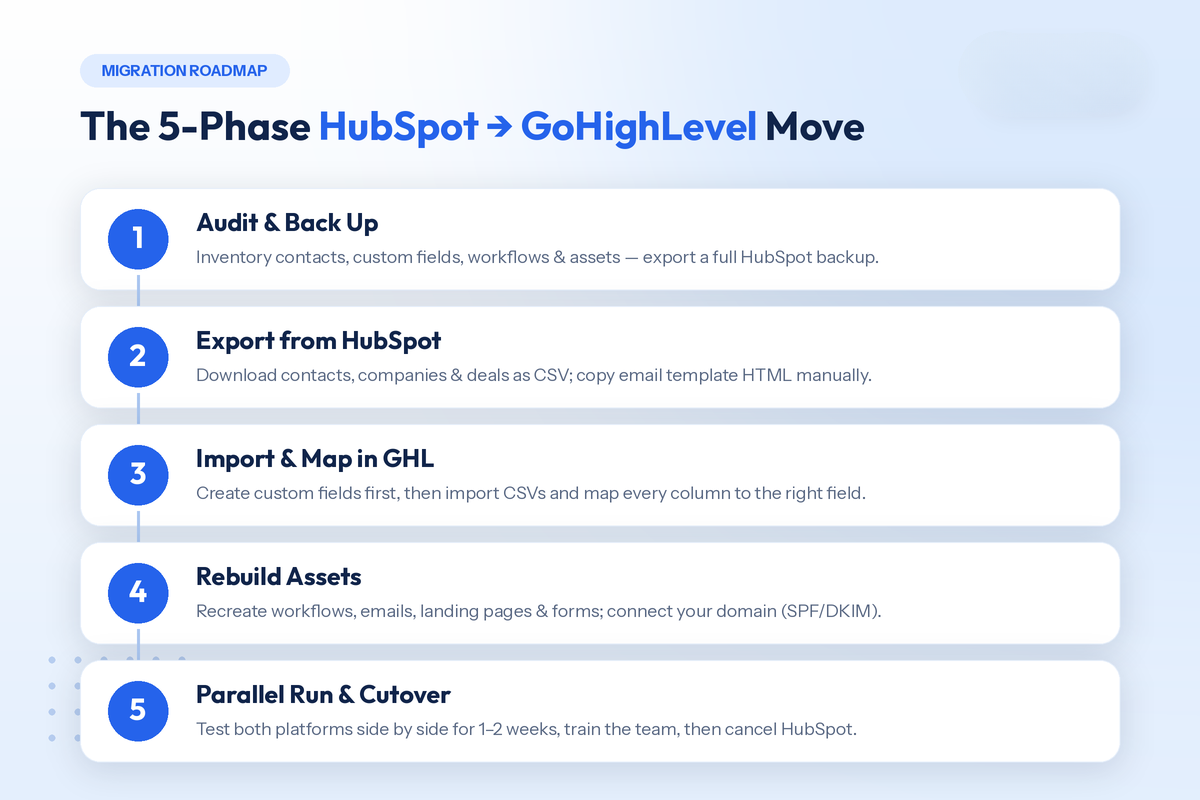
Pre-migration
- Full audit of contacts, properties, workflows, templates, pages, forms, pipelines, and integrations
- Complete CSV + asset backup stored outside HubSpot
- Data cleaned: dead contacts and dead workflows excluded
- Migration window scheduled away from major campaigns
- GoHighLevel account created and plan selected
Data migration
- Contacts, companies, and deals exported from HubSpot as CSV
- Email template HTML copied out manually
- Custom fields created in GoHighLevel (before import)
- CSVs imported with fields mapped and import tags applied
- 15–20 records spot-checked against HubSpot originals
- Pipelines recreated; open deals imported as opportunities
Rebuild
- Critical workflows were rebuilt and tested with a test contact
- Email templates rebuilt; merge tags converted and test-sent
- Landing pages rebuilt; forms reconnected; 301 redirects live
- Domain connected; SPF/DKIM/DMARC verified
- A2P 10DLC registration submitted (if using SMS in the US)
- Calendars, phone numbers, and integrations reconnected
Cutover
- New leads routing to GoHighLevel
- One–two week parallel run completed with no discrepancies
- Team trained on GoHighLevel
- Final HubSpot archive exported
- HubSpot cancelled before the renewal date
5 Common Migration Mistakes (and How to Avoid Them)
1. Importing before creating custom fields. Your custom data has nowhere to land, and you end up re-importing. Fields first, import second. Always.
2. Skipping email authentication and warm-up. Teams rebuild everything perfectly, then send their first 20,000 email blast from a cold domain with no DKIM. Deliverability craters, and they blame the platform. Authenticate, warm up, then scale.
3. Forgetting the 301 redirects. Old HubSpot landing page URLs live in ads, emails, and backlinks. No redirects means broken links, wasted ad spend, and lost SEO equity.
4. Migrating everything. Ten years of unengaged contacts and zombie workflows don't deserve a new home. Migrate what's alive; archive the rest.
5. Cancelling HubSpot too early. Once the subscription ends, your data and hosted pages are gone. Parallel-run first, archive everything, then cancel.
How Long Does the Whole Thing Take?
For a typical small business, a few thousand contacts, one or two pipelines, 5–15 active workflows, and a handful of landing pages, plan on 2–4 weeks:
- Week 1: audit, cleanup, exports, GoHighLevel account setup, DNS
- Week 2: imports, pipelines, critical workflow rebuilds
- Week 3: emails, landing pages, redirects, integrations, testing
- Week 4: parallel run, training, cutover
Agencies moving multiple client accounts should add one to two weeks for client communication and training, though snapshots compress every migration after the first one. Heavily customized enterprise portals with deep API integrations can stretch to 6–8 weeks. If your team doesn't have the bandwidth, a done-for-you GoHighLevel migration service (Webdew offers exactly this) typically pays for itself in avoided downtime and deliverability mistakes alone.
Is the Switch Worth It? The Bottom Line
Run the math on your own numbers. Take your current annual HubSpot spend, subscription, extra seats, contact overages, and the integrations you pay for separately (SMS, scheduling, funnels) and compare it against GoHighLevel's flat $97–$497/month plus realistic usage costs. For most small businesses and nearly all agencies, the gap is large enough that the migration effort pays back within the first quarter.
But cost isn't the only variable. If your revenue engine depends on HubSpot's reporting depth, content tools, and ecosystem, staying put can be the right call — I say that as someone who keeps significant operations on HubSpot. The right move depends on your team, your channels, and your growth model, which is exactly why I made the side-by-side comparison video after running both platforms in parallel.
And if you decide to switch, do it the boring way: audit, back up, clean, import, rebuild, test, parallel-run, cut over. Boring migrations are the ones that work.
Need help executing yours? Webdew's team handles HubSpot and GoHighLevel implementations daily, from one-off migrations to full white-label agency setups. Talk to us, and we'll scope your migration honestly, including telling you if you shouldn't switch at all.
Dive Into our
Client Testimonials
Listen to business owners like you share how we’ve helped them grow. Your story could be next!





.svg)

“Recently we reached out to Webdew for a website inside of HubSpot and they also did some mocking automation for us.”

“Webdew team was quite honest and quite easy to work with in terms of taking feedback implementing it, showing that it doesn’t happen again and things like making sure that it meets our expectations.”

“We worked with webdew to help us build our HubSpot website and they did an amazing job with it. They were very quick.”

“webdew has helped us optimize the sales and marketing processes, and this is automating a lot of processes.”

“Hi everyone my name is Kara and I work as a channel consultant at HubSpot Singapore. I’ve been working closely with webdew agency”

“Hi my name is Christian from OpenDoors Mortgage team and I’m in the mortgage business and just trying to work on new projects and kind of incorporating HubSpot for my operations”

“I’m one of the technology directors for Travelopia. We are the largest experiential travel company in the world. We’ve engaged webdew recently, not recently, it’s been about a couple of quarters now.”
“We worked with Chehak over the past several months to create a series of animated videos for an academic planner that we produce. And from the very beginning, she was absolutely professional and a pleasure to work with.”


6x
We helped clients multiply their website conversion rates through strategic design and UX optimization.
20%
Our marketing campaigns led to a 20% uplift in customer engagement across digital channels.
2K+
Delivered over 2,000 qualified leads through targeted funnels and smart automation.
120+
Our video content has earned 120,000+ views, driving brand awareness and audience retention.
“I recently had the pleasure of working with Chehak on a video demo project, and I was thoroughly impressed with her services.”
.svg)

Additional Resources
Access expert tips, trends, and strategies designed for small businesses. Stay ahead of the curve and make informed decisions with our comprehensive resources!