Thinkific is a leading online course platform that empowers creators with various features to build, market, and sell their courses and membership sites.
Podia emerges as a versatile online learning platform, providing creators the tools to craft, sell, and market online courses, memberships, and digital products.
Step into the future by exploring the best online course platforms where learning has transformed into a virtual realm. Journey with us through the best online course platforms, shaping how we acquire knowledge in this futuristic E-learning landscape.
Discover the best platforms that empower learners and educators alike, transcending traditional boundaries and embracing the digital evolution of education.
19 Best Online Course Platforms you need to know about
Here is a list of some useful and amazing online course platforms to create and sell online courses easily and quickly.
1. Teachable
Teachable stands as a powerhouse for creative entrepreneurs and coaches, providing an online course creation platform that has fueled the success of over 100,000 creators, generating a remarkable $1 billion through individual courses and coaching programs.
Renowned clients like The NY Times, Shopify, and Pat Flynn trust Teachable for its robust features and user-friendly interface.
One can utilize Teachable’s built-in affiliate marketing feature without the need for third-party integration. This will easily add affiliates to your sales team, offering them a percentage of course sales.
One can filter and message students based on enrollment, coupon redemption, or course completion using Teachable’s native email marketing tool.
Teachable
Customization and Website Building
Integration Capabilities
Native email marketing
Creation of coupon codes for quick sales
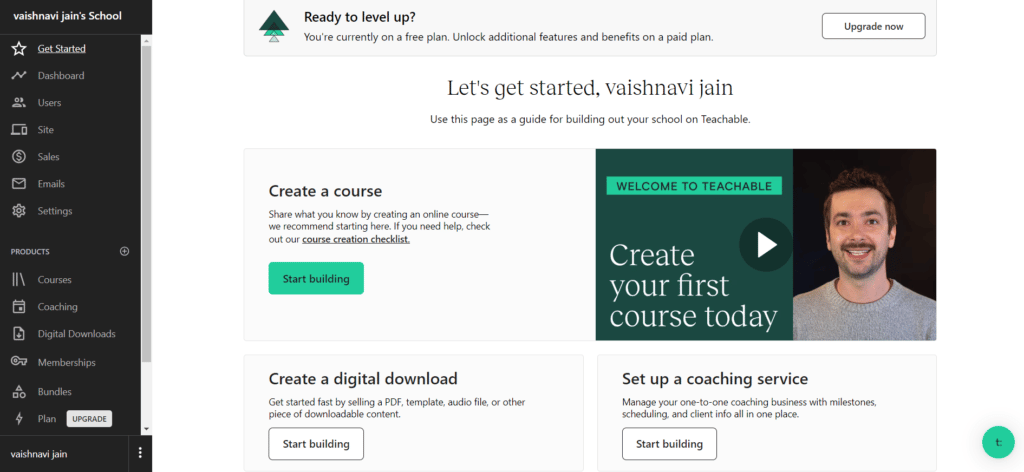
It’s time to get started with the Teachable platform. After logging in, you’ll land on a main page to get an overview of the platform. Here is a tutorial video that you can watch to learn how to use the platform easily.
Click on ‘Start Building’ and get started with the new course creation process.
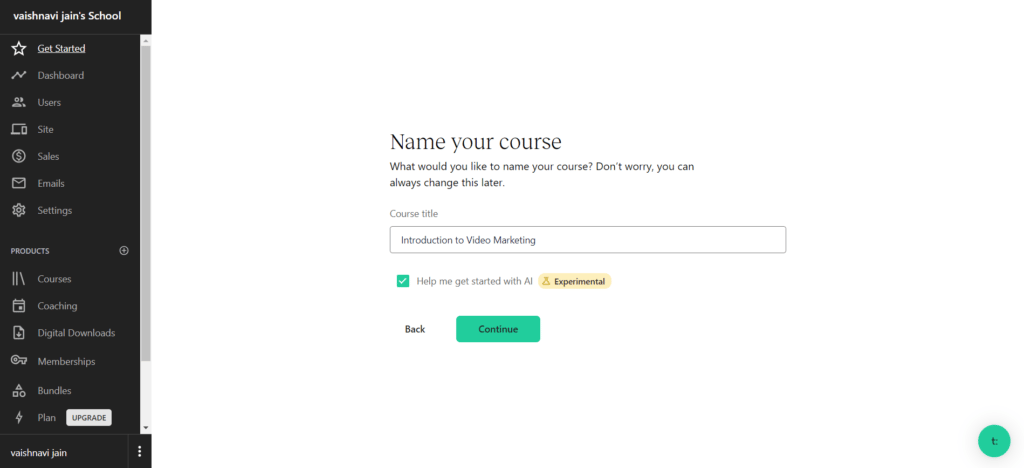
Next it will ask you to add the name to your course. We added ‘Introduction to Video Marketing’ and also checked in the box below to get help of AI.
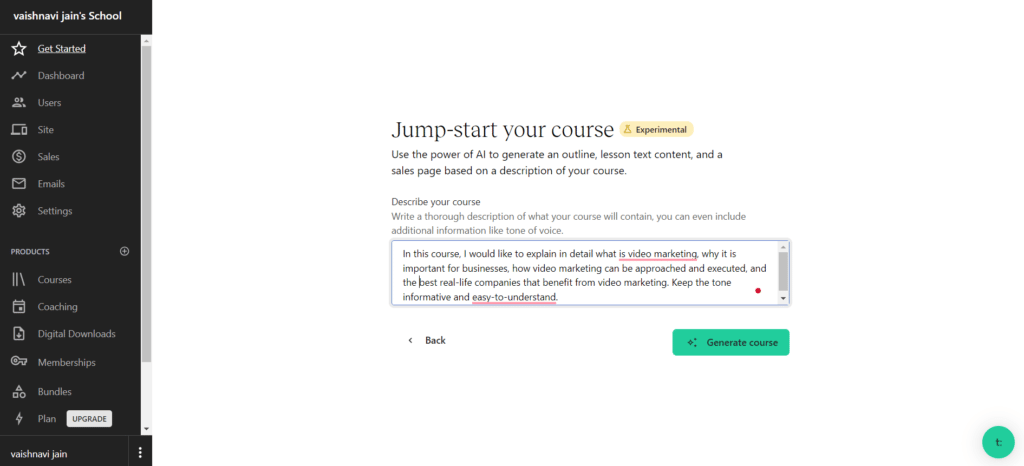
Next, the AI will ask you to describe your course and the tone of the voice in which you need the outline for your course.
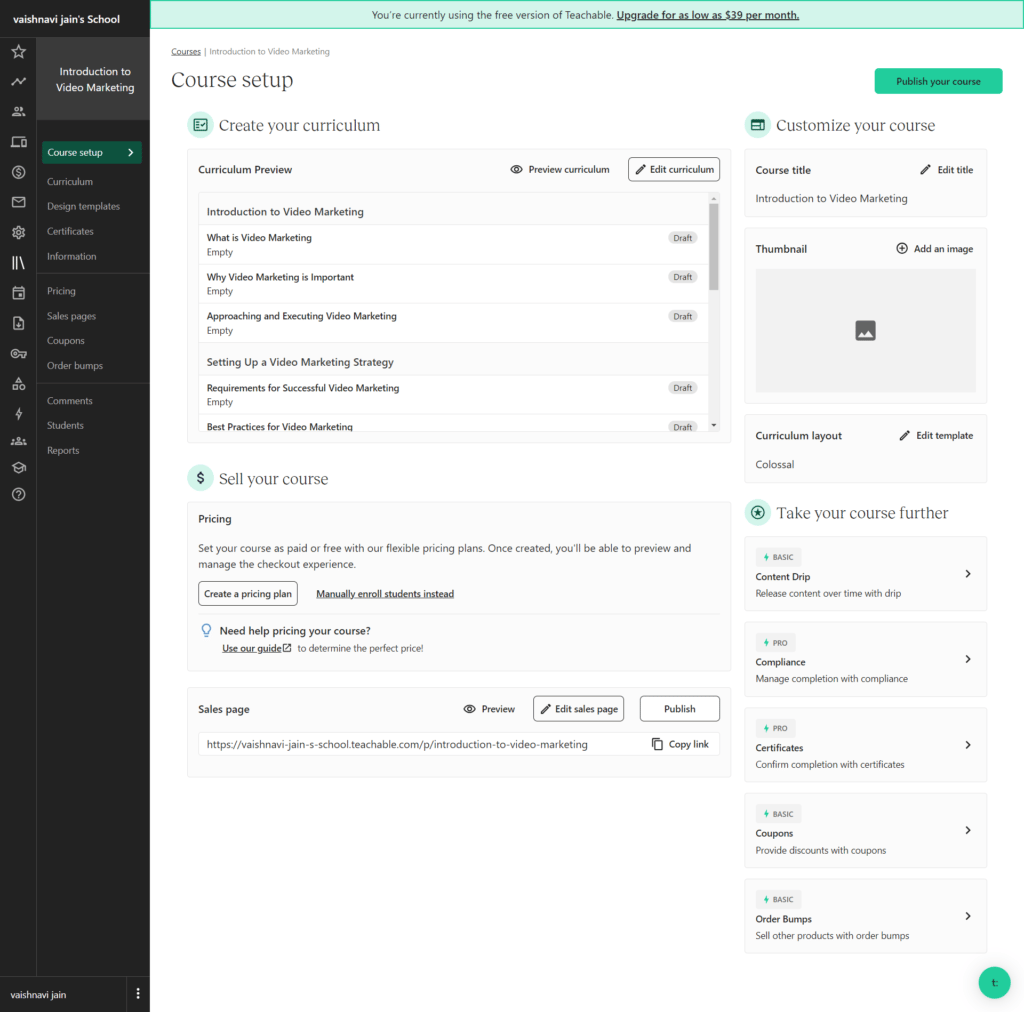
By analyzing the details we provided to the AI, a curriculum for the course was created. Yu can have a look at the curriculum and can change it as per your choice.
On the right side of it, there is an option to Customize your course, where we added the name of the course and added a thumbnail image.
It may seem a bit messy as all the options here are together, but on the other hand, it makes it convenient for you to keep a check on the basic options of the course easily.
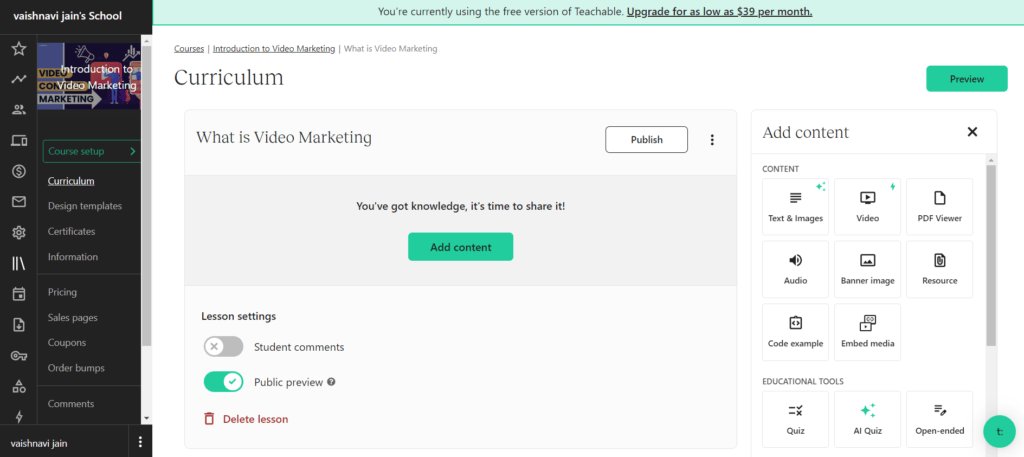
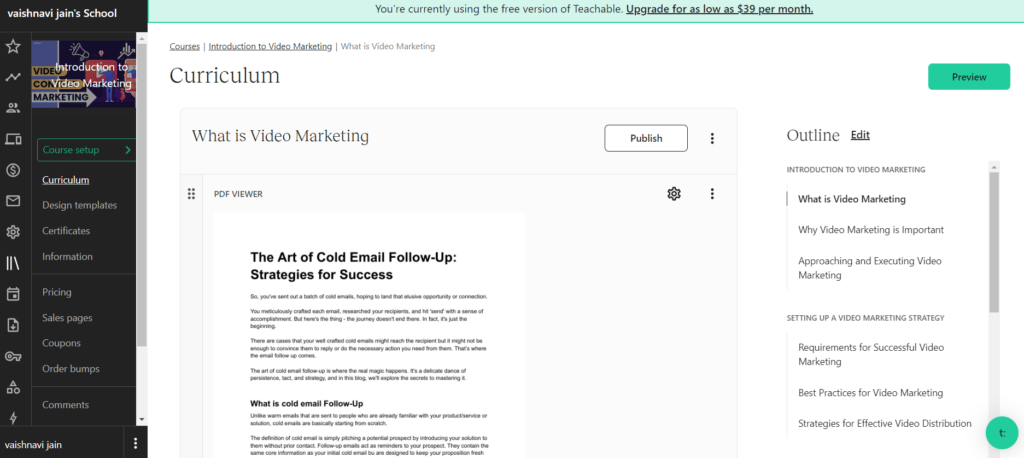
Click on your curriculum lessons to add content to them. I chose the first one i.e ‘What is video Marketing’, and added PDF as the content for your reference. You can add another type of content, too, as per your choice.
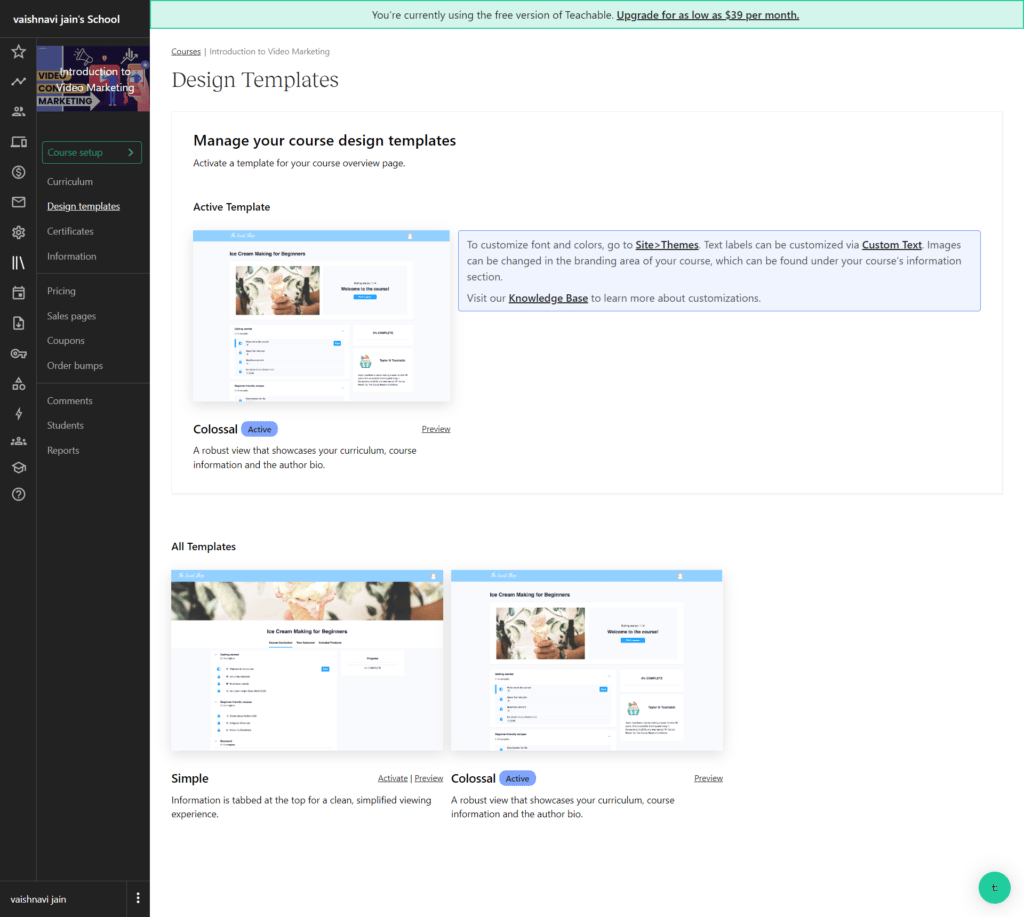
On the left side, you’ll see a vertical menu with the second option ‘Design Templates’. You can edit iteasily in minutes.
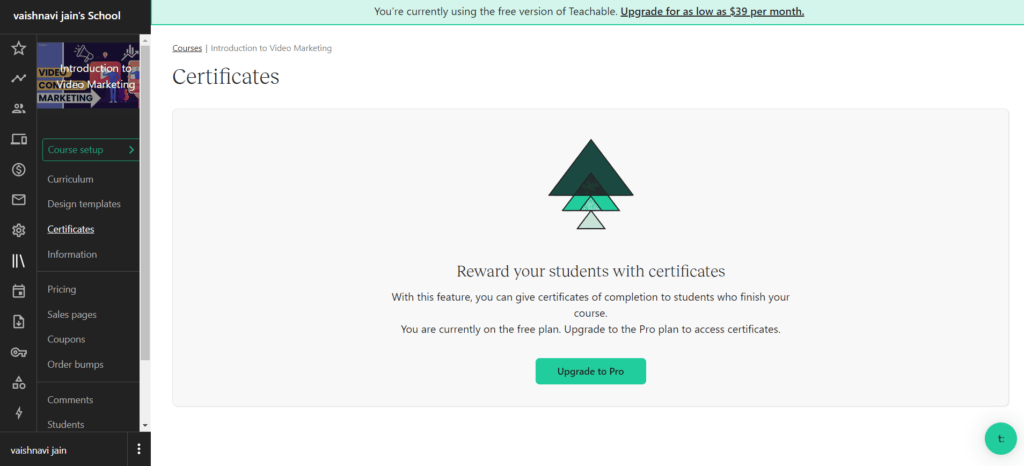
Next is Certificates, but to avail of this feature, you need to upgrade to the pro plan.
Other options are simple to use – like Pricing (set the pricing of your course) and coupons (add coupons to make it lucrative for students).
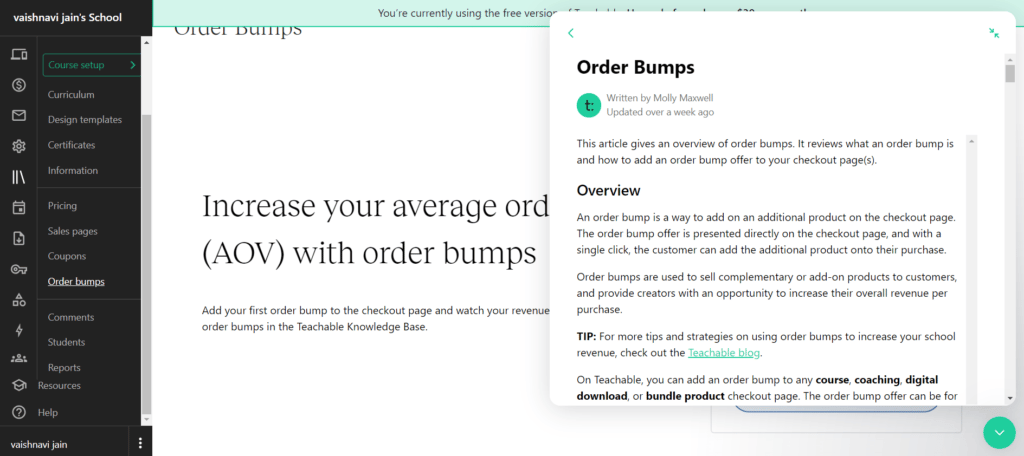
Bu Order Bump is something that many of you will not be aware of. To make it clear, we took the help of the chatbot, which is accessible with the green round button in the bottom right.
Here is the overview of the Order Bumps and with this clear understanding you can add them as per your choice.
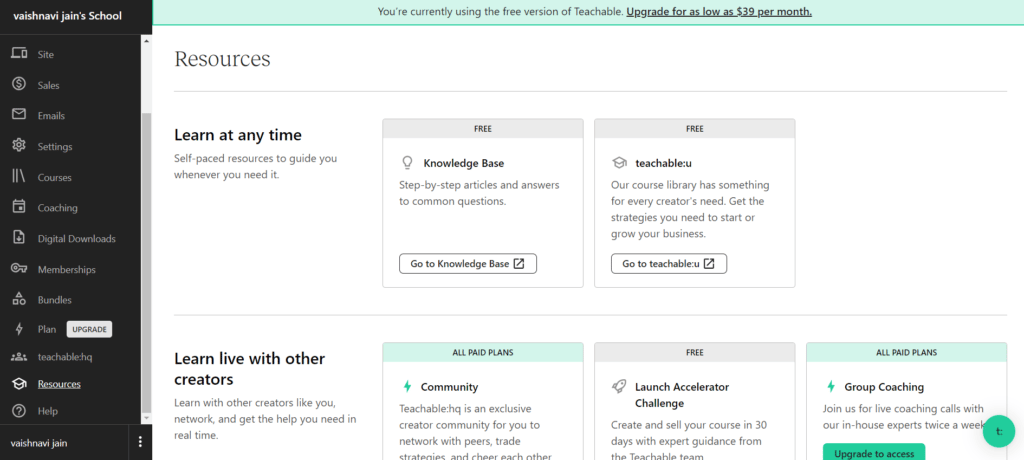
Teachable also provides Resources to help the users utilize the platform in the best way possible.
Let’s have a look at the pros and cons of the Teachable platform.
Pros
It has flexible pricing options.
The tool accepts payments in 130+ currencies, Paypal, and mobile pay.
Facilitates the filing and remitting of EU VAT.
Cons
The array of features may pose a learning curve for new users.
Thinkific, a leading online course platform, empowers course creators with various features to build, market, and sell courses and membership sites.
With over 50,000 course creators and $650 million earned on the platform, Thinkific stands out in e-learning. Despite not having a mobile app, Thinkific’s courses and websites are fully mobile-responsive.
It allows creators to tailor courses withfeatures like private and hidden options, drip content, and flexible scheduling. The integration with Zapier offers seamless connectivity to over 1,500 apps, enhancing automation possibilities.
Thinkific supports robust marketing tools, including analytics, ad tracking, and affiliate marketing programs with customizable commissions.
Thinkific
Advanced Customization
Zapier Integration
Robust Marketing Tools
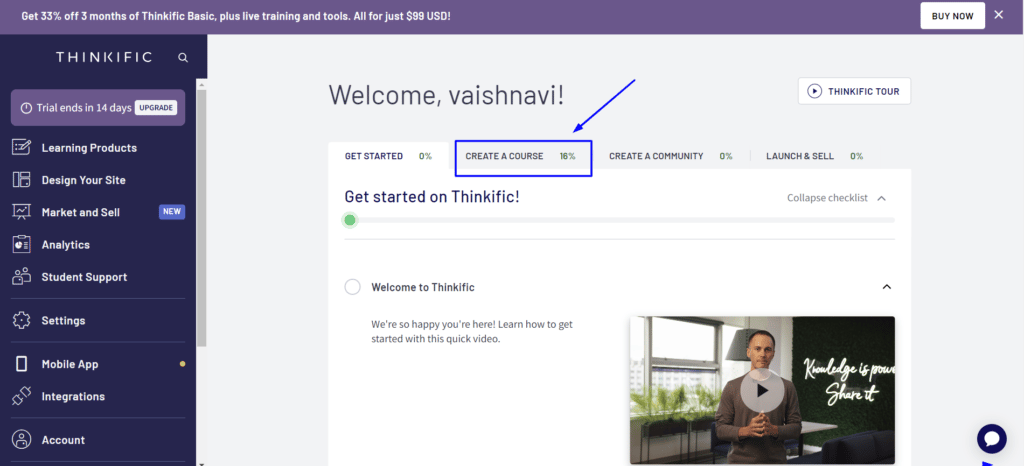
After logging in this course creation tool, you’ll find a dashboard like the one in the image below. Just click on ‘Create a Course’ and get started.
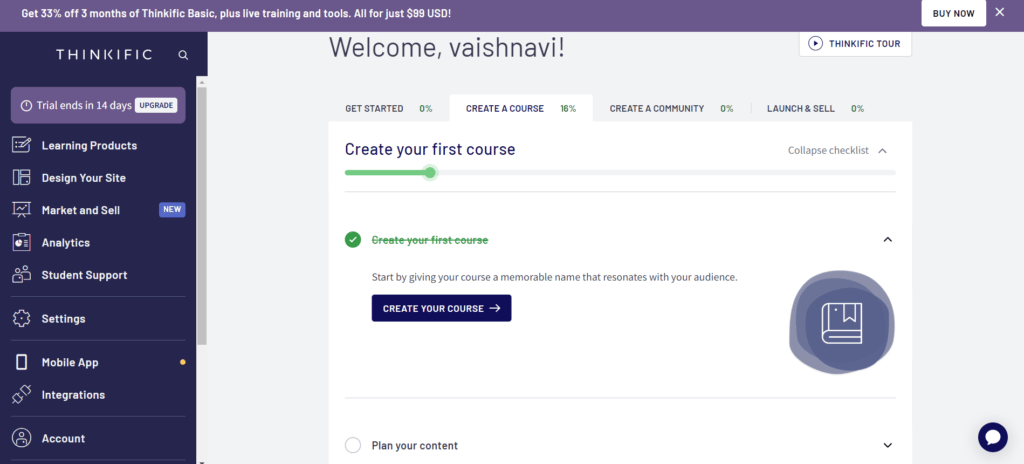
Click on button ‘Create Your Course’.
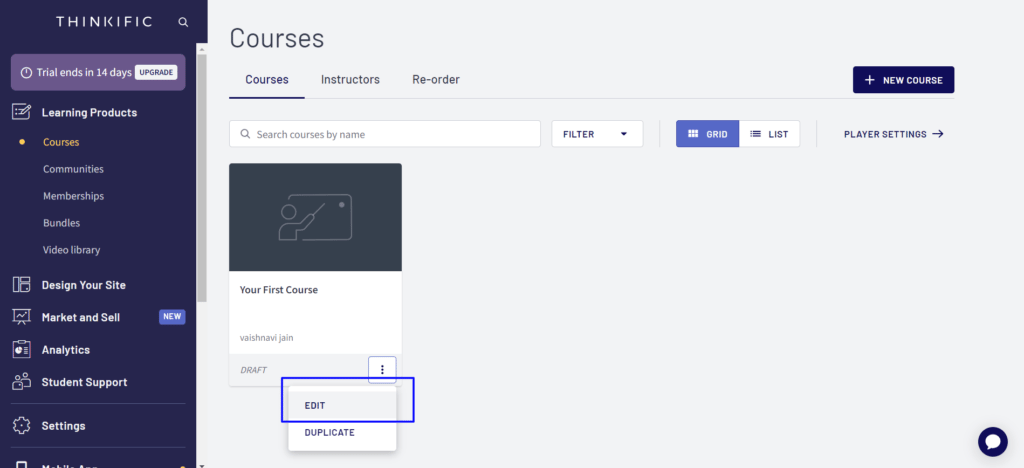
Now you can click on courses under ‘Learning Products,’ and you’ll see your first course there. After clicking on the ‘three dots’ you’ll get an option to edit your course.
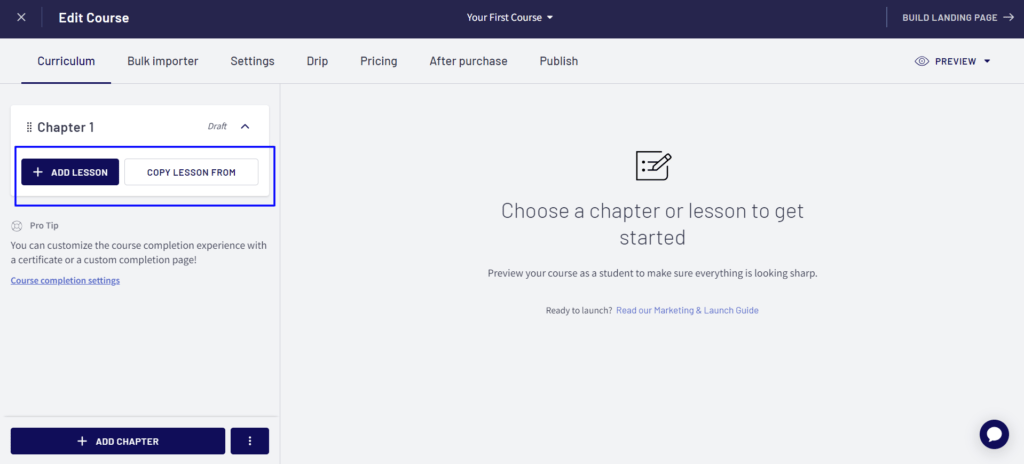
Following will be the editing dashboard for your course. Start with the Curriculum by adding lessons in your Chapter 1.
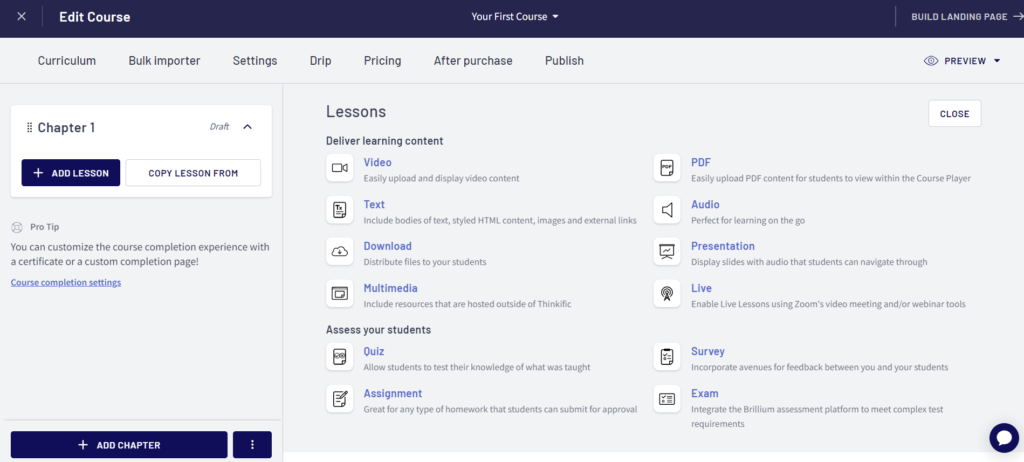
After clicking on ‘Add Lesson,’ you’ll find different options to add content to your lesson. The list of options can be clearly seen on the right side of the image. We added a pdf as course material to show you as an example.
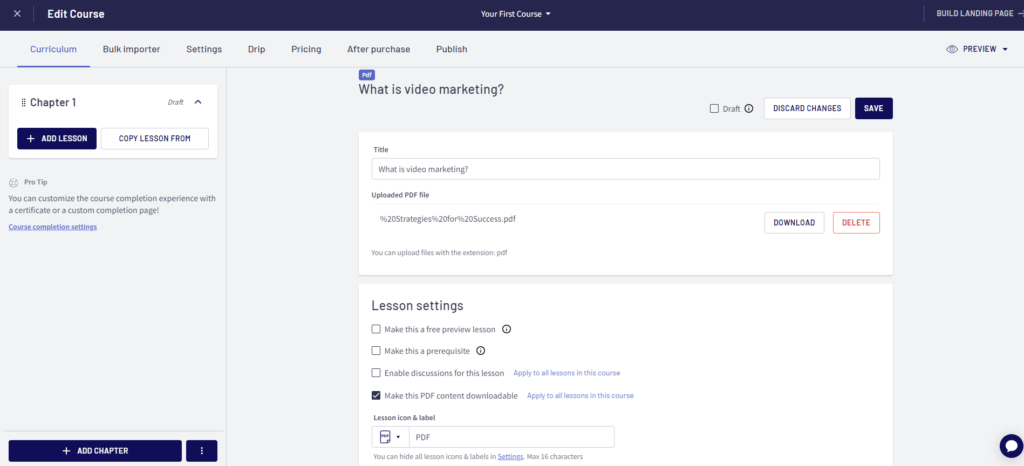
Add the name of your lesson and change the settings as per your requirement
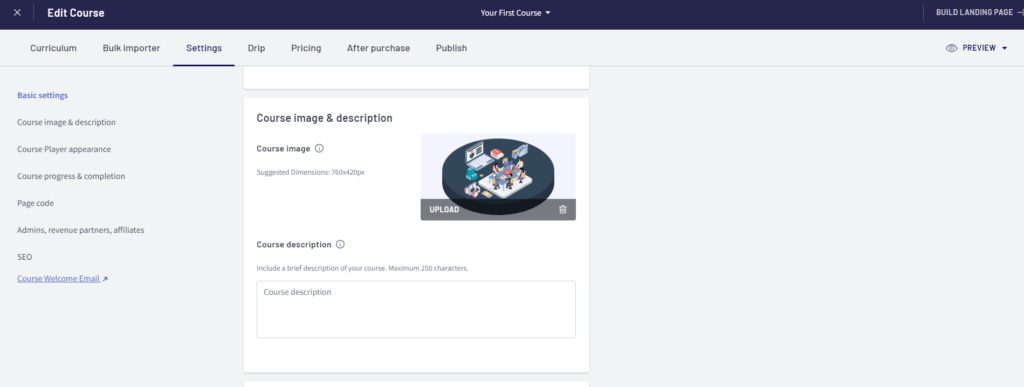
The next turn is of ‘Settings’. Under this, you can find 8 sub-settings on the left. By editing the second you can add course image and description.
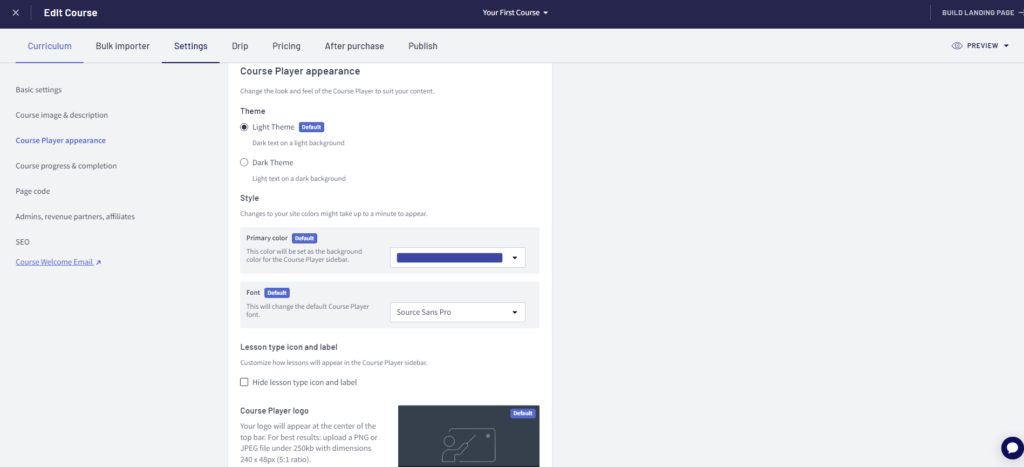
In course player appearance, you can choose theme (light or dark), style, logo, and lesson type icon and logo.
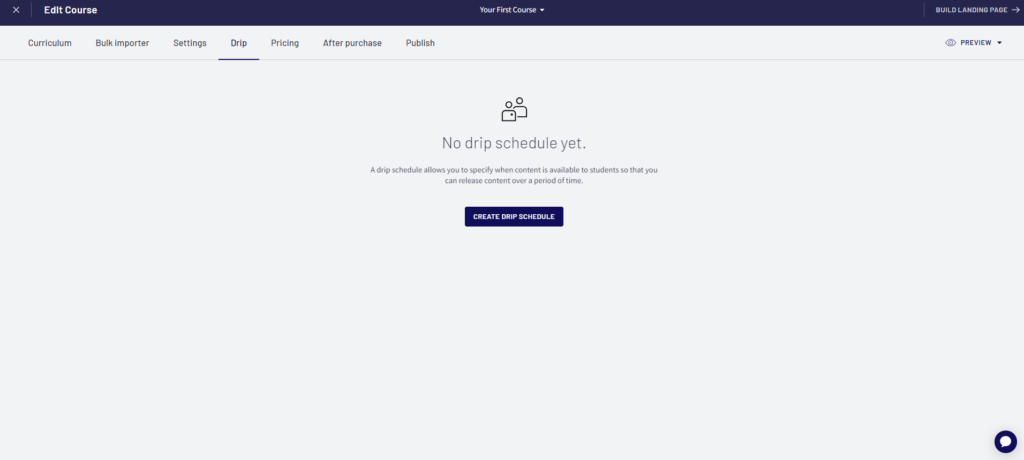
Next is the option to create a drip schedule for your course. You can schedule the chapters of your course easily by clicking on ‘Create Drip Schedule’
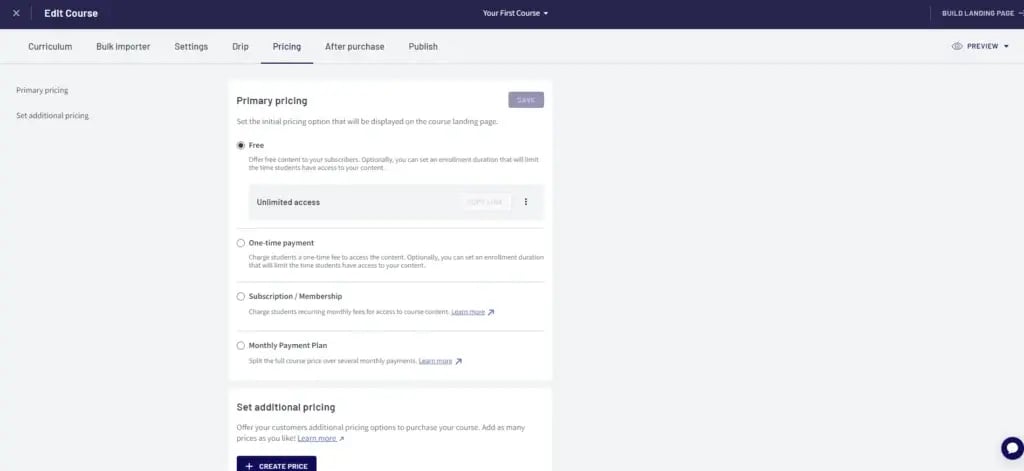
Adjusting pricing is simple; just try to choose the best strategy and plan to gain more benefits with your paid course. You can also add a system of coupons to make it appealing and attractive for learners.
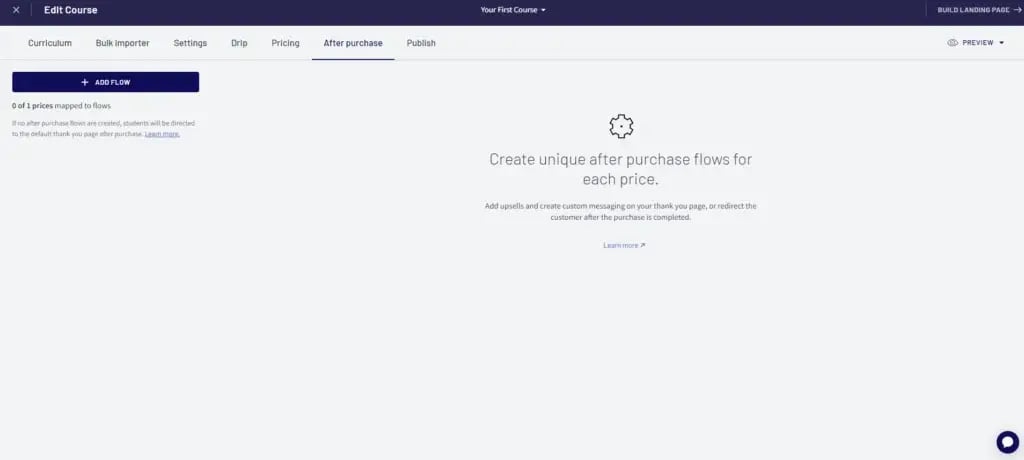
After purchase, instructions are easy to follow. You can either try to upsell your other content. Or you can provide a custom thank you message or redirect the learners to your site or required page.
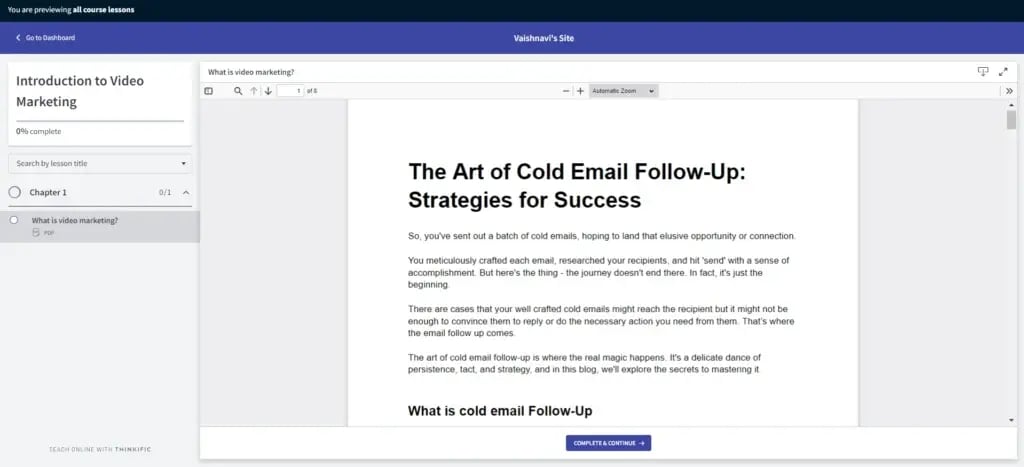
You can find the option to preview in the top right corner. Following image shows the preview of your course, with an option to complete the current lesson and continue.
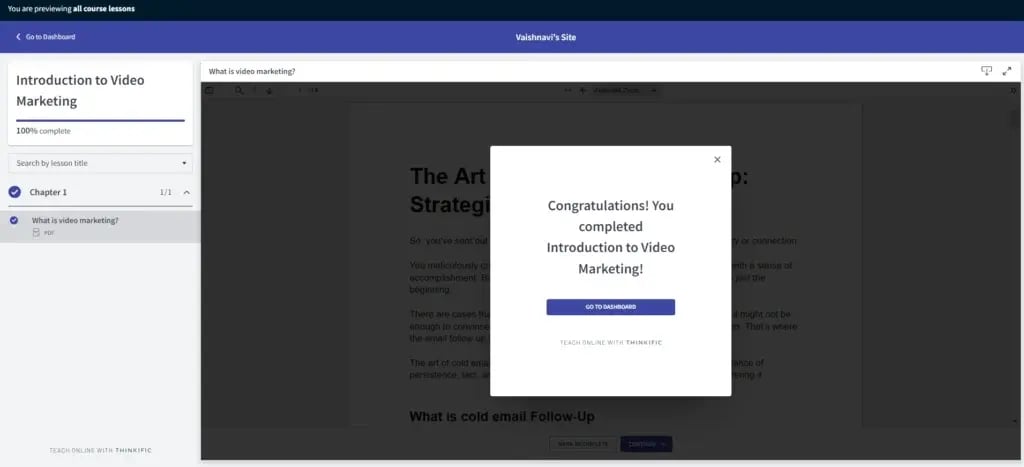
To illustrate the use of this tool, we added a lesson to the first chapter, and thus, it will seem to be a short course. After completing the course, you’ll see an appreciation message on completing the course.
Let’s have a look at the pros and cons of Thinkific platform.
Pros
It supports multiple currencies for payment.
It offers free 30-day trial and no transaction fees on course sales.
It is a user-friendly and lucrative platform.
Cons
Learning curve
These are the four pricing plans that Thinkific offers to its customers. Just select the one that fits your budget and fulfills your editing requirements.
Podia emerges as a versatile and one of the best Online Course Platforms, providing creators the tools to craft, sell, and market online courses, memberships, and various digital products.
Entrepreneurs seeking to establish their online presence, store, or educational platform can benefit from Podia’s robust resource library and free tools. However, depending on specific needs—like advanced customization, analytics, or community features—some creators may also explore Podia alternatives to find the best fit for their business model.
Podia
Multimedia CourseCreation
Integration Capabilities
Content Migration
Let’s have a look at the pros and cons of Podia platform.
Pros
Podia stands out by offering free migration services.
Access 24/7 live customer support for both course creators and students.
full control over your course website’s branding and content delivery system.
Cons
Podia may not cater to the needs of more advanced educators seeking specialized features.
It has a learning curve.
Here are the pricing plans for the Podia platform. Choose the one that suits your needs well.
Kajabi emerges as a comprehensive online platform, empowering digital entrepreneurs, small businesses, freelancers, and individual instructors to create, market, and sell online courses effortlessly.
Specializing in crafting high-converting funnels, sales pages, and webinars, Kajabi provides an all-in-one platform for launching effective advertising campaigns.
Every facet of your course and business is seamlessly managed within Kajabi, encompassing email marketing, pipeline building, marketing automation, and customer relationship management.
Kajabi caters to non-techy online course creators, digital entrepreneurs, small businesses, freelancers, creators, and individual instructors focused on offering straightforward courses and downloadable content.
Kajabi
Over 3000 integrations through Zapier
Comprehensive Lead/Customer Tracking
User-Friendly Customization
Let’s have a look at the pros and cons of Kajabi platform.
Pros
The platform is a one-stop solution, consolidating course creation, marketing, and sales.
Kajabi caters to non-techy online course creators
Cons
Sometimes one can face difficulty in using it initially.
Price can be higher for some users.
Here are the pricing plans for the Kajabi platform. Choose the one that suits your needs well.
LearnWorlds stands out as a versatile online course platform designed to empower users to create, promote, and sell their courses.
Focusing on user-friendliness, it provides a comprehensive dashboard for building yourcourses, effective marketing materials, and streamlined sales pages with integrated payment processing.
It provides note-taking features, interactive ebooks, video conferencing, certificates, and SCORM compatibility, ensuring a dynamic learning experience for students.
Learnworlds
Automatic Transcripts
Range of Interactive Elements
Zapier Integrations
Integrated Social Network
Let’s have a look at the pros and cons of Learnworlds platform.
Pros
It offers responsive 24/7 online support with onboarding for new customers
It has the LearnWorlds Academy offering courses to course creators, free e-learning resources.
Cons
Learning Curve
It may be relatively higher compared to some competitors
Here are the pricing plans for the LearnWorlds platform. Choose the one that suits your needs well.
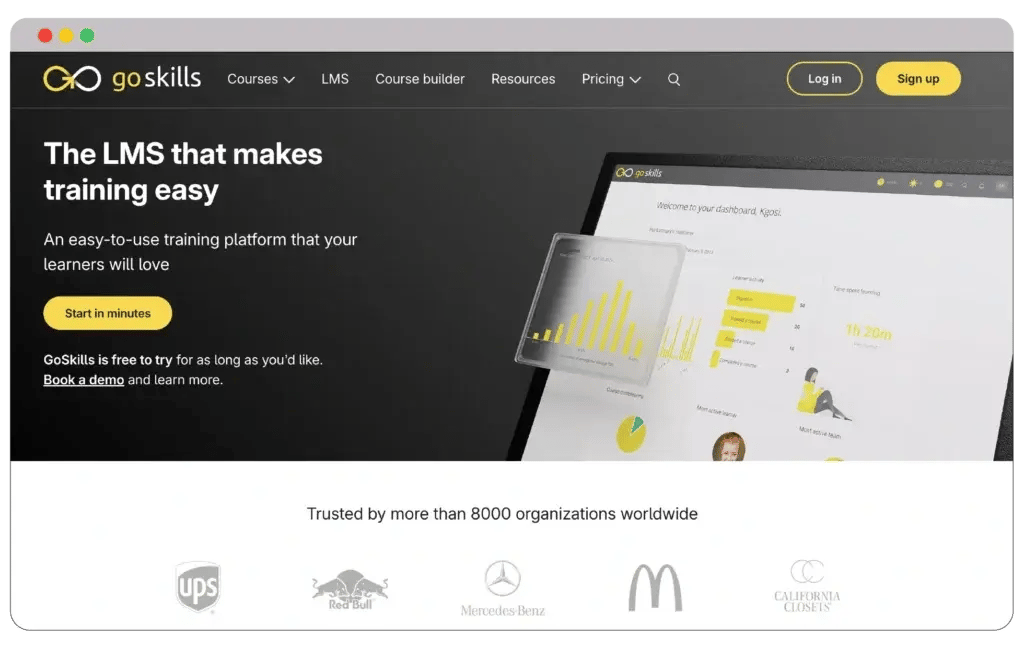
GoSkills LMS is a top-tier online course platform designed to simplify employee training, skill development, and certification for businesses. It offers organizations a comprehensive toolkit to create, deliver, and track engaging learning content, accessible anytime, anywhere.
Entrepreneurs, HR departments, and corporate trainers looking to upskill their teams can leverage GoSkills’ intuitive course creation tools and extensive library of ready-made courses.
GoSkill LMS
Customizable course selection
Mobile access
Course builder
Detailed reporting and analytics
If you’re a small business and looking for an online course platform with an intuitive interface, affordability, and robust features, you won’t be disappointed.
Pros
User-friendly interface suitable for all skill levels
Access to a variety of pre-made courses and a customizable course builder
Dedicated support team available to assist with onboarding and usage
Cons
Limited third-party integrations compared to some other platforms
It offers a free plan suitable for teams of any size, eliminating costly setup fees and ensuring accessibility for smaller enterprises. The platform includes a library of expert-led business courses on key topics such as Microsoft Excel, project management, and soft skills, which can be assigned to individuals or entire teams.
GoSkills LMS pricing structure
1. Free Trial: 7-day access
2. Monthly: $39/user/month
3. Yearly: $21/user/month (billed annually)
4. Enterprise: Custom pricing based on organizational needs
Moreover, GoSkills features a free built-in course builder, enabling businesses to create custom training materials tailored to their needs or upload external content. It also provides detailed analytics to track progress and performance effectively.
Why choose GoSkills LMS?
GoSkills LMS stands out as a top choice for small businesses and individuals, primarily due to its intuitive interface and affordability. You don’t need to worry about any costly setup fees. Moreover, the accessibility for smaller enterprises will always be better.
Besides accessing unlimited extensive lessons, the course library will also help you gain relevant knowledge on your courses. You can also leverage the best benefits of gamification with personalized awards.
TrainerCentral, a product of the Zoho team, stands out as a straightforward online course creation platform designed for ease of use.
With a clean interface, a free plan, and an affordable upgrade option, TrainerCentral focuses on simplicity without compromising functionality.
TrainerCentral offers six ready-made and fully customizable landing pages, providing a seamless user experience.
Moreover, users can implement graded tests and create completion certificates with over 30 design options, enhancing the educational experience for learners.
Trainer Central
Course Building Workflow
Clean Design and Customizable Pages
Payment Gateway Integration
Zapier Integration
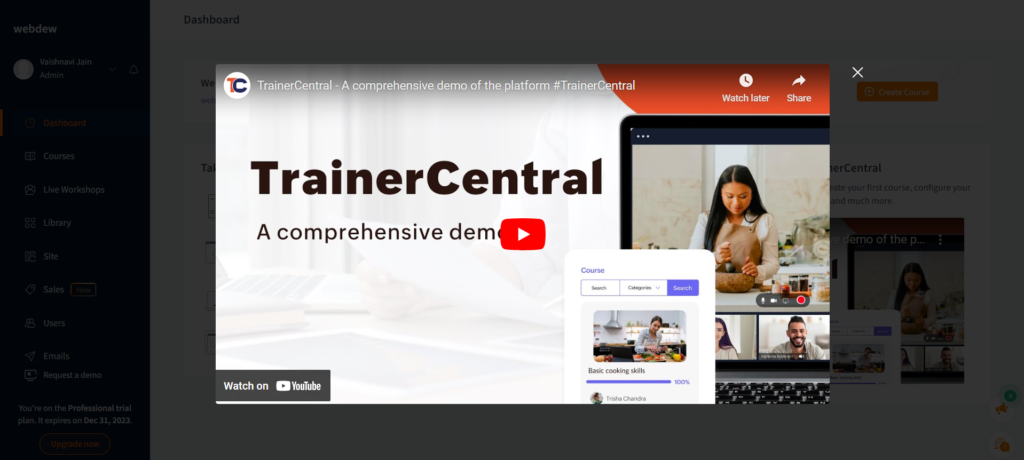
After logging in, you’ll find a tutorial video pop-up that will help you to understand using the platform.
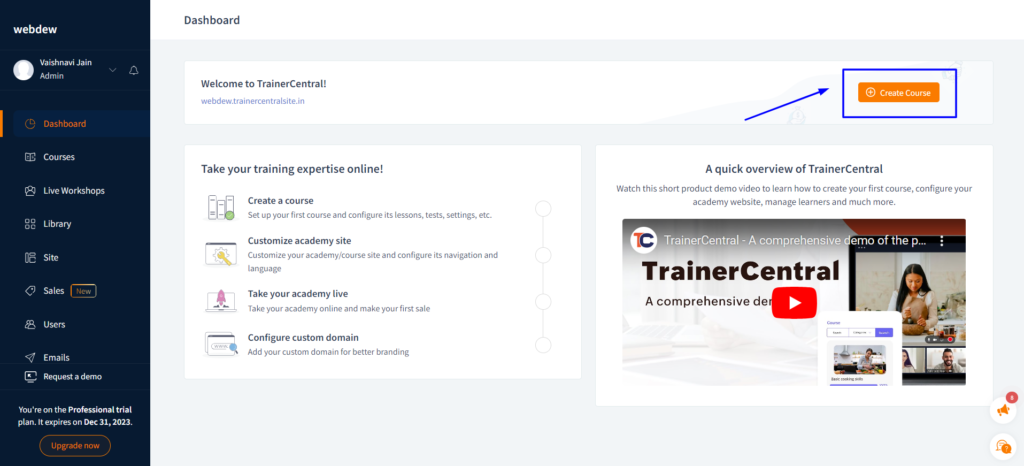
Next click on the option ‘Create Course’, and just get started.
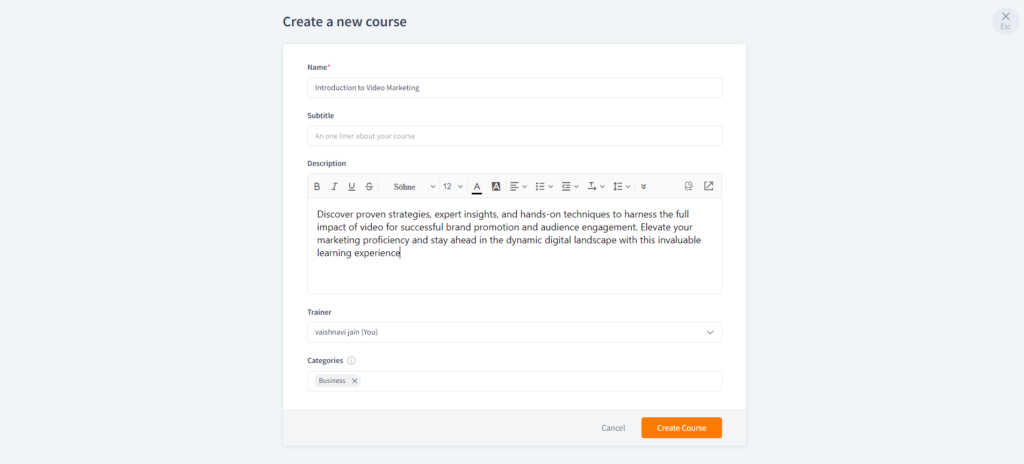
Fill in the details to create a course, including, Name, Subtitle (optional), Description (optional), Trainer Name, and Categories (given to choose).
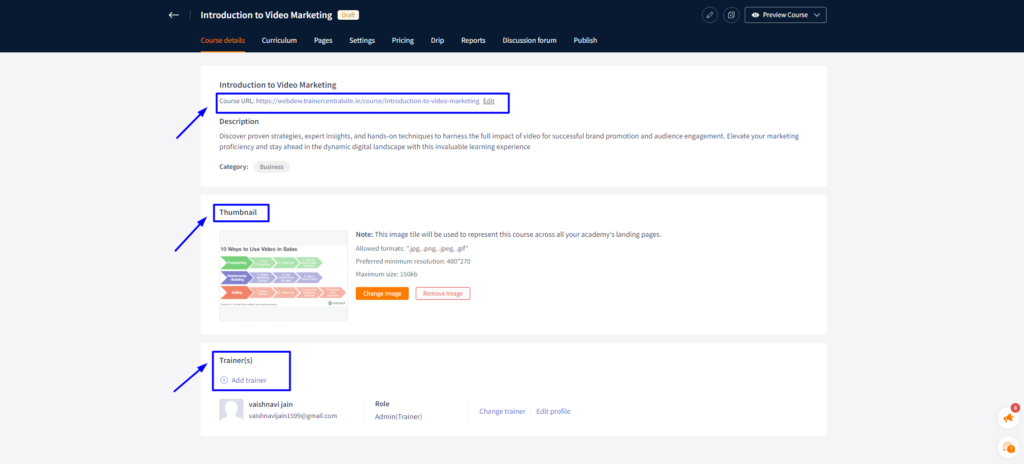
Moving forward, you’ll witness a dashboard. The first section is ‘Course Details’ . Here you can edit the URL, add thumbnail, and add trainers (as needed).
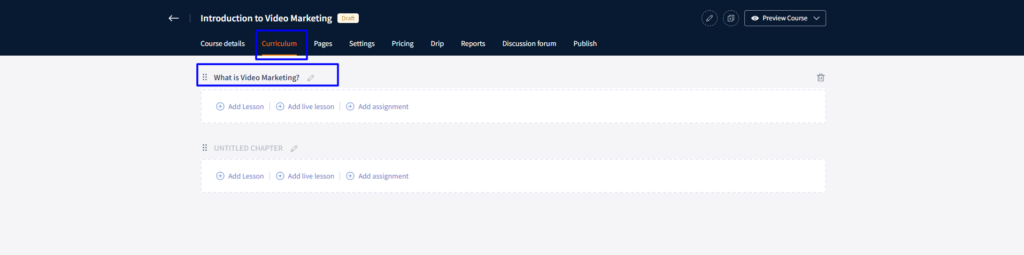
Next, we come to curriculum. You can simply start adding chapters and lessons within it.
We created ‘What is Video Marketing?’ as our first chapter.
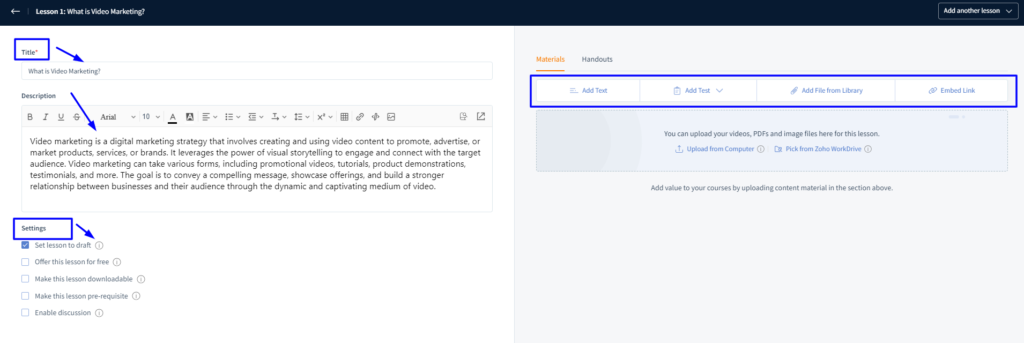
Edit your first chapter and by following the same we added a description and kept the settings as ‘Set lesson to draft’.
In the right, you’ll find some more options like ‘Materials and Handouts’. With this, you can add required media to your chapters.
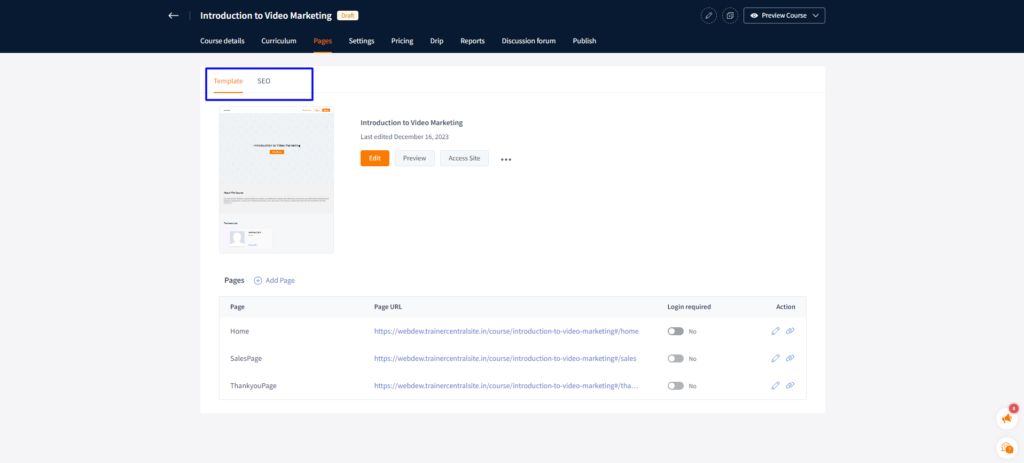
Next is the turn of ‘Pages’. In this, there are two options – Template and SEO. This section will let you edit the URLs of the pages, add more pages and do the SEO of it including course SEO title and meta description.
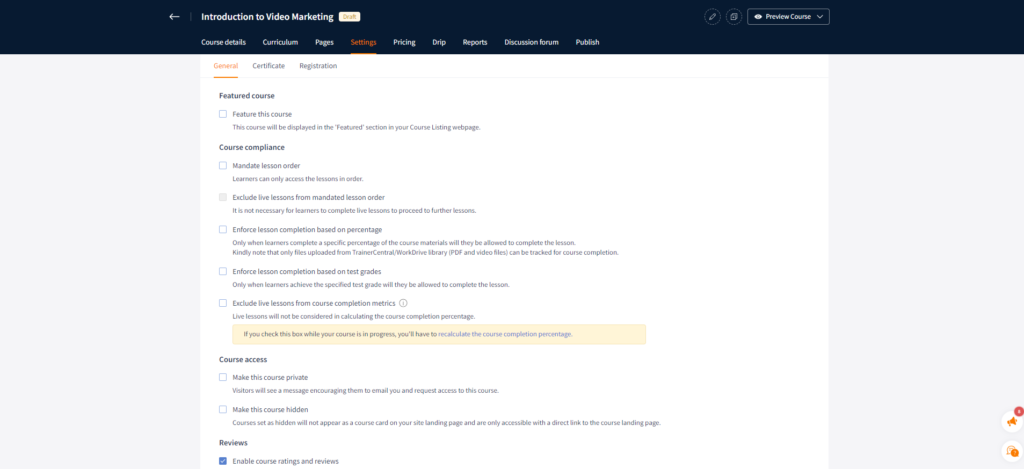
Under the ‘Settings’ section, here are three sub-settings – General, Certificate, and Registration. Here is the list of general settings, that you can easily change as per your need.
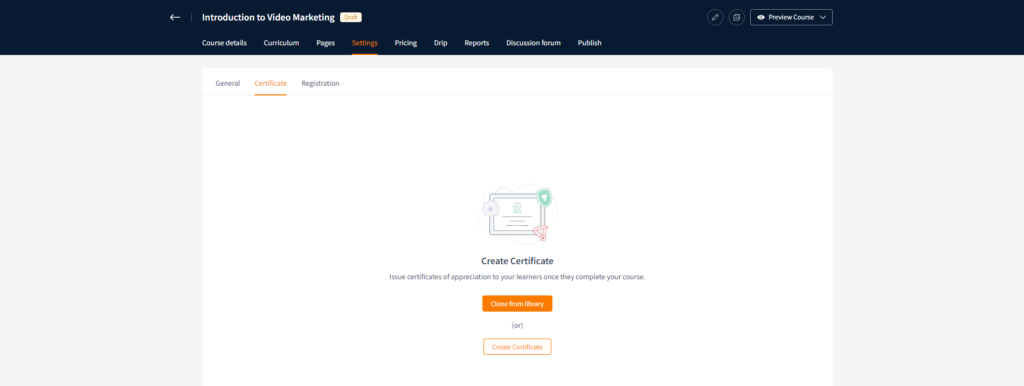
In the certificate section, there is one option, that is to add or create certificate to provide it to the learners as a token of appreciation.
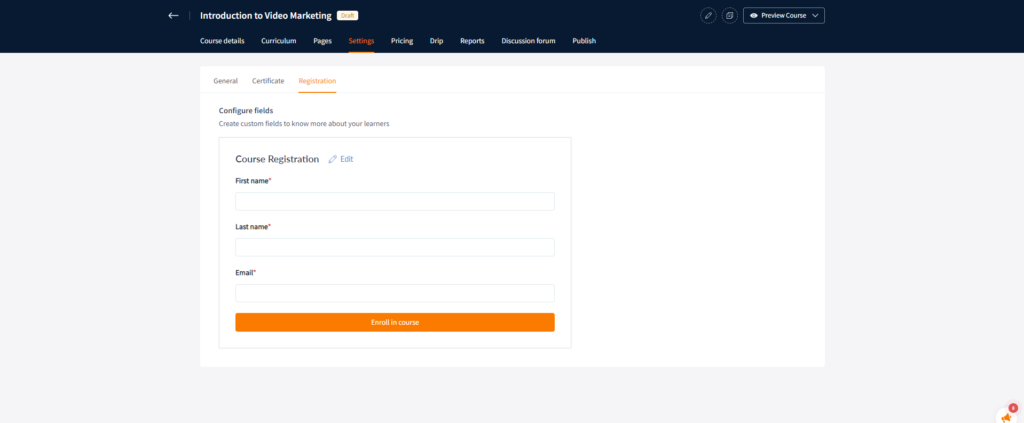
In the Registration category, you can add feilds as per your choice to get the information of your learners and nurture them in future.
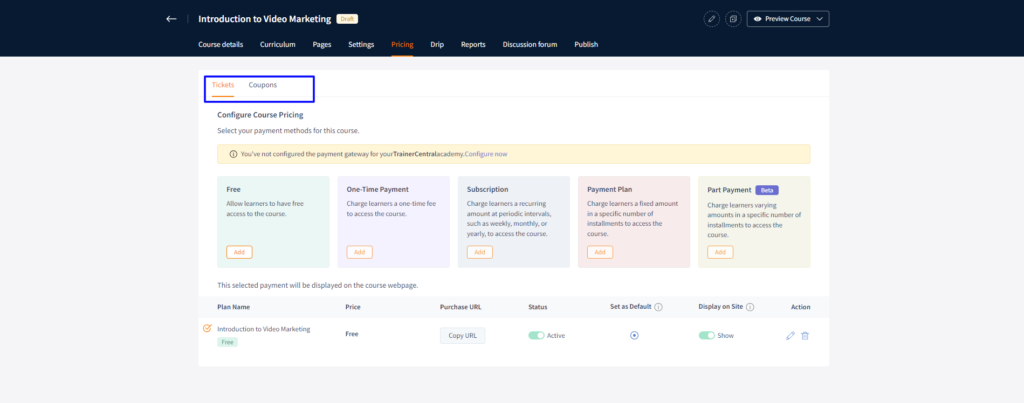
Adjusting pricing is simple, just try to choose the best strategy and plan to gain more benefits. You can also add a system of coupons to make it appealing and attractive for learners.
In drip settings, you get an option to schedule your course content to maintain the value of your content and curiosity among the learners.
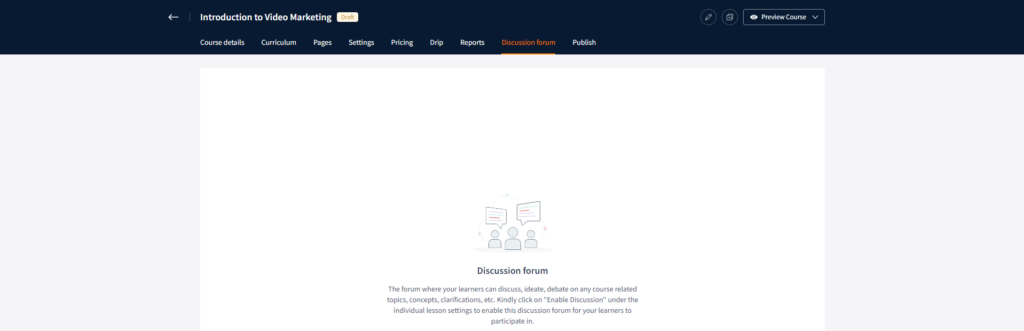
By enabling the discussion option, you can create a space for discussion for your learners that will help to enhance their knowledge. This will also help to boost your presence among them.
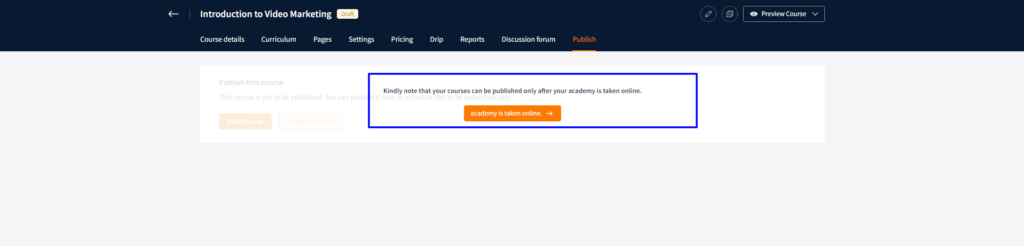
At last, there is an option to publish your course, it will happen only when you’ll take your academy online.
Now, let us quickly check out the pros and cons of Trainer Central.
Pros
It has an easy to use interface.
The platform offers customization options for landing pages, themes, and colour schemes.
It provides 15-day free trial with no credit card details.
Cons
It may lack some advanced features present in more comprehensive platforms.
It provides minimal marketing tools.
Here is the bifurcation of the pricing plans of the Trainer Central – Online Course Creation Platform. Choose the one that suits your business needs well.
AccessAlly, a prominent WordPress plugin is a go-to choice for online course creators, serving a vast community of over 2.5 million learners.
The platform has features designed to elevate the selling process of courses, including affiliate program tracking, diverse payment options – supporting free/paid trials, recurring payments, installments, one-time payments, preselling, and more, abandoned cart follow-ups, and conversion-focused order forms.
AccessAlly enhances the online teaching experience with tools like quizzes, homework submissions, project tracking, video view tracking, and bookmarking, creating an intuitive learning environment.
The platform offers gamification features and comprehensive metrics for engagement and sales to keep students engaged.
AccessAlly
Various Course Enhancer Tools
Gamification Features
Automated follow-ups
Provides Mobile-Responsive Design
Customer Self-Management
Let’s have a look at the pros and cons of AccessAlly platform.
Pros
It provides 60 days money-back guarantee
Drag-and-drop course builder
Cons
There is no free plan available.
Requires multiple third-party accounts.
Learning curve
Here are the pricing plans for the Access Ally online course platorm. Choose the one that suits your needs well.
Easygenerator stands out as a user-friendly platform with rich interface options, offering simplicity in creating online courses.
Unlike other e-learning platforms, Easygenerator aims to democratize the course creation process, making it accessible to individuals with varying levels of expertise.
It is ideal for freelancers, small/medium companies, large enterprises, and non-profit organizations, easygenerator caters to a diverse audience.
Easygenerator
EasyAI to create courses
Auto Translation in 75 languages
Powerpoint Import
Course Outline Build
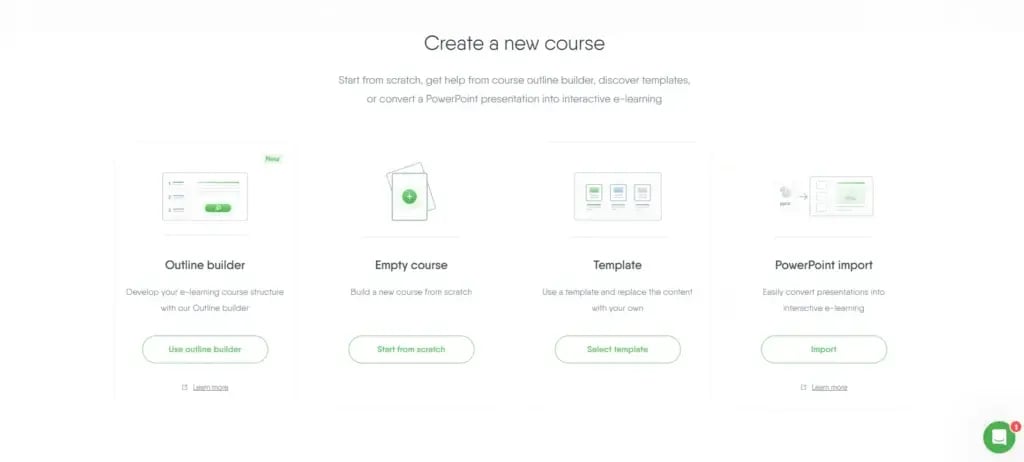
After logging in, you’ll find four options to get started with this platform. We chose ‘Empty Course’ to create a course from scratch.
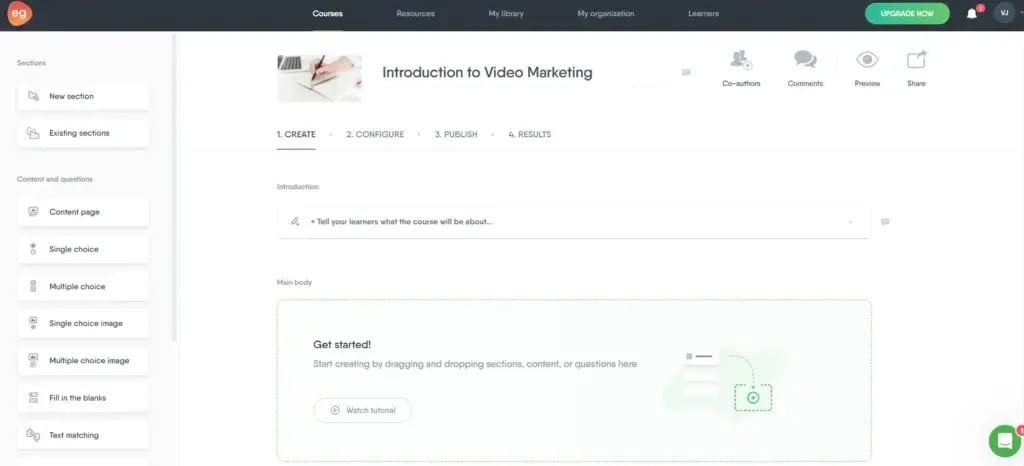
You’ll get an option to add name to your course.
We chose ‘Introduction to Video Marketing’ as our title. Next, is to write introduction for your course.
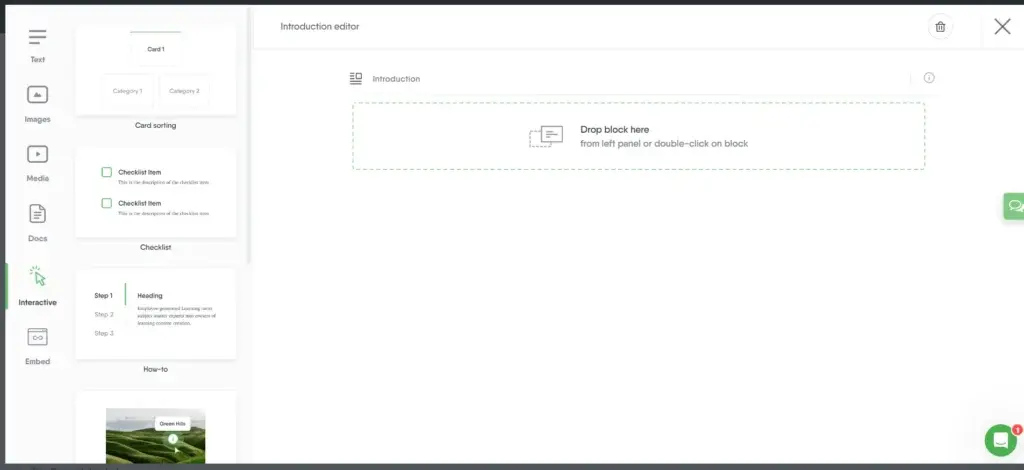
You’ll get an editor like this after clicking on the ‘Introduction’ button. On the left side, there are a total 6 formats to add the introduction. For now, we chose ‘Text’ and added a paragraph.
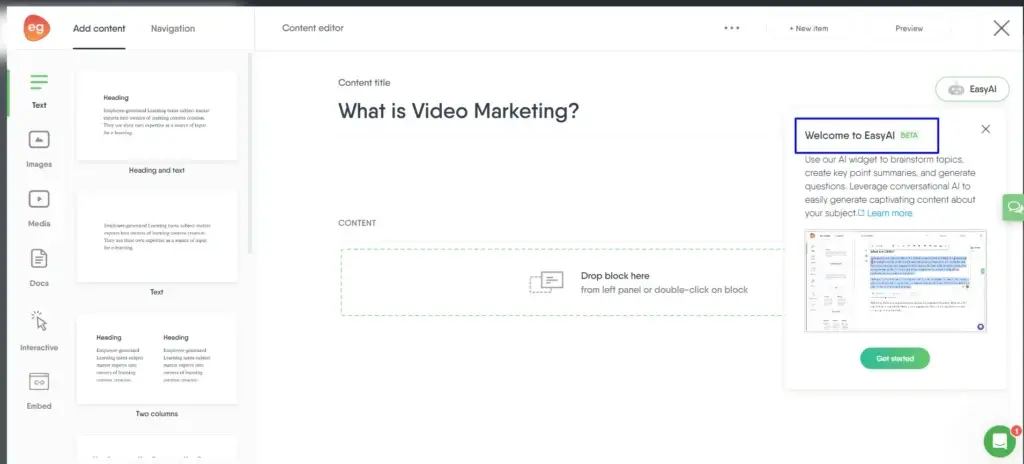
After going back to the editor page, you can select the ‘Main Body Content’ to start adding content to your course. On the right side, you’ll find an option for ‘Easy AI’ , whereAI will help you to get started with content.
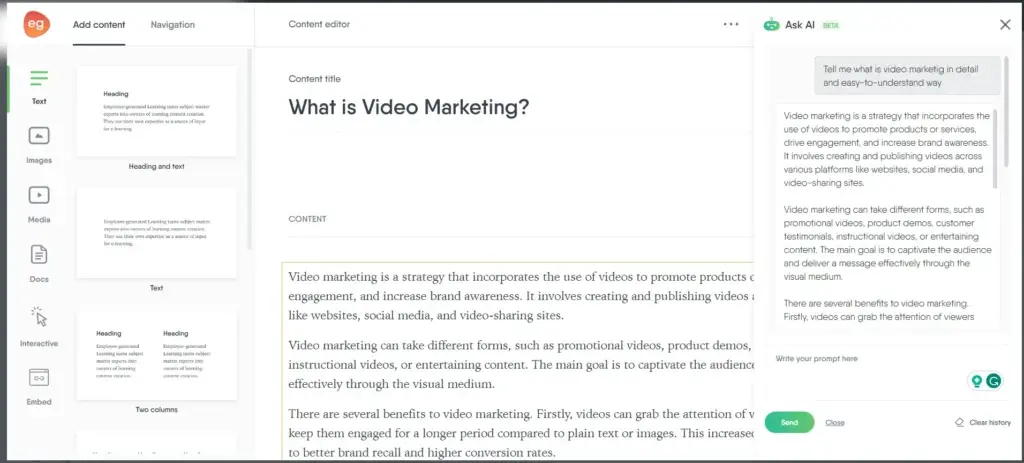
Again, you’ll get different options to add content, but we chose the ‘Text’ format to show you the process and added a heading there. We asked Easy AI to tell us about ‘What is Video Marketing in a detailed and easy way’.
We added the content provided by it. However you can change the content as per your need.
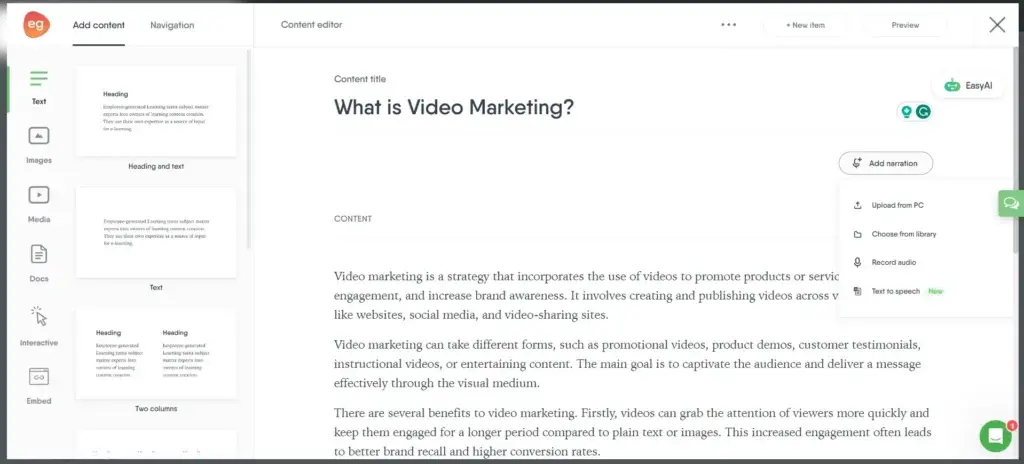
There is also an option to ‘Add Narration’. There are four options with a special option to convert your text not speech.
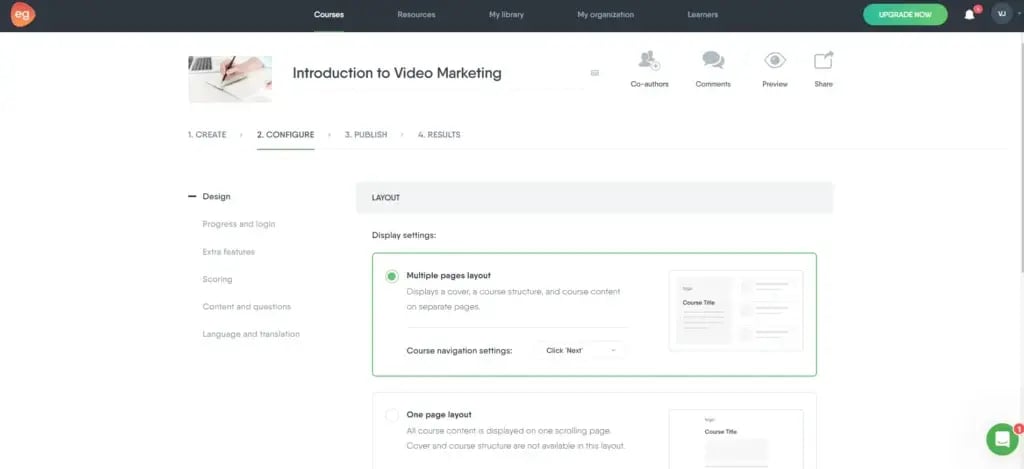
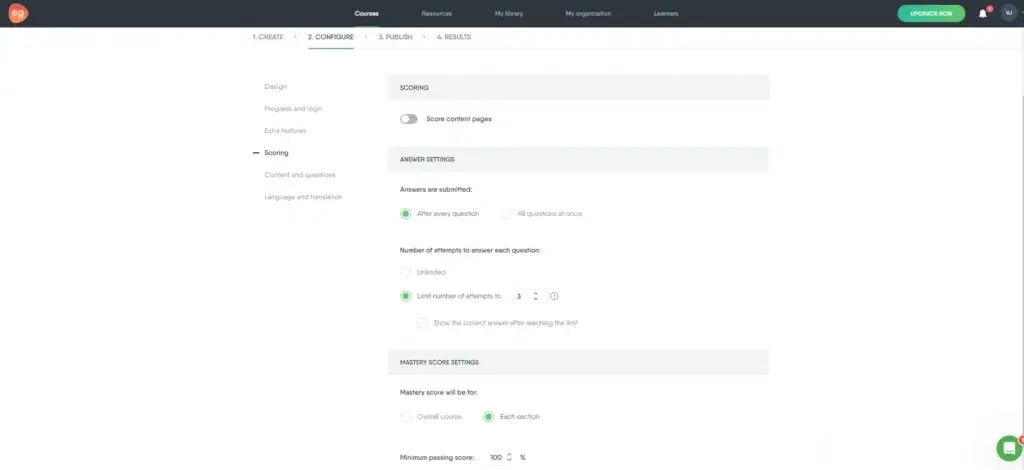
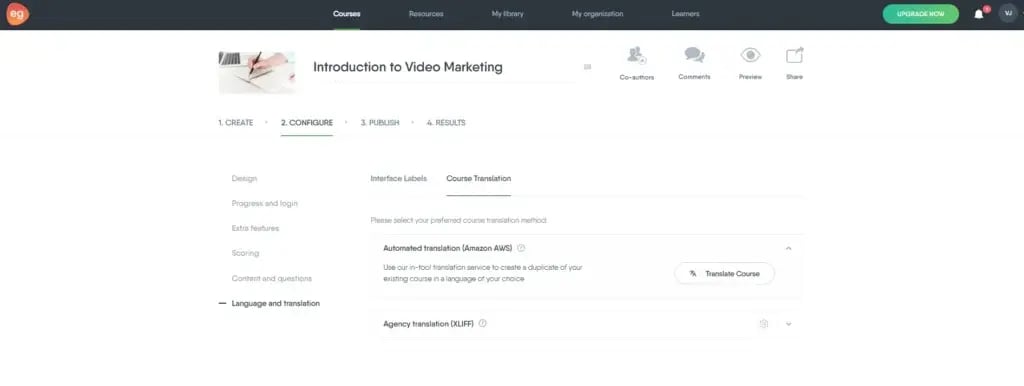
Go back and move forward to the ‘Configure’ setting. You’ll find 6 options on the left side to edit the configure settings.
Under the design sub-setting, you can change the layout.
Under Scoring sub-setting, you can change the following settings.
There is also and option to translate your course in a language of your choice.
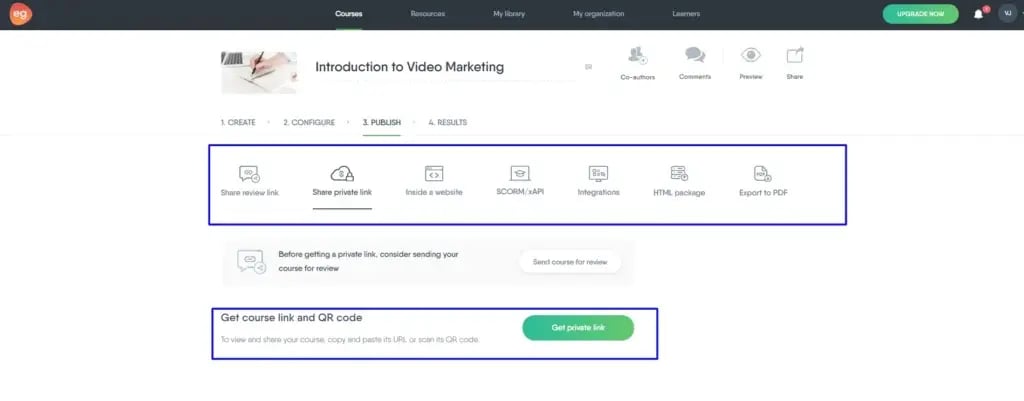
Moving forward to ‘Publish’ settings, you can select the option of your choice to publish and share your course. For now, we copied the private link of the course and pasted it in a different tab to preview.
Yu can also use ‘Preview’ option above to preview the course.
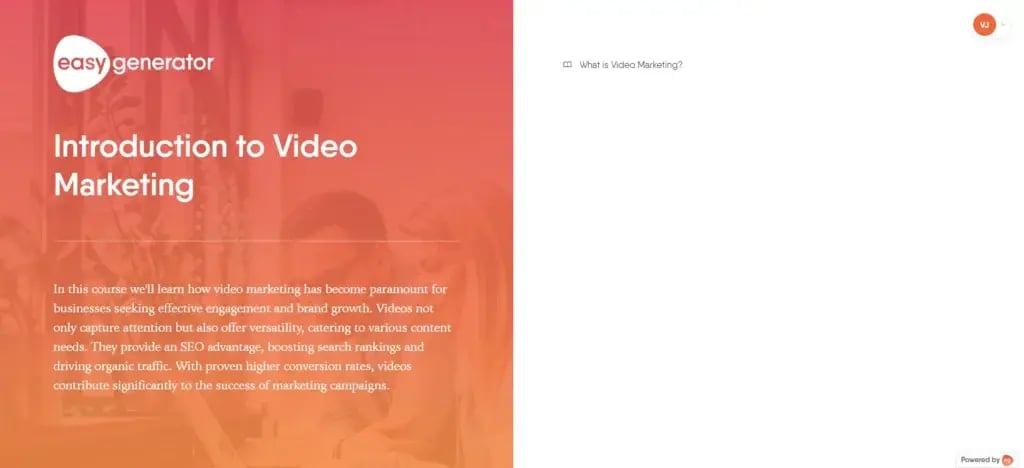
Here is a glimpse of the course. You’ll find it a short course because we chose to add one topic as an illustration.
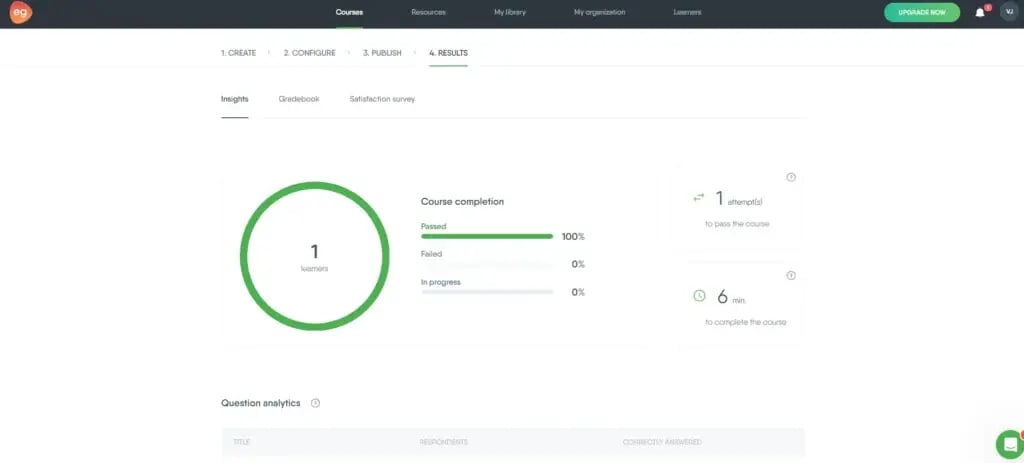
With the ‘Results’ setting, you can check the report of your course in a detailed form.
Let’s have a look at the pros and cons of Easygenerator platform.
Pros
Easy-to-use interface for users without an e-learning background.
The platform caters to a wide range of users, from freelancers to large enterprises.
It offers support during business hours through Easy Generator Live
Cons
The Pro plan restricts the number of authors to one.
Here are the pricing plans for the EasyGenerator platform. Choose the one that suits your needs well.
iSpring Learn emerges as a dynamic cloud-based Learning Management System (LMS) crafted to streamline the creation, hosting, and delivery of eLearning content.
Noteworthy for its integrated iSpring Suite authoring toolkit, iSpring Learn provides a comprehensive solution for developing interactive courses, incorporating video tutorials, role-play training software, and quizzes.
iSpring learn adapts to the structure of any organization, allowing administrators to set diverse user roles and access permissions. The LMS offers a robust reporting system with over 20 types of in-depth reports. This helps to cater to both group and individual analytics.
It caters to time constraints with a user-friendly tool for constructing page-like courses with embedded tests. This accelerates the course creation process, providing a quick solution for those requiring immediate content development.
iSpring Learn
Integrated Authoring Toolkit
Page-Like Course Builder
Mobile Learning Accessibility
Flexibility in user roles, access permissions, and automated training management tasks
Let’s have a look at the pros and cons of iSpring Learn platform.
Pros
The LMS adapts to the organizational structure
iSpring Learn serves as an all-in-one solution, eliminating the need for separate authoring tools.
It provides 30-day money back guarantee.
Cons
Limited compatibility with alternative authoring tools may restrict flexibility for some educators.
Administrators may experience a learning curve when implementing advanced features and customization options.
Here are the pricing plans for the iSpring Learn platform. Choose the one that suits your needs well.
Udemy is one of the platforms that revolutionized online education by not only making learning accessible but also pioneering the concept of teaching online.
Boasting over 50 million students who enrolled in the course and a formidable instructor base exceeding 75,000, Udemy is a global leader in the online course marketplace.
Courses on Udemy are structured to include at least 30 minutes of video content and five lectures, with the flexibility to incorporate quizzes, assignments, coding exercises, and discussion prompts.
Moreover, aspiring instructors can apply to become premium instructors, unlocking a user-friendly interface guiding them through creating their first course.
Udemy
Supportive Ecosystem
Customized Marketing Programs
Comprehensive Support Resources
Let’s have a look at the pros and cons of Udemy platform.
Pros
It has an easy-to-use interface.
Udemy offers a global platform for instructors to showcase their expertise.
Cons
Udemy takes a share of course sales for promotional activities.
Here are the pricing plans for the Udemy platform. Choose the one that suits your needs well.
Coursera stands as a prestigious online course marketplace, catalyzing professionals and organizations to enhance their skills and achieve course completion certificates and degrees.
Renowned for its association with esteemed institutions like Duke, Stanford, Google, and IBM, Coursera creates an educational ecosystem of global significance.
Coursera is tailored for professors affiliated with Higher Education (HE) partner institutions, businesses, and enterprises, aligning with the platform’s focus on established professionals seeking advanced learning opportunities.
Coursera
Integration with learning platforms
Mobile App Accessibility
Courses featured at renowned institutions
Let’s have a look at the pros and cons of Coursera platform.
Pros
Coursera’s mobile app provides easy access to students.
Selected instructors enjoy the privilege of having their courses featured at renowned institutions.
Cons
The invitation-based system for instructors limits entry for those new to their fields or course creation
Coursera caters to a specific audience, primarily established professionals and institutions.
Here are the pricing plans for the Coursera platform. Choose the one that suits your needs well.
Ruzuku stands out as a dedicated online course platform tailored for brands offering unique or niche courses. Catering to diverse educators like Amy Medling, Fabiana Pestorini, and Jeffrey Davis, Ruzuku provides an affordable, user-friendly solution enriched with excellent design features.
It enables course creators to build engaging, visually stunning courses hosted on custom domains, fostering a vibrant digital community.
It facilitates interaction among students with discussion questions, prompts for specific activities or content, a course-wide Q&A forum, and interactive video broadcasts featuring slides, group chat, and automatic recording.
Ruzuku
eCommerce Capabilities
Student Engagement Features
Document Hosting and Sharing
Course Templates
Mailchimp Integration
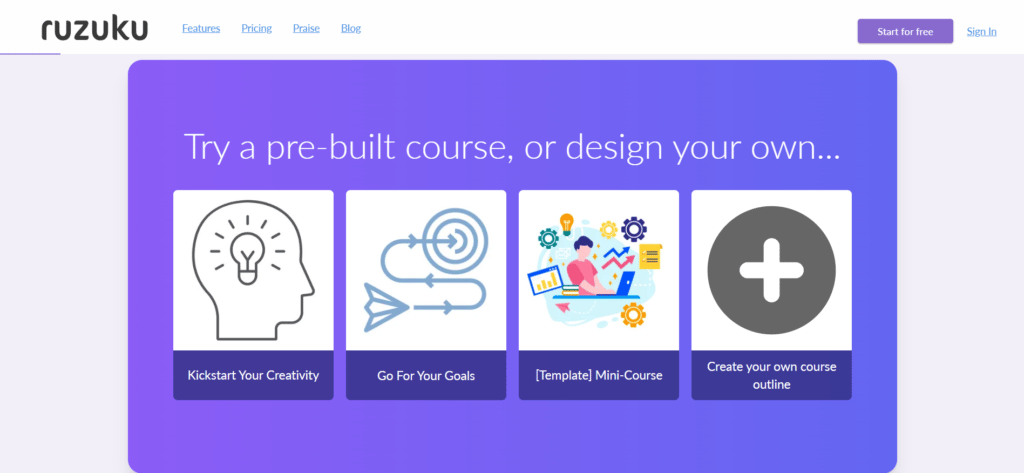
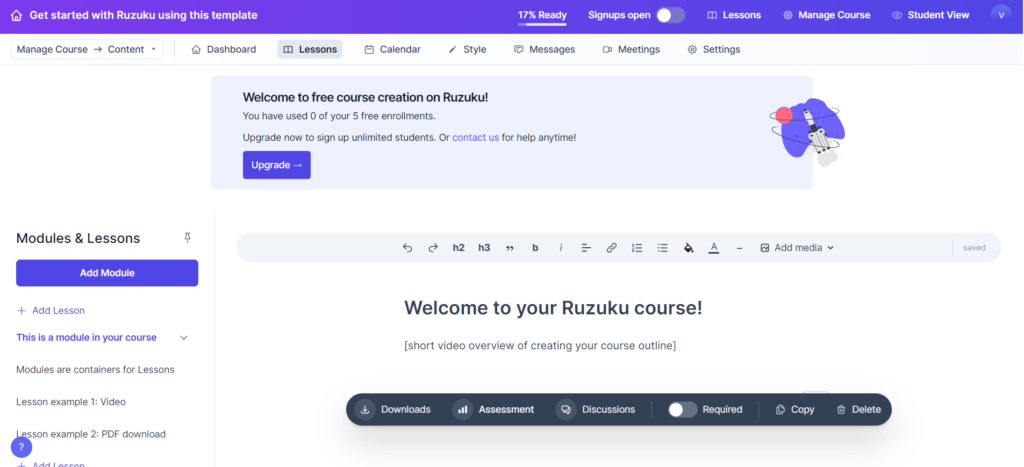
After logging in, you’ll get the following options to start with the platform. We chose ‘Create your own course outline.’
You’ll land on a page where you can start creating your course by adding modules and lessons.
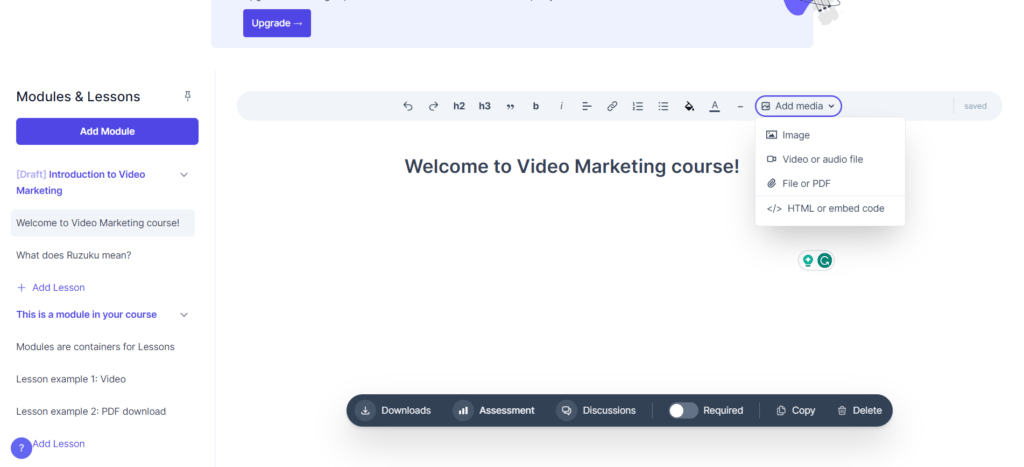
We changed the name of the module ‘Introduction to Video Marketing’ and the lesson name ‘Welcome to Video Marketing course’.
With this, you’ll find an option to add media to your lesson as per your choice.
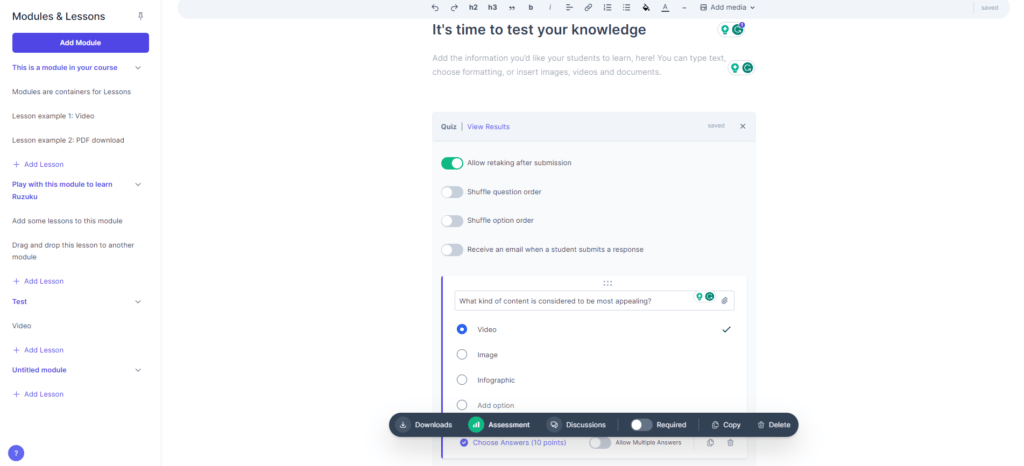
In the next lesson, we tried to add an assessment with the options below. We added the name ‘It’s time to test your knowledge’ to the lesson and changed some of the given settings.
We illustrated the use of this block by adding one question with few options. You can add questions and answers as per your choice.
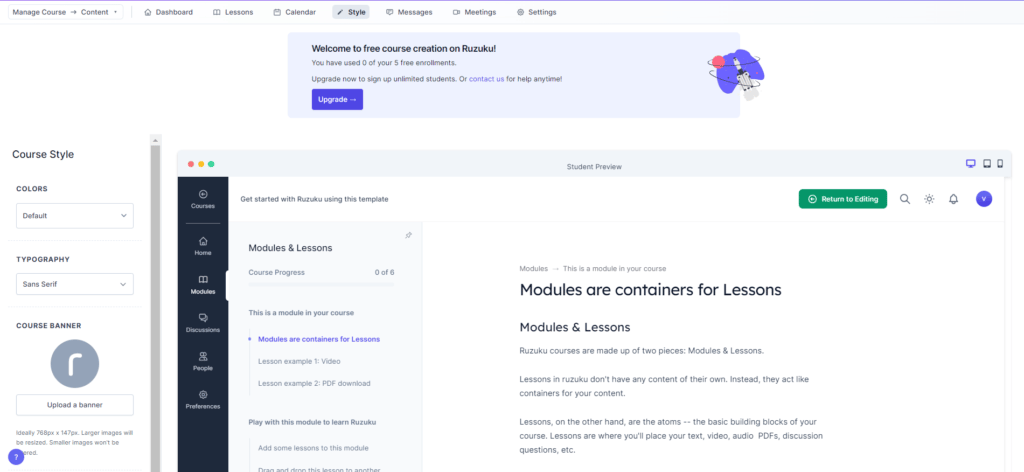
At the top, you’ll find a menu bar with some settings to edit. After ‘Lessons’, we moved forward to ‘Style.’ Here, we added a banner and kept the rest of the settings as default.
You can edit all of the settings as per your requirement.
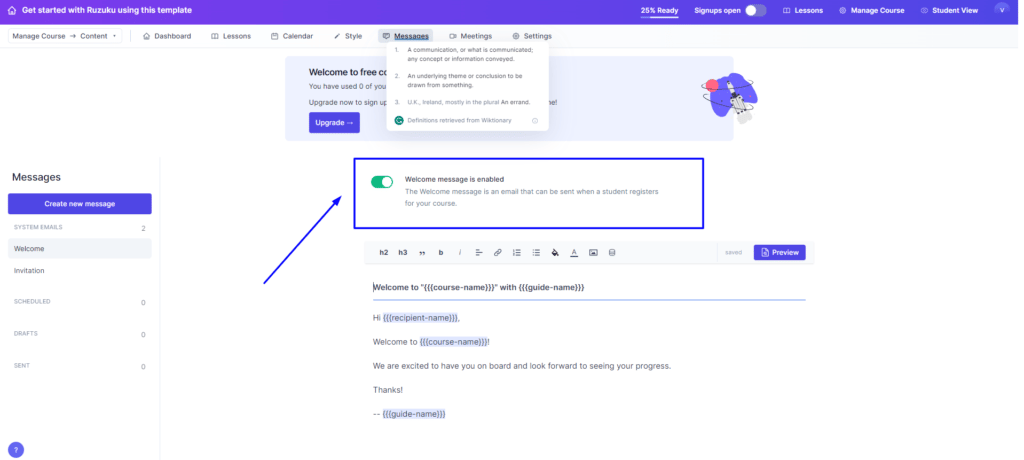
Next is ‘Messages’. In this, you can enable or disable the option of ‘Welcome Message’. This is the message that will be sent to the people who register for your course.
Basic options are available to edit the message.
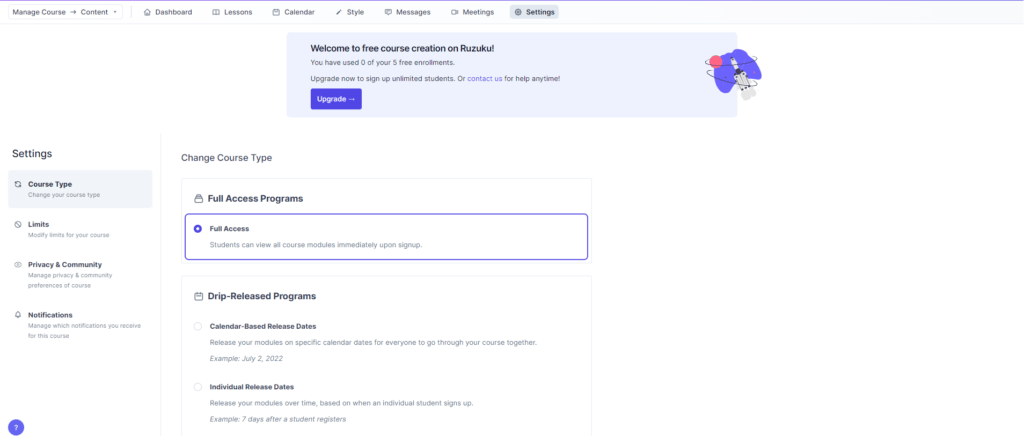
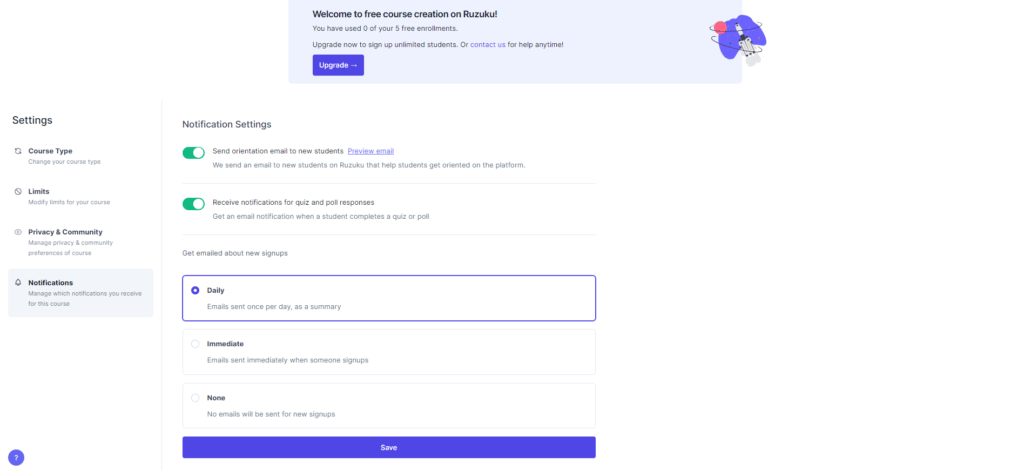
The ‘Settings’ option comes up with four sub-settings, as shown in the two images below.
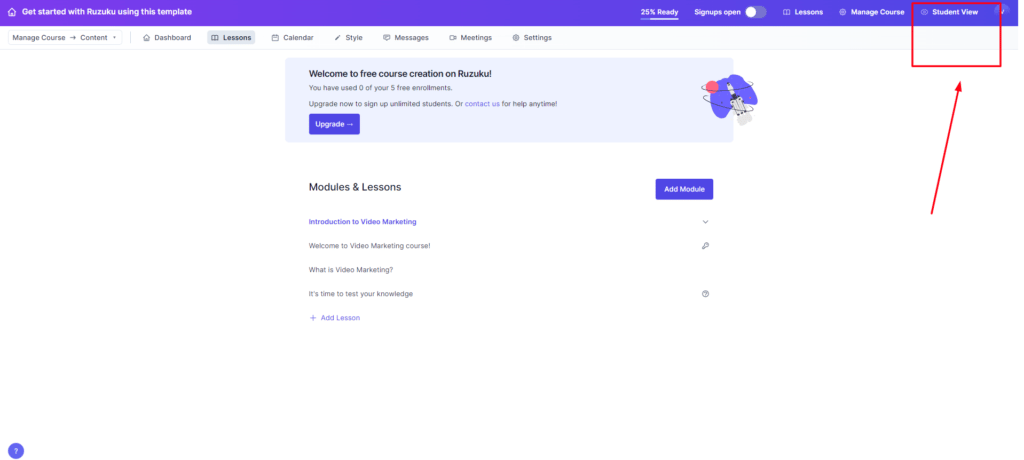
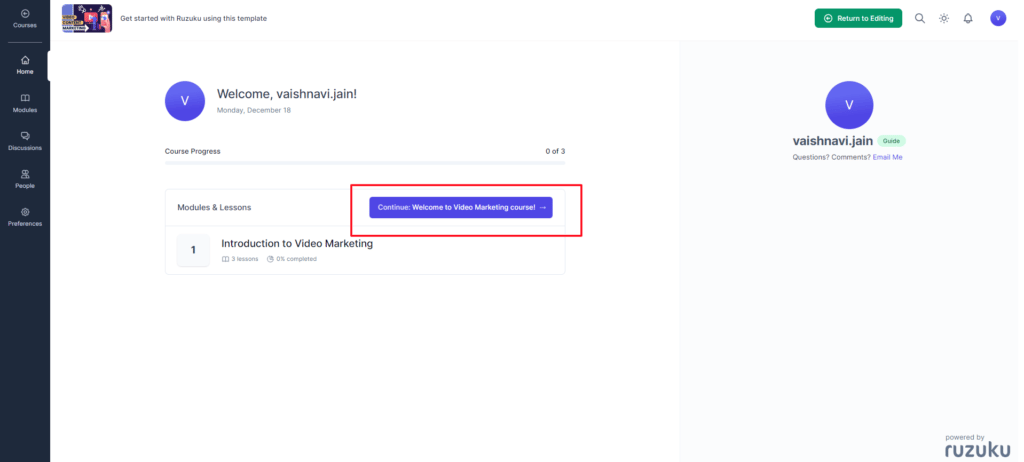
You can find an option to preview your course by clicking on the ‘Student View’ option in the right corner.
You just need to click on Continue to view the course further and it’s done.
Let’s have a look at the pros and cons of Ruzuku platform.
Pros
It has user-friendly Interface.
It is a cost-effective Solution.
The tool allows hosting a variety of files for digital downloads, including PDFs, Word, PowerPoint, videos, and more.
Cons
It has limited advanced features.
Here are the pricing plans for the Ruzuku platform. Choose the one that suits your needs well.
OpenSesame stands out as a dynamic online course marketplace tailored to businesses and corporations eager to enhance their workforce’s skills through targeted training programs.
With a focus on flexibility and accessibility, OpenSesame provides an avenue for course creators to deliver impactful content while facilitating seamless integration with various Learning Management Systems (LMS).
Domestic sellers receive monthly payments via check, while international sellers benefit from the convenience of PayPal transactions.
OpenSesame
Free Course Hosting
Simon platform to create and translate courses into multiple languages
Partner Integrations with 30+ platforms
Guest blogging opportunities
Let’s have a look at the pros and cons of OpenSesame platform.
Pros
Creators have the autonomy to set prices for their courses, earning a competitive 60% of revenues generated from sales
It has a multifaceted promotional approach.
It provides 30-day free trial.
Cons
It depends on External Platforms:
Creators unfamiliar with SEO and PPC strategies may find it challenging
Here are the pricing plans for the OpenSesame platform. Choose the one that suits your needs well.
Academy of Mine stands out as a robust Learning Management System (LMS) tailored to cater to the diverse needs of businesses and institutions.
Specifically designed for professional development, continuing education, certifications, and B2B training, this platform has garnered trust from prestigious clients such as Harper Collins, USC, and Allied Behavioral Health.
AOM’s award-winning support team stands ready to assist customers in navigating challenges and optimizing learning programs.
Moreover, one can craft interactive content using a variety of formats, including PPT, PDF, videos, and more. It also has the flexibility to customize existing features or integrate new ones via API for an enriched learning experience.
Academy of Mine
Fully Customized LMS
Mobile App Accessibility
Secure, Dedicated Server Hosting
Versatile Content Creation
Customizable Reporting and Analytics Tools
Let’s have a look at the pros and cons of Academy of Mine platform.
Pros
Ideal for academics, large enterprises, public administrations, and small/medium businesses
Flawless 24/7 customer support
Cons
It has a learning curve for advanced customization.
Users should carefully assess their needs to ensure cost-effectiveness.
Here are the pricing plans for the Academy of Mine platform. Choose the one that suits your needs well.
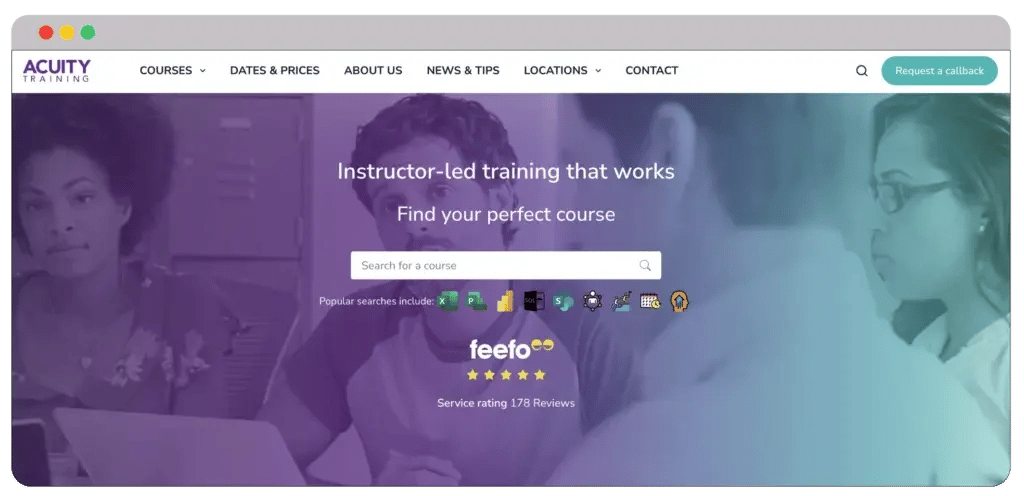
Acuity Training offers many professional courses covering everything from Microsoft Office and IT to various soft skills like leadership development. Moreover, you will also get manager training courses, which will benefit your professional career.
But why is Acuity Training different from other online course platforms? What sets this provider apart from the competition in the industry? It’s the hands-on and instructor-led training.
Acuity Training
Simple booking procedure
Customizable courses
Small and personal classes
Expert trainers
But that’s not all. Acuity Training ensures that courses are led by industry professionals with extensive experience. Thus, you don’t need to worry about mediocre or poor instructions.
Pros
Availability of an extensive course library
Courses are available both online and in-person
Customized training sessions as per specific needs
Learners will receive recognized certificates
Cons
Fewer options for learners looking for creative or non-business courses
Thanks to the flexible online options, Acuity is a perfect fit for professionals looking to upskill or reskill. Whether you want to learn new things or are planning to revise your old professional studies, courses from Acuity Training will undoubtedly help you.
Their Power BI, Excel, and Line Manager Training courses are highly regarded for their depth and practical application. Excel and Power BI will help you create advanced reports and visualization.
Why choose Acuity Training?
Acuity Training is popular for businesses and individuals seeking professional development and training programs. They provide a variety of learning formats, such as online courses and instructor-led training for different learning styles.
Moreover, acuity training caters to a diverse audience. It doesn’t matter if you’re a beginner or an advanced learner; Acuity Training provides a learning experience tailored to your needs.
Upskillist is a distinguished online course marketplace that serves career professionals by providing globally recognized certifications.
This validation enhances the authority of the courses and ensures global recognition by professional bodies, adding significant value for students.
Courses offered on Shaw Academy receive external validation, enhancing their credibility and recognition by professional bodies worldwide. Global recognition increases the value of certifications, benefiting learners in their career pursuits.
Upskillist
Accreditation for Course Authority
Mobile App Accessibility
Global professional recognition with certifications
Let’s have a look at the pros and cons of Upskillist platform.
Pros
Easy-to-use interface for non-techies.
It provides global professional recognition with certifications.
Cons
The platform features fewer courses compared to some competitors.
Complaints regarding billing issues after cancelling the 4-week free trial have been reported by users.
Here are the pricing plans for the Upskillist platform. Choose the one that suits your needs well.
Skillshare stands out as an innovative online course platform tailored for entrepreneurs, designers, writers, photographers, and bloggers eager to share their creative skills.
Whether your passion lies in marketing, photography, cooking, hand painting, doodling, or even wall hanging, Skillshare provides a dynamic space for teaching and learning.
Additionally, for those offering specialized content such as manager training courses, Skillshare’s platform allows instructors to engage effectively with students through features like Announcements and Discussions. These tools contribute to a vibrant learning community and foster collaborative learning experiences.
Skillshare
Unlimited Courses Hosting
Social Media Integration
Mobile App Accessibility
Student Engagement Tools like Announcements & Discussions
Let’s have a look at the pros and cons of Skillshare platform.
Pros
Each month, 30% of Skillshare’s premium membership revenue is allocated to a royalty pool for instructors.
Instructors can earn $10 for every Skillshare member they refer to the platform.
Cons
Instructor revenue is tied to the minutes premium students watch, potentially creating variability in monthly earnings.
Switching between templates isn’t possible
Here are the pricing plans for the Skillshare platform. Choose the one that suits your needs well.
Moodle, an open-source Learning Management System (LMS), stands as a versatile choice for educators and organizations worldwide, trusted by notable entities such as Shell, Microsoft, and the State University of New York.
Offering a personalized learning environment, Moodle facilitates the creation of tailored courses through its intuitive drag-and-drop course builder.
With an active online community exceeding 213 million users, Moodle provides a wealth of knowledge through forums, wikis, and blogs. One can collaborate with Moodle partners for expert assistance in building your online school.
Moodle
Unlimited Courses Hosting
Extensive Tutorials and Documentation
Let’s have a look at the pros and cons of Moodle platform.
Pros
While offering a free plan, Moodle’s paid options present highly competitive pricing among enterprise-level LMS providers.
Well-documented resources simplify the course-building process, empowering educators to navigate challenges effectively.
Cons
Hosting Moodle independently might pose challenges for those less experienced in technical aspects.
New users may experience a learning curve, especially when exploring the extensive features and customization options.
Here are the pricing plans for the Moodle platform. Choose the one that suits your needs well.
Which Online Course Creator did you find the best?
Your online teaching journey with confidence using our expertly curated list of the top 19 online course platforms.
Whether you’re a novice or an experienced educator, these platforms offer user-friendly features to help you seamlessly build, launch, manage, and sell your courses. Choose the perfect platform for your needs and unlock the potential of online education
Feel free to share your thoughts on using best online course platforms in the comments. Additionally, reach out to us for any further marketing assistance – our experts are ready to help.
Frequently Asked Questions
Which is the best online learning platform?
Choosing the best online learning platform depends on your specific needs and preferences. Some popular options include platforms like Coursera, Udacity, edX, and Khan Academy, each offering a range of courses across various subjects.
What is the most popular online course website?
The most popular online video courses or other types of course often include platforms like Udemy, Coursera, and LinkedIn Learning. These platforms host a vast array of courses on diverse topics, attracting a wide audience.
Which website is best for online class?
Selecting the best website for online classes depends on the type of content, teaching style, and interactivity you prefer. Coursera, Udemy, and Skillshare are well-regarded platforms known for their extensive course offerings and user-friendly interfaces.
What is the best website to create an online course?
Platforms like Teachable, Thinkific, and Udemy are commonly recommended for creating an online course. These platforms provide tools and features to help instructors effectively design, market, and sell their courses.
Dive Into our Client Testimonials
Listen to business owners like you share how we’ve helped them grow. Your story could be next!
Play Video
The webdew team is very supportive, they provide us with thoughtful suggestions.
We contracted webdew to build our new website. And let me tell you, they did a fantastic job. Their team was really easy to communicate with.”
Teresa ZhaoSenior Marketing Manager, Coreio
Play Video
The webdew team is very supportive, they provide us with thoughtful suggestions.
We contracted webdew to build our new website. And let me tell you, they did a fantastic job. Their team was really easy to communicate with.”
Teresa ZhaoSenior Marketing Manager, Coreio
Play Video
The webdew team is very supportive, they provide us with thoughtful suggestions.
We contracted webdew to build our new website. And let me tell you, they did a fantastic job. Their team was really easy to communicate with.”
Teresa ZhaoSenior Marketing Manager, Coreio
“We worked with Chehak over the past several months to create a series of animated videos for an academic planner that we produce. And from the very beginning, she was absolutely professional and a pleasure to work with.”
Veronica BishopContent Writer, Bishop Content Studio
6x
We helped clients multiply their website conversion rates through strategic design and UX optimization.
20%
Our marketing campaigns led to a 20% uplift in customer engagement across digital channels.
2K+
Delivered over 2,000 qualified leads through targeted funnels and smart automation.
120+
Our video content has earned 120,000+ views, driving brand awareness and audience retention.
“I recently had the pleasure of working with Chehak on a video demo project, and I was thoroughly impressed with her services.”
Matt KayCo-founder, Talem AI
Additional Resources
Access expert tips, trends, and strategies designed for small businesses. Stay ahead of the curve and make informed decisions with our comprehensive resources!



 We typically respond the same day