

 We typically respond the same day


Most B2B teams on HubSpot have the traffic. What they lack is a repeatable process for finding where that traffic leaks before it converts. A HubSpot CRO audit gives you that process: a structured review of your pages, forms, CTAs, and analytics that surfaces exactly where qualified visitors drop off and what to fix first.
TL;DR:
- A HubSpot CRO audit covers five areas: analytics baselines, page-level conversion data, form and CTA performance, mobile and speed diagnostics, and A/B test prioritization
- HubSpot's native tools handle most of this without third-party software
- Most B2B teams find their biggest leak is form friction or CTA placement, not traffic volume
- Run a full audit quarterly; monitor key pages monthly
What is a HubSpot CRO audit?
A HubSpot CRO audit is a structured review of your website's conversion performance using HubSpot's analytics, page performance, and testing tools. It identifies which pages, forms, and CTAs are underperforming relative to your traffic volume, then produces a prioritized fix list.
CRO stands for conversion rate optimization. For B2B teams, conversion typically means a form submission, a meeting booked, or a content download that hands a lead to sales. A HubSpot audit focuses on the native data available inside your portal, which covers page views, session data, form submission rates, CTA click rates, and A/B test results.
Why do B2B teams need a CRO audit on their HubSpot site?
HubSpot sites accumulate pages and forms over time without a clean baseline for what "good" performance looks like. According to Unbounce's Conversion Benchmark Report, the median landing page conversion rate across B2B industries sits around 3–5%. Most HubSpot portals have pages performing at 1% or below with no clear diagnosis of why.
Without an audit, teams make changes based on opinions rather than data. A page gets redesigned because someone thinks it looks dated, not because the data shows visitors are bouncing from the pricing section. An audit replaces that guesswork with a clear picture of where conversion actually breaks down.
Step 1: Pull your analytics baseline from HubSpot Reports
Before looking at individual pages, you need a site-wide baseline. In HubSpot, go to Reports > Analytics Tools > Traffic Analytics. Set the date range to the last 90 days for a representative sample.
Record the following for your whole site: total sessions, bounce rate, average session duration, and the ratio of new to returning visitors. Then break that same data down by source: organic search, paid, direct, referral, and email. This tells you whether your traffic mix has changed over the audit period, which matters because different sources convert at different rates.
Note any pages that appear in your top 20 by sessions that you have not audited before. These are your starting point for step 2.
Step 2: Identify your highest-traffic, lowest-converting pages
In Traffic Analytics, switch to the Pages report. Sort by sessions, then add a secondary column for contacts created. This shows you which pages attract the most traffic and how many leads each one produces.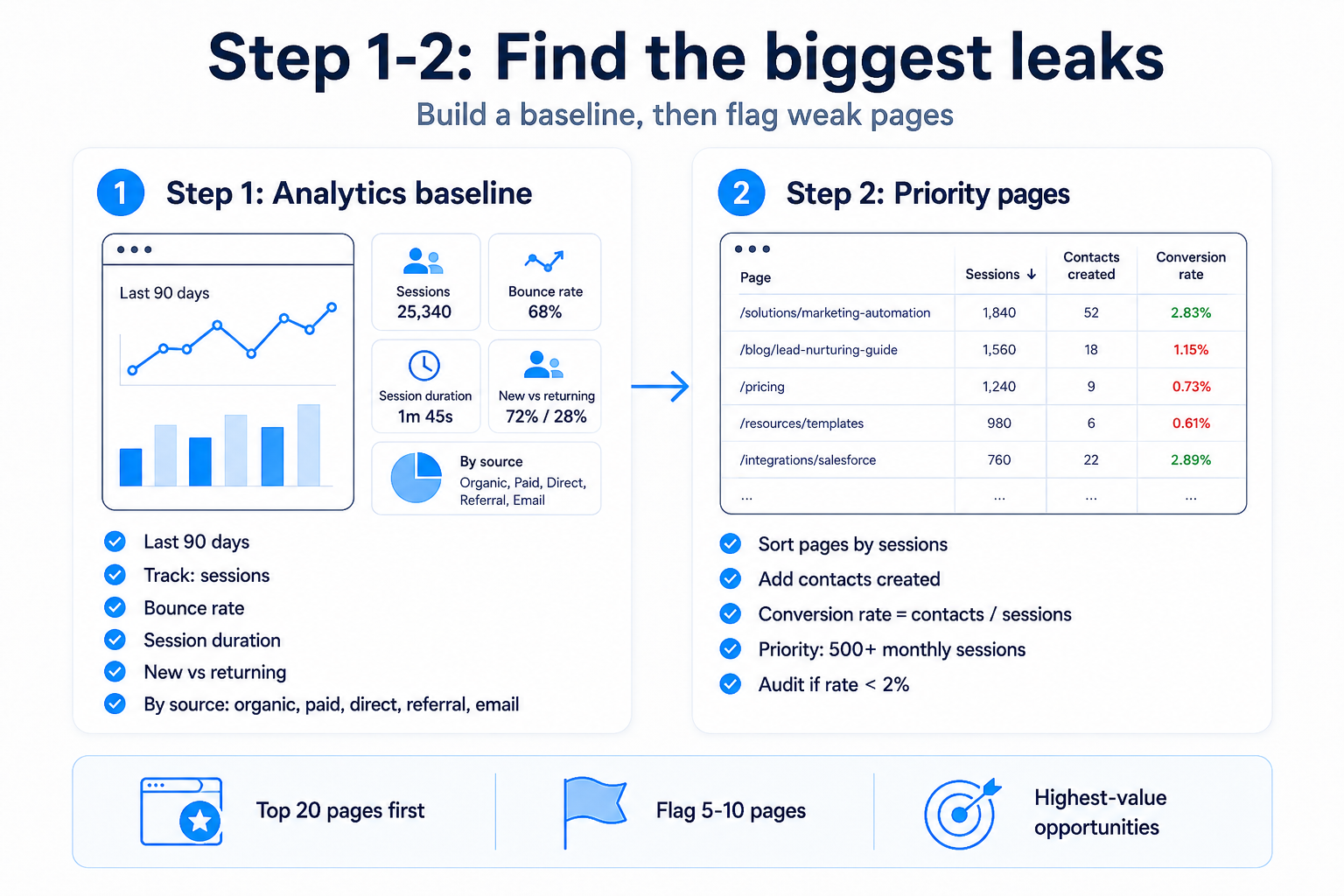
Calculate a rough conversion rate for each top page: contacts created divided by sessions. Any page with more than 500 monthly sessions and a conversion rate below 2% is a priority for the audit. Flag these pages in a spreadsheet with their session count and conversion rate before moving on.
This step typically takes 30 to 45 minutes. The output is a short list, usually five to ten pages, that represents the highest-value conversion opportunities on your site.
Step 3: Review your forms in HubSpot's form performance dashboard
Go to Marketing > Lead Capture > Forms. Every form in your HubSpot portal shows a view rate, a submission rate, and a rate of contacts created from those submissions. Sort by views to find the forms that see the most traffic.
For each high-traffic form, check three things. First, is the submission rate above 20%? Below 20% on a gated content form or contact form typically signals too many fields, a weak headline, or a mismatch between what the page promises and what the form asks for. Second, are there fields collecting information that sales does not use in the first week of outreach? Cut those fields. Third, check whether the form is embedded on the page or lives on a separate landing page. Forms embedded within longer pages often outperform standalone landing pages for warm traffic; the reverse tends to be true for cold paid traffic.
webdew commonly identifies form friction as the primary conversion leak during HubSpot website audits, particularly on service pages where the form asks for budget range and company size before building sufficient trust through the page content.
Step 4: Audit your CTAs using HubSpot's CTA tool
In Marketing > Lead Capture > CTAs, you can see impression counts and click-through rates for every CTA across your site. A standard B2B CTA on a blog post or service page should achieve a click-through rate of at least 1 to 2%. Below that threshold, the CTA has a copy, placement, or relevance problem.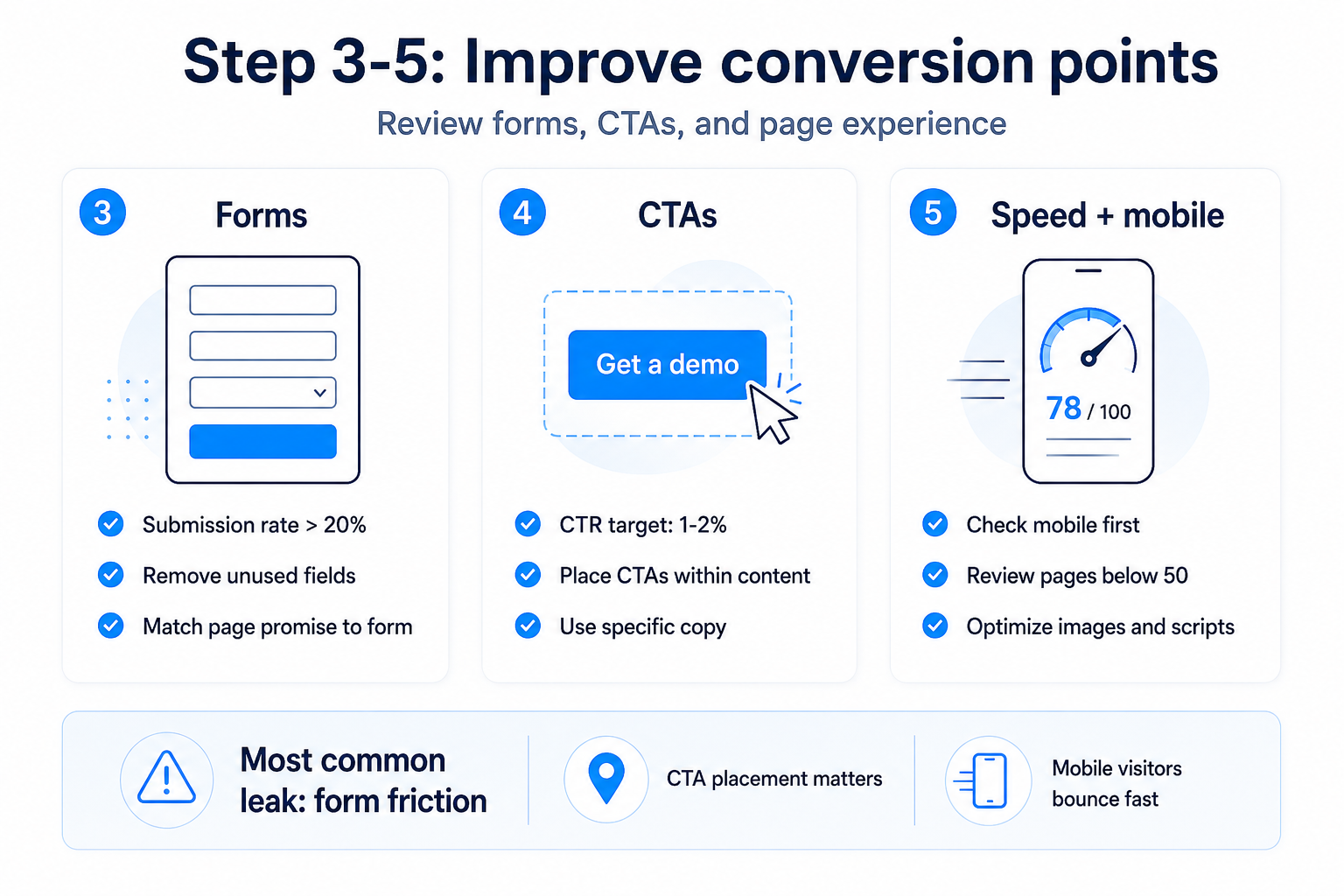
Work through your top ten CTAs by impressions and look for two patterns. First, check placement: CTAs placed only at the bottom of long pages get a fraction of the clicks of CTAs embedded within the content, roughly one-third of the way down. Second, check copy specificity. "Learn more" and "Get started" consistently underperform CTAs that name a specific outcome, such as "Book a free HubSpot audit" or "Download the implementation checklist."
If a CTA has more than 1,000 impressions and a click rate below 0.5%, mark it for rewrite or repositioning before your next publish.
Step 5: Check page speed and mobile experience
HubSpot CMS pages feed into Google's Core Web Vitals metrics, which affect both rankings and on-page behavior. In HubSpot, go to Reports > Website > Page Performance. For each priority page from step 2, review the mobile score and desktop score.
For B2B sites, mobile performance is often deprioritized because analytics show a majority of sessions come from desktop. This is partly accurate for decision-stage traffic, but awareness-stage visitors, including those arriving from LinkedIn posts and email campaigns, arrive on mobile at higher rates. A page that loads slowly on mobile loses those visitors before they read enough to engage.
Any page scoring below 50 on Google's mobile performance scale should be reviewed for image size, unminified scripts, and render-blocking resources. HubSpot's page editor flags the most common culprits in the Optimization tab.
Step 6: Review your A/B tests and build a test backlog
In HubSpot, landing pages and email can be A/B tested natively. In Marketing > Landing Pages, filter for pages that have an active or completed A/B test. If you have no completed tests in the last 90 days on your highest-traffic pages, you are missing the highest-confidence source of conversion data available to you.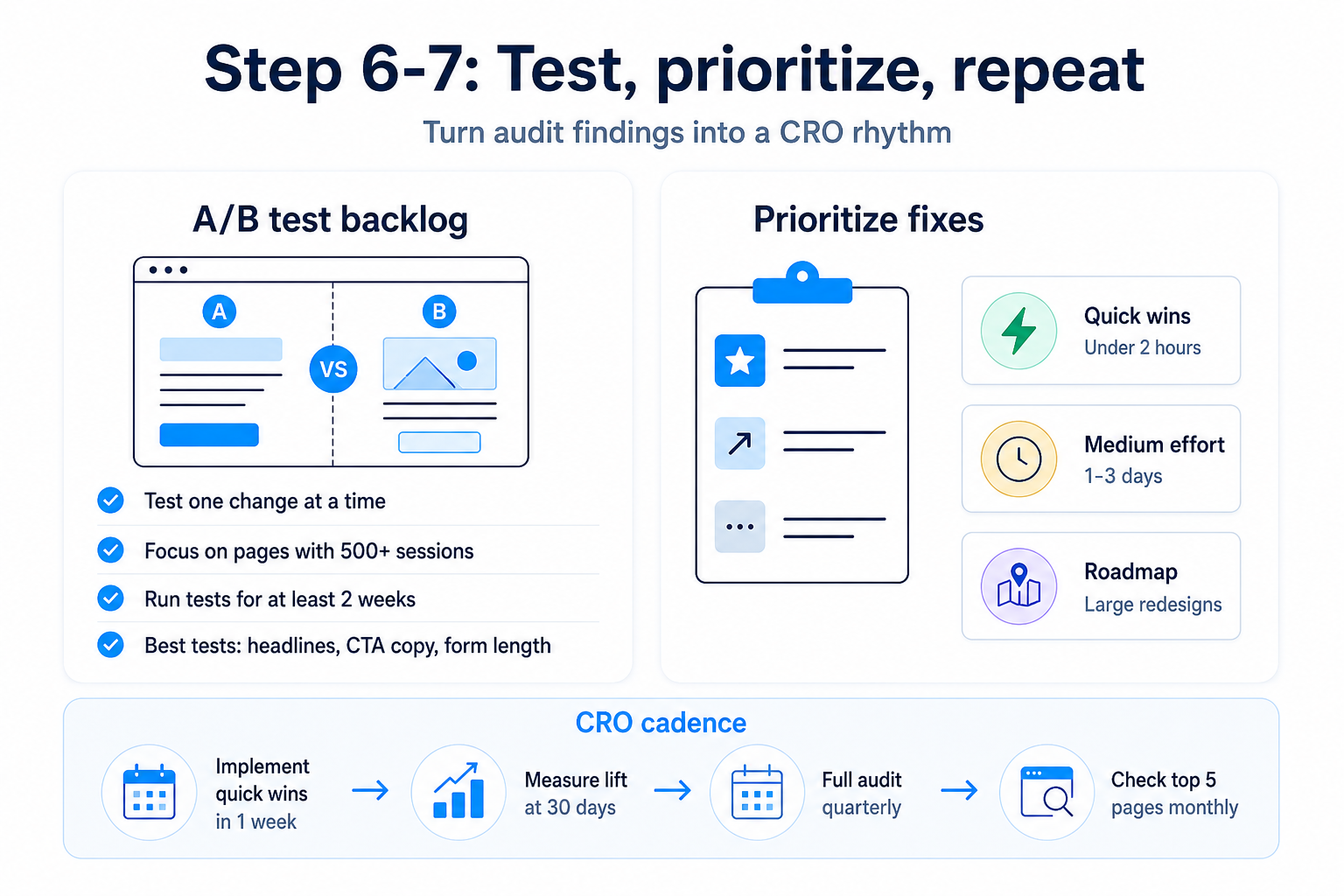
Build a test backlog in priority order. The highest-value tests for most B2B HubSpot sites are: headline copy on service pages, CTA placement and copy on blog posts, form length on gated content pages, and hero image versus no hero on landing pages. Prioritize tests on pages with at least 500 monthly sessions, since lower-traffic pages take months to reach statistical significance.
Run one test per page at a time. HubSpot's A/B tool splits traffic 50/50 by default; leave tests running for at least two full weeks before reading results.
Step 7: Document findings and prioritize fixes
The output of a HubSpot CRO audit is not a report. It is a prioritized fix list with three columns: the page or asset, the specific problem identified, and the estimated effort to fix.
Categorize fixes into three buckets. Quick wins are changes that take under two hours and have a clear data case: a CTA rewrite, removing two form fields, or moving a form higher on the page. Medium-effort fixes take one to three days and include things like restructuring a service page layout or adding a new conversion path for a high-traffic blog post. Larger projects, such as a full page redesign or building out a missing bottom-of-funnel page, go into a separate roadmap.
Start implementing quick wins within one week of completing the audit. Set a 30-day checkpoint to measure whether the changes produced a measurable lift in the pages you touched.
How often should B2B teams run a HubSpot CRO audit?
Run a full audit once per quarter. Between full audits, check your top five pages monthly using the same form submission rate and CTA click-through metrics from steps 3 and 4. If a page that was converting at 4% drops to 1.5% without an obvious traffic source change, that is a signal to investigate before the next quarterly cycle.
Teams that treat CRO as a quarterly discipline rather than a one-time project see compound gains over time. Each round of fixes raises the baseline conversion rate that the next round builds on.
What HubSpot tools do you need for a CRO audit?
A standard HubSpot CRO audit uses five native tools: Traffic Analytics (steps 1 and 2), the Forms dashboard (step 3), the CTA tool (step 4), the Page Performance report (step 5), and the A/B testing tool in Landing Pages (step 6). No third-party software is required to run the full audit. Teams with HubSpot Marketing Hub Starter or above have access to all five.
HubSpot Marketing Hub Professional adds custom reporting, which makes it faster to build the page-level conversion table in step 2 and to set up automated alerts when key pages drop below conversion thresholds.
If your HubSpot site is generating traffic but not leads, a CRO audit is the fastest way to identify where the disconnect sits. webdew works with B2B SaaS teams on HubSpot to run structured audits and implement the fixes that move conversion rates. Talk to webdew team about your HubSpot website.
Dive Into our
Client Testimonials
Listen to business owners like you share how we’ve helped them grow. Your story could be next!





.svg)

“Recently we reached out to Webdew for a website inside of HubSpot and they also did some mocking automation for us.”

“Webdew team was quite honest and quite easy to work with in terms of taking feedback implementing it, showing that it doesn’t happen again and things like making sure that it meets our expectations.”

“We worked with webdew to help us build our HubSpot website and they did an amazing job with it. They were very quick.”

“webdew has helped us optimize the sales and marketing processes, and this is automating a lot of processes.”

“Hi everyone my name is Kara and I work as a channel consultant at HubSpot Singapore. I’ve been working closely with webdew agency”

“Hi my name is Christian from OpenDoors Mortgage team and I’m in the mortgage business and just trying to work on new projects and kind of incorporating HubSpot for my operations”

“I’m one of the technology directors for Travelopia. We are the largest experiential travel company in the world. We’ve engaged webdew recently, not recently, it’s been about a couple of quarters now.”
“We worked with Chehak over the past several months to create a series of animated videos for an academic planner that we produce. And from the very beginning, she was absolutely professional and a pleasure to work with.”


6x
We helped clients multiply their website conversion rates through strategic design and UX optimization.
20%
Our marketing campaigns led to a 20% uplift in customer engagement across digital channels.
2K+
Delivered over 2,000 qualified leads through targeted funnels and smart automation.
120+
Our video content has earned 120,000+ views, driving brand awareness and audience retention.
“I recently had the pleasure of working with Chehak on a video demo project, and I was thoroughly impressed with her services.”
.svg)

Additional Resources
Access expert tips, trends, and strategies designed for small businesses. Stay ahead of the curve and make informed decisions with our comprehensive resources!