

 We typically respond the same day

TL;DR
- Sales and marketing misalignment in HubSpot is rarely a platform limitation; it is process, data, automation, and adoption decisions that were never made or never enforced.
- This guide fixes misalignment in that order: process first, then data, then automation, then adoption. Each layer depends on the one before it.
- The most common HubSpot-specific fracture is two teams using lifecycle stages and lead status differently inside the same portal.
- Most fixes are configuration and agreement, not new tools. Budget buys the last mile, not the alignment itself.
- A diagnostic at the end helps you find which of the four layers is currently costing you pipeline.
Why does sales and marketing misalignment happen in HubSpot?
Misalignment happens because HubSpot makes it easy to launch fast and hard to notice when two teams are quietly working from different rules inside the same portal. The platform ships with lifecycle stages, lead status, and automation ready to use, so teams configure around their own assumptions before anyone writes those assumptions down.
These are ordinary CRM implementation challenges, and HubSpot's speed of setup can amplify them. The same flexibility that lets marketing build a workflow in an afternoon lets it build one that contradicts a sales routing rule nobody documented. Webdew sees this pattern across HubSpot engagements: the portal works exactly as configured, and the configuration encodes a disagreement. If you want the underlying concepts first, our primer on the customer relationship management system covers the fundamentals this guide builds on.
The fix is not a better tool. It is four layers of decisions, resolved in order.
How do you fix process misalignment first?
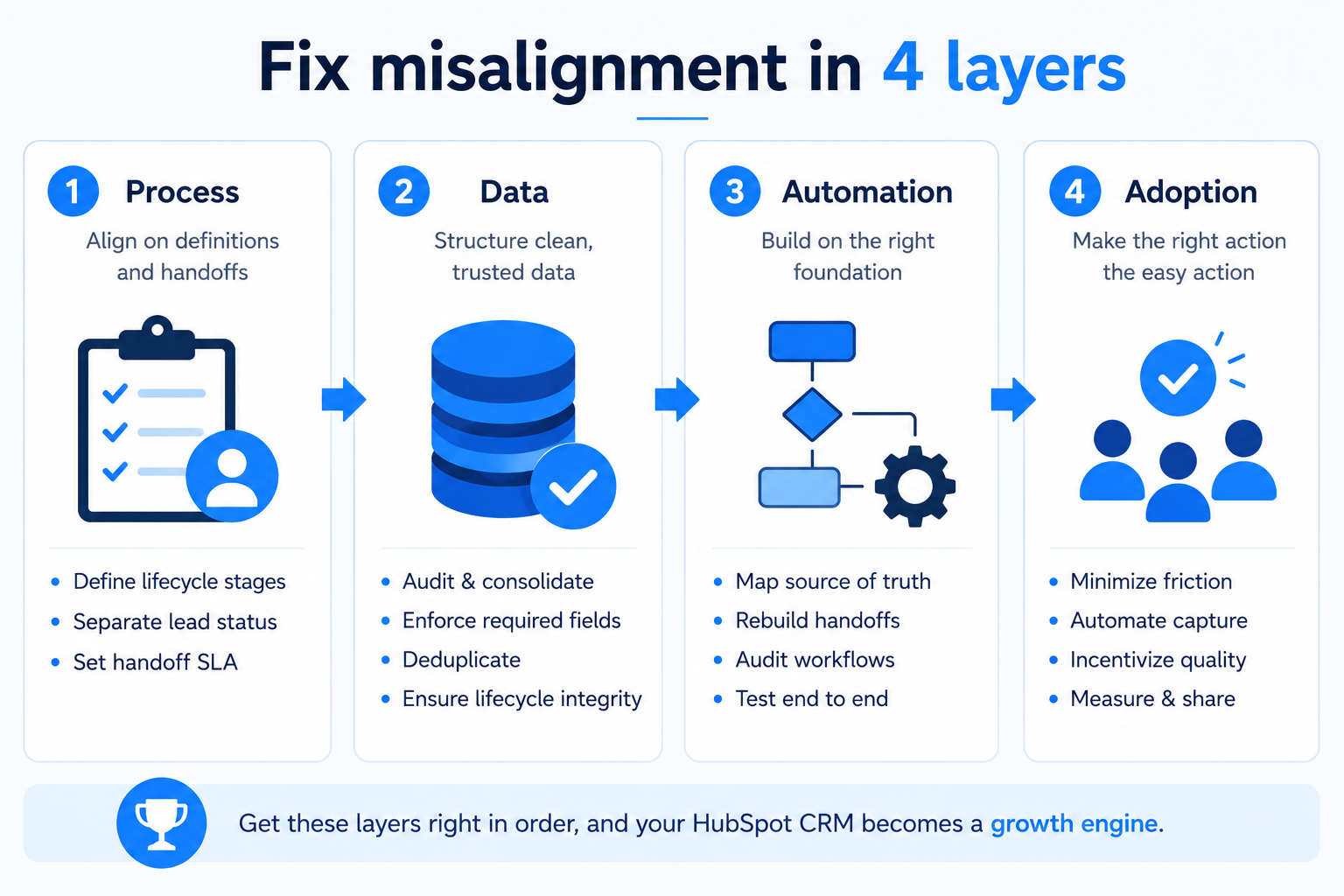
Start by agreeing on definitions, because every layer below inherits them. Process misalignment is two teams meaning different things by the same HubSpot field, and no data or automation fix survives on top of an undefined process.
Work through three steps:
- Define every lifecycle stage in one sentence. Subscriber, lead, MQL, SQL, opportunity, customer: write what each means and what action moves a record forward. Get marketing and sales leads to sign the same document.
- Separate lifecycle stage from lead status. This is the HubSpot-specific trap. Lifecycle stage tracks the funnel; lead status tracks sales working the lead. Teams that overload one property with both jobs produce reports neither team trusts.
- Write a handoff SLA. Marketing commits to passing leads that meet the signed MQL definition; sales commits to working them within a set window. The SLA becomes an automation rule later, not a slide.
Once definitions are signed, the rest of the work is enforcement. Skipping this step is why so many HubSpot reimplementations fail the same way the first one did.
How do you resolve data structure problems?
Fix the data model to match the signed process, because clean data on a broken process just automates the wrong thing faster. This is where sales and marketing alignment becomes a schema question rather than a meeting topic.
The data layer needs four passes:
- Property audit. List every custom property, find the duplicates (three fields all capturing "company size"), and consolidate to one per fact with a documented format.
- Required-field discipline. Require only the fields the signed process depends on. Over-requiring drives the adoption problems that surface in the last layer.
- Deduplication with a rule. Set a survivor rule before merging (most recent activity is the common choice), run the merge, and log it. HubSpot's duplicate management helps, but the rule is yours to define.
- Lifecycle data integrity. Make sure historical records carry the lifecycle stage the new definitions imply, so trend reporting does not break at the switch.
For teams migrating in from another system, this pass is heavier and belongs before go-live rather than after. Ongoing, it is the core of CRM services management: someone owns the data model and prunes it on a schedule, or it drifts within two quarters.
How do you fix automation and integration gaps?
Rebuild workflows on the signed definitions, and treat every integration as a place data can silently break. Marketing automation integration failures rarely announce themselves; they drop fields and create timing gaps that surface weeks later as strange campaign behavior.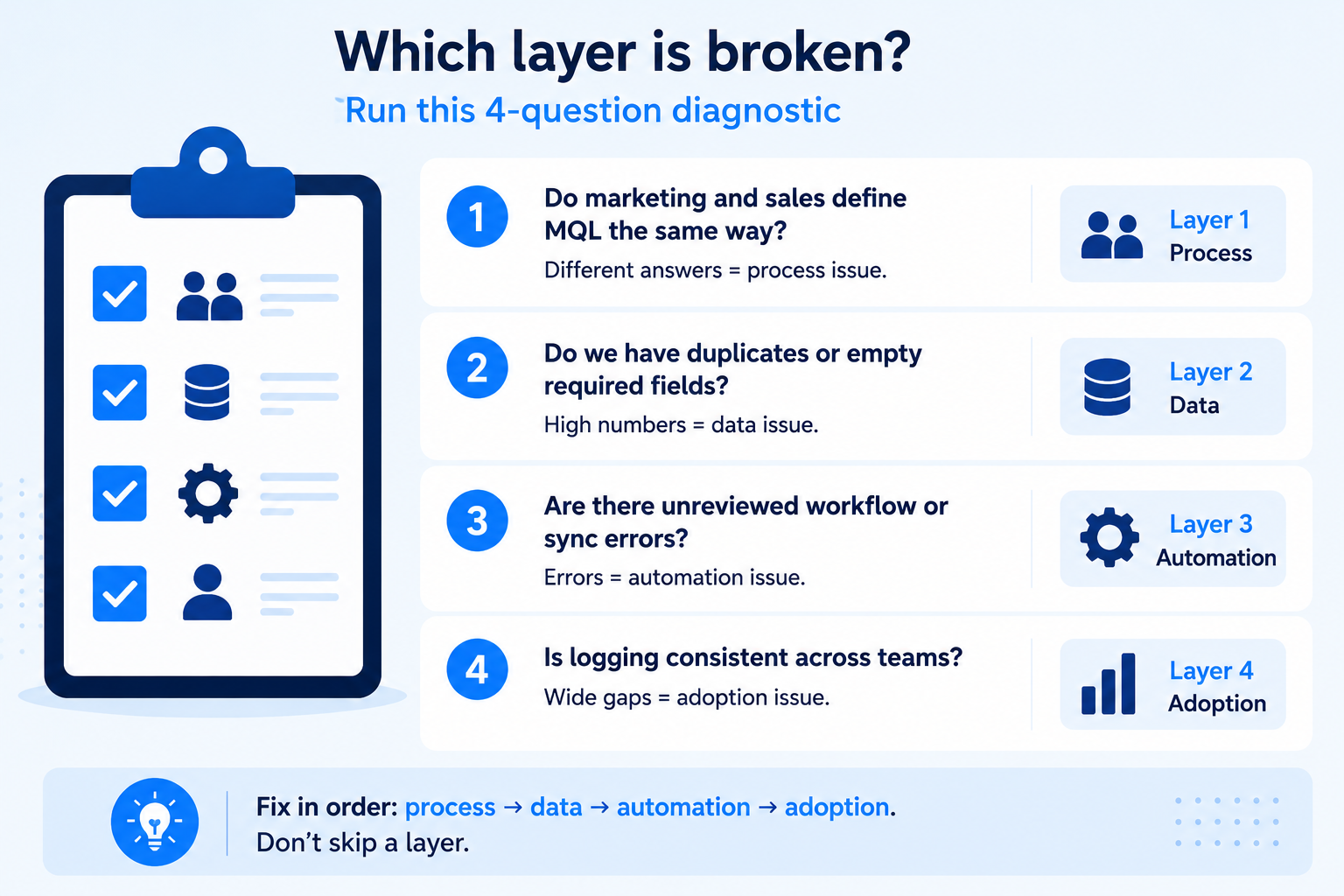
The automation layer, in order:
- Map the source of truth per field. When HubSpot syncs with another system, one side wins per field. Document it, because conflicting writes overwrite each other quietly.
- Rebuild handoff automation on the SLA. Lead hits the signed MQL bar, routing fires, sales gets notified, and a task opens with an owner. No record routes to nowhere.
- Audit for contradicting workflows. In older portals, multiple workflows often act on the same records with opposite instructions. List every active workflow and check for collisions before adding new ones.
- Test the full path after any change. Create a test contact and run it end to end through enrollment, routing, and notification, not just the step you edited.
HubSpot's native connectors reduce a lot of this risk, and knowing which integrations are native versus custom shapes the plan; our overview of HubSpot CRM integration is a useful reference when you scope this layer.
How do you solve CRM adoption issues?
Make the correct action the easy action, because adoption is not a training problem, it is a friction problem. CRM adoption issues turn every clean definition and tidy workflow above into guesswork, since automation acts on a partial picture as if it were complete.
Four moves that move adoption:
- Cut required fields to the minimum the signed process needs. Every extra required field is a reason to work outside the system.
- Automate capture. Turn on email and calendar logging and meeting scheduling so reps enter less by hand.
- Show reps the payoff. Route the best leads to the people whose records are cleanest, and say so openly. Adoption follows incentives, not memos.
- Publish adoption by team. Uneven logging between teams is invisible until someone measures and shares it.
The features that make HubSpot pleasant to use daily also drive adoption, and teams often underuse them; our rundown of HubSpot CRM features covers the ones worth turning on early. If you are still evaluating whether the platform fits, the broader HubSpot CRM overview is the place to start.
How do you know which layer is broken?
Run this four-question diagnostic with marketing and sales in the same room. Each question maps to one layer:
- Ask both teams to define an MQL in writing, separately. If the definitions differ, process (layer one) is broken.
- Export your contacts and count duplicates plus empty required fields. High numbers mean data (layer two) needs a pass.
- Pull last month's workflow and sync error logs. Unreviewed errors mean automation (layer three) is drifting.
- Compare logging rates between two teams. A wide gap means adoption (layer four) is the live problem.
Most portals have issues in more than one layer. Fix them in order anyway, because a data fix on an undefined process, or automation on dirty data, does not hold. For larger organizations, these compound into the governance-level problems that define enterprise CRM solutions, where the same four layers exist but span business units and regions.
Key takeaways
- HubSpot CRM misalignment is a decisions problem, not a platform problem. The portal faithfully runs whatever disagreement you configured into it.
- Fix in strict order: process definitions, then data structure, then automation and integration, then adoption. Each layer rests on the one before it.
- The HubSpot-specific trap is conflating lifecycle stage with lead status; separating them clears a surprising share of reporting disputes.
- Run the four-question diagnostic before buying anything. The answers tell you which layer is taxing pipeline right now.
If the diagnostic surfaces problems across more than one layer, Webdew works with B2B SaaS revenue teams to resolve them in sequence, from definition workshops through workflow rebuilds and adoption tracking. Talk to the team about a HubSpot alignment audit scoped to your portal.
Dive Into our
Client Testimonials
Listen to business owners like you share how we’ve helped them grow. Your story could be next!





.svg)

“Recently we reached out to Webdew for a website inside of HubSpot and they also did some mocking automation for us.”

“Webdew team was quite honest and quite easy to work with in terms of taking feedback implementing it, showing that it doesn’t happen again and things like making sure that it meets our expectations.”

“We worked with webdew to help us build our HubSpot website and they did an amazing job with it. They were very quick.”

“webdew has helped us optimize the sales and marketing processes, and this is automating a lot of processes.”

“Hi everyone my name is Kara and I work as a channel consultant at HubSpot Singapore. I’ve been working closely with webdew agency”

“Hi my name is Christian from OpenDoors Mortgage team and I’m in the mortgage business and just trying to work on new projects and kind of incorporating HubSpot for my operations”

“I’m one of the technology directors for Travelopia. We are the largest experiential travel company in the world. We’ve engaged webdew recently, not recently, it’s been about a couple of quarters now.”
“We worked with Chehak over the past several months to create a series of animated videos for an academic planner that we produce. And from the very beginning, she was absolutely professional and a pleasure to work with.”


6x
We helped clients multiply their website conversion rates through strategic design and UX optimization.
20%
Our marketing campaigns led to a 20% uplift in customer engagement across digital channels.
2K+
Delivered over 2,000 qualified leads through targeted funnels and smart automation.
120+
Our video content has earned 120,000+ views, driving brand awareness and audience retention.
“I recently had the pleasure of working with Chehak on a video demo project, and I was thoroughly impressed with her services.”
.svg)

Additional Resources
Access expert tips, trends, and strategies designed for small businesses. Stay ahead of the curve and make informed decisions with our comprehensive resources!