

 We typically respond the same day

TL;DR
- A HubSpot automation audit finds three things: workflows that contradict each other, workflows nobody uses, and lifecycle stages with no automation at all.
- Audit by lifecycle stage rather than by workflow list, because friction shows up where stages hand off, not inside individual automations.
- Most B2B SaaS CRM portals accumulate more workflow debt than missing features; the fix is usually pruning and reconnecting, not building more.
- The audit runs in five passes: inventory, lifecycle coverage, collision check, performance review, and prune-and-document.
- Run it twice a year. Portals drift within two quarters of any reorg, pricing change, or new funnel motion.
Why do HubSpot automations need a regular audit?
HubSpot automations need auditing because portals accumulate workflows faster than anyone retires them, and nobody notices until a contact gets three emails from two teams. Every campaign, experiment, and one-off request leaves an automation behind, and each one keeps running long after the person who built it has moved on.
For SaaS teams the drift is faster than most, because the funnel itself keeps changing:
- New pricing tiers add lifecycle branches the old workflows were never designed for.
- Product-led and sales-led motions run side by side, often with automation built by different teams.
- Reorgs change routing owners while the workflows keep pointing at the previous structure.
The result is a portal that looks well-automated yet behaves unpredictably. webdew runs this audit as standing work for B2B SaaS clients precisely because the problem is cumulative: nothing breaks on any single day, and then a quarter of pipeline is moving through rules nobody has read in two years. If you want the conceptual grounding first, our primer on the customer relationship management system covers the fundamentals underneath this work.
How do you inventory what is actually running?
Start with a full list of active automations and mark who owns each one, because you cannot evaluate what you have not counted. Most teams are surprised by the number.
Pass one produces four columns:
- Every active workflow, with its enrollment trigger and last-modified date. Anything untouched for over a year is a review candidate by default.
- The owner. A name, not a team. Workflows with no owner are the ones that cause collisions later.
- The purpose, in one sentence. If nobody can state what a workflow is for, that is the finding.
- The objects it touches. Contacts, companies, deals, tickets, and any custom objects, so you can see overlap at a glance.
Include the adjacent automation too: sequences, forms with follow-up actions, and integration-triggered updates. CRM automation in a mature portal rarely lives in the workflow tool alone, and an inventory that stops there misses the collisions that matter most.
How do you check lifecycle coverage?
Map every workflow to the customer lifecycle stage it serves, then look for the stages with nothing attached. Coverage gaps are the most common finding, and the highest-return one.
Lay your stages across a simple grid: subscriber, lead, MQL, SQL, opportunity, customer, and whatever expansion or renewal stages your model uses. For each, ask:
- What automation moves a record into this stage, and what evidence does it require?
- What happens to a record that stalls here for longer than normal?
- Who gets notified, and does the notification carry enough context to act on?
- What moves a record out, and is that transition automated or manual?
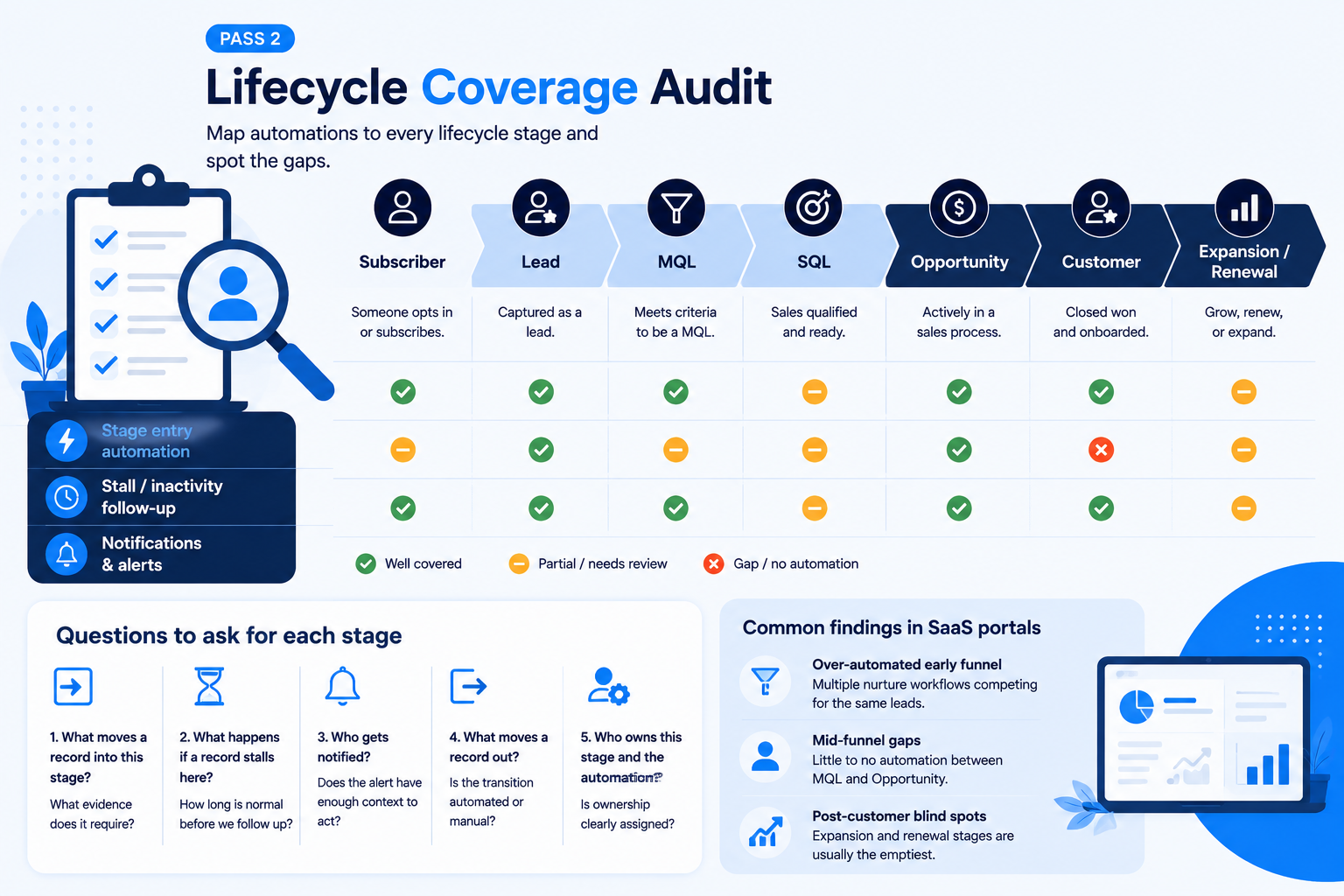
Two patterns show up nearly every time. Early stages are over-automated, with several nurture workflows competing for the same contacts, while mid-funnel stages between MQL and opportunity have almost nothing, which is exactly where sales funnel management gets expensive. Post-customer stages are usually emptiest of all, even at companies whose growth depends on expansion and renewal.
How do you find workflow collisions and dead weight?
Look for workflows that act on the same records with contradicting instructions, then for workflows that act on almost nobody. Both waste resources; only the first one damages the customer experience.
Pass three checks four things:
- Overlapping enrollment. Two or more workflows enrolling the same contacts on similar triggers. Read their actions side by side and confirm they are not undoing each other.
- Property write conflicts. More than one automation setting the same property, especially lifecycle stage or lead status. One should win; the rest should be rewritten to defer.
- Email frequency stacking. Count the maximum emails a single contact could receive in a week across all active workflows. The number is usually higher than anyone expects.
- Zero-enrollment workflows. Anything that has enrolled nobody in ninety days is either broken or obsolete. Both need a decision.
Property write conflicts deserve special attention in a B2B SaaS CRM, because lifecycle stage drives reporting, routing, and often compensation. When two automations write to it on different logic, every funnel report downstream inherits the disagreement.
How do you review automation performance?
Judge each workflow against the outcome it was built to produce, not against whether it is running. Plenty of automations run flawlessly and accomplish nothing.
Pass four scores each surviving workflow on three questions:
- Is it doing its job? Compare enrollments to completions and to the outcome it was meant to drive. Nurture workflows with high enrollment and no stage progression are candidates for redesign.
- Is it fast enough? Check delays and time-based branches. Delays that made sense at a slower sales cycle often now hold leads past the window when they were interested.
- Is it still true? Confirm the logic matches your current pricing, packaging, and funnel. This is where most drift hides, and where automation quietly contradicts the sales motion.
Portals with heavy integration activity need one more check: whether data arriving from other systems still lands where the workflows expect it. Our overview of marketing automation with CRM covers how those handoffs should be structured when the stack spans more than one platform.
How do you prune and document what remains?
Turn off more than you build, then write down what survived and why. An audit that ends without documentation guarantees the same audit next year.
The closing pass:
- Deactivate before deleting. Turn workflows off, wait a full cycle, then delete what nobody missed. Deletion removes history you may want later.
- Consolidate near-duplicates. Three similar nurture workflows usually become one with branching, which is easier to maintain and far easier to audit next time.
- Document each survivor. Purpose, owner, trigger, and the decision date. A shared doc is enough if it is maintained.
- Set a review cadence. Twice yearly, plus a mandatory review after any reorg, pricing change, or new funnel motion.
- Assign the owner role formally. Someone owns the portal's automation model, or it drifts again. This is the core of ongoing CRM services, whether the owner sits internally or with a partner.
Teams evaluating whether to extend automation beyond the CRM will find our rundown of business automation tools useful for scoping what belongs in HubSpot and what belongs elsewhere, a decision worth making deliberately rather than by accumulation.
What should the audit produce?
A finished audit produces four deliverables, and a team that stops after the first has not finished:
- The inventory, with owners assigned to every surviving automation.
- A lifecycle coverage map showing which stages are over-automated, under-automated, and correct.
- A prune list with decisions recorded, including the ones you chose not to act on.
- A rebuild backlog, prioritized by the stage where friction costs the most pipeline.
For mid-market SaaS tools stacks especially, the rebuild backlog is where the value lands. The audit finds problems; the prioritized backlog turns findings into a quarter of work that measurably reduces funnel friction.
Key takeaways
- Audit by lifecycle stage, not by workflow list. Friction concentrates at the handoffs between stages.
- Run five passes: inventory, lifecycle coverage, collision check, performance review, prune and document.
- Expect over-automation early in the funnel and gaps in mid-funnel and post-customer stages; that pattern repeats across most portals.
- Property write conflicts on lifecycle stage are the highest-damage finding, because reporting and routing both inherit them.
- Finish with documentation, a named owner, and a twice-yearly cadence, or the drift restarts immediately.
If your portal has more workflows than anyone can explain, an audit usually recovers more pipeline than a new campaign would. webdew runs structured HubSpot automation audits for B2B SaaS teams; see the HubSpot audit service or bring your workflow list to a first call and we will start with the lifecycle coverage map.
Dive Into our
Client Testimonials
Listen to business owners like you share how we’ve helped them grow. Your story could be next!





.svg)

“Recently we reached out to Webdew for a website inside of HubSpot and they also did some mocking automation for us.”

“Webdew team was quite honest and quite easy to work with in terms of taking feedback implementing it, showing that it doesn’t happen again and things like making sure that it meets our expectations.”

“We worked with webdew to help us build our HubSpot website and they did an amazing job with it. They were very quick.”

“webdew has helped us optimize the sales and marketing processes, and this is automating a lot of processes.”

“Hi everyone my name is Kara and I work as a channel consultant at HubSpot Singapore. I’ve been working closely with webdew agency”

“Hi my name is Christian from OpenDoors Mortgage team and I’m in the mortgage business and just trying to work on new projects and kind of incorporating HubSpot for my operations”

“I’m one of the technology directors for Travelopia. We are the largest experiential travel company in the world. We’ve engaged webdew recently, not recently, it’s been about a couple of quarters now.”
“We worked with Chehak over the past several months to create a series of animated videos for an academic planner that we produce. And from the very beginning, she was absolutely professional and a pleasure to work with.”


6x
We helped clients multiply their website conversion rates through strategic design and UX optimization.
20%
Our marketing campaigns led to a 20% uplift in customer engagement across digital channels.
2K+
Delivered over 2,000 qualified leads through targeted funnels and smart automation.
120+
Our video content has earned 120,000+ views, driving brand awareness and audience retention.
“I recently had the pleasure of working with Chehak on a video demo project, and I was thoroughly impressed with her services.”
.svg)

Additional Resources
Access expert tips, trends, and strategies designed for small businesses. Stay ahead of the curve and make informed decisions with our comprehensive resources!