

 We typically respond the same day

TL;DR: B2B SaaS customer retention improves when onboarding is treated as a data problem rather than a welcome sequence. HubSpot supports this by storing lifecycle stages, product usage events, support history, and renewal dates on the same records, and firing workflows when an account stalls. This guide covers the metrics to define first, the data to sync, the workflows that catch churn early, and a 90-day rollout order.
Most churn in B2B SaaS is decided in the first 90 days, long before a renewal dashboard notices anything. An account signs, takes a kickoff call, receives logins, and then goes quiet. By the time the renewal date surfaces in a forecast, the habits that predict renewal either formed or they did not.
HubSpot can shorten that window, but only when the HubSpot onboarding process runs inside the CRM instead of alongside it in spreadsheets and calendar invites. That means defining retention metrics as properties, syncing product behavior onto records, and letting workflows act on the gap between what a customer bought and what they use. Webdew builds this layer for SaaS clients as part of its CRM platform services.
Why does HubSpot onboarding affect B2B SaaS customer retention?
HubSpot onboarding affects retention because it determines how early a team can see an account drifting. Onboarding decides which properties exist, which timestamps get written and which workflows can fire, and those become the churn warnings a customer success team relies on six months later.
Frederick Reichheld and Earl Sasser reported in Harvard Business Review in 1990 that cutting customer defections by 5% raised profits between 25% and 85% across the service businesses they studied. Those figures predate subscription software, so read them as directional, but the mechanism holds: profitability rises with tenure.
Which retention metrics belong in HubSpot first?
Four metrics cover most retention decisions: gross revenue retention, net revenue retention, activation rate and time to value. Each has to exist as a stored property or calculated field before a workflow can reference it.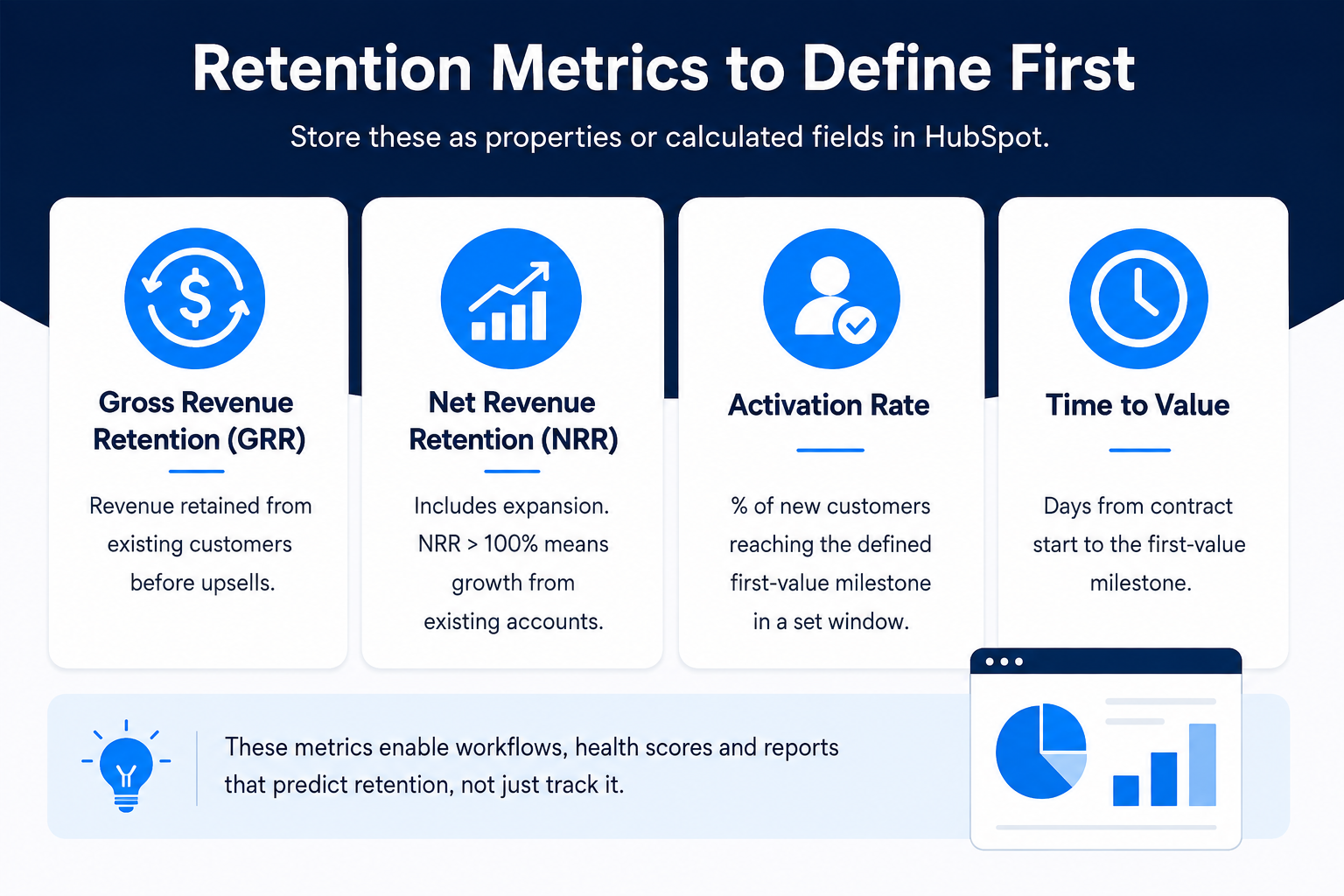
Revenue retention: GRR and NRR
Gross revenue retention measures recurring revenue kept from existing customers before upgrades, so it isolates churn and downgrades. Net revenue retention adds expansion, so a figure above 100% shows growth from existing accounts outpaced losses. HubSpot calculates neither natively, so both usually arrive from billing data pushed onto company records. Store them at company level, since contact-level storage breaks when a champion leaves.
Activation rate and time to value
Activation rate is the share of new customers reaching a defined first-value milestone inside a set window. Time to value is the days from contract start to that milestone. Both rest on one decision no tool can make: what counts as first value in this product. A data platform might pick first successful integration; a reporting product might pick first shared dashboard. Once named, that milestone becomes a date property, and the gap between it and contract start becomes a calculated property that health scores read from.
How should HubSpot lifecycle stages map to the post-sale journey?
The default lifecycle ends at Customer, which is too coarse for retention work, so most SaaS teams add stages after it to make post-sale progress visible in the same funnel reports as acquisition. HubSpot's default lifecycle stages run from Subscriber through Customer and Evangelist, which means everything after signature collapses into one stage.
Stages to add after Customer
A workable post-sale set is Onboarding, Activated, Adopted, At risk and Renewed, each with a written entry and exit rule before it goes into the portal. Without those rules, stage changes become opinions. Every change writes a timestamp, which is what makes cohort reporting possible.
A small property set does the rest: onboarding owner, kickoff date, milestone dates, health score, renewal date, seats licensed and seats active. The gap between the last two is the cheapest churn indicator available, since an account paying for 50 seats and using 11 has made a decision it has not communicated.
What customer data has to reach HubSpot for retention automation to work?
Three streams have to land on records: product usage, support history and contract terms. Workflows built on less fire on marketing engagement, a weak proxy for whether software is being used.
Product usage answers the only question that matters during onboarding: is the customer doing the thing they bought the product to do. Logins are the weakest version of that signal, while feature-level events tied to the activation milestone are stronger, and they should write to both the contact and the associated company so account rollups stay accurate. Ticket volume and renewal dates frame the risk around it.
None of this survives dirty data. Duplicate company records split usage history, unowned accounts fall out of alert routing, and inconsistent domain formatting breaks the link between a contact and the company paying the invoice. Webdew's CRM consulting engagements start here rather than with workflows, because a model built on records that disagree produces alerts nobody acts on.
Which HubSpot workflows reduce churn in B2B SaaS?
The workflows that reduce churn fire on the absence of activity, not the presence of it. Anyone can automate a welcome email; the value sits in automations that notice silence.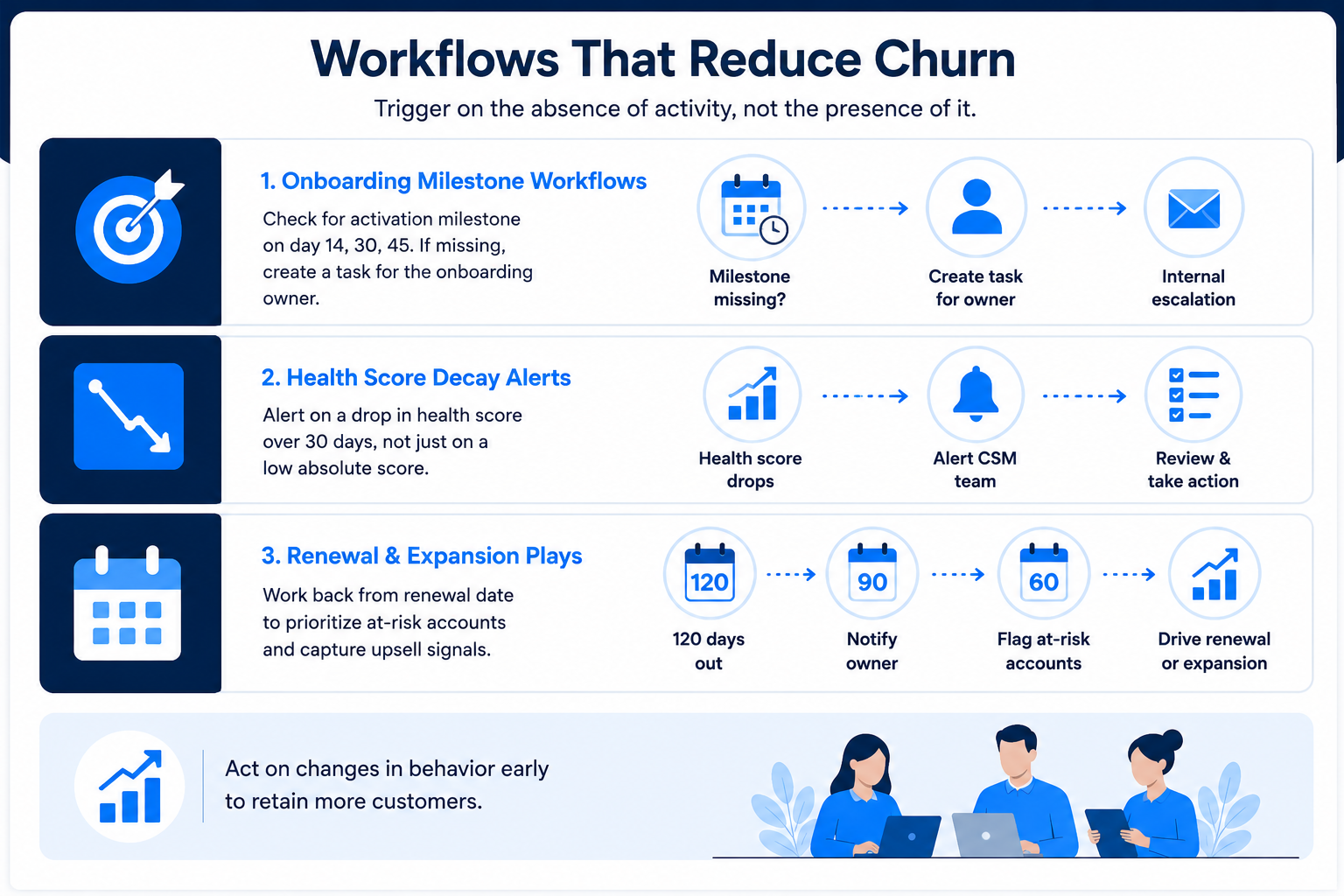
Onboarding milestone workflows
Enroll a company when its lifecycle stage becomes Onboarding, then branch on whether the activation milestone date is set by day 14, day 30 and day 45. When it is missing, assign a task to the onboarding owner rather than sending another email, since internal escalation beats another nudge in the customer's inbox. SaaS onboarding videos often sit inside these workflows as the step before a human intervenes.
Health score decay alerts
A first health score does not need to be complex. Weighted inputs across usage recency, feature breadth, seat utilization and open ticket count are enough to rank accounts. What matters is the trigger: alert on a drop of a set number of points inside 30 days rather than on an absolute threshold. Thresholds catch accounts that were always quiet; decay catches accounts that just changed behavior.
Renewal and expansion plays
Backdate from the renewal property instead of working forward from signature. A workflow that creates a renewal deal 120 days out, notifies the owner at 90 days, and flags accounts below their health threshold at 60 days gives customer success a working queue. The same properties drive expansion, since seats active approaching seats licensed is an upsell signal rather than a risk one.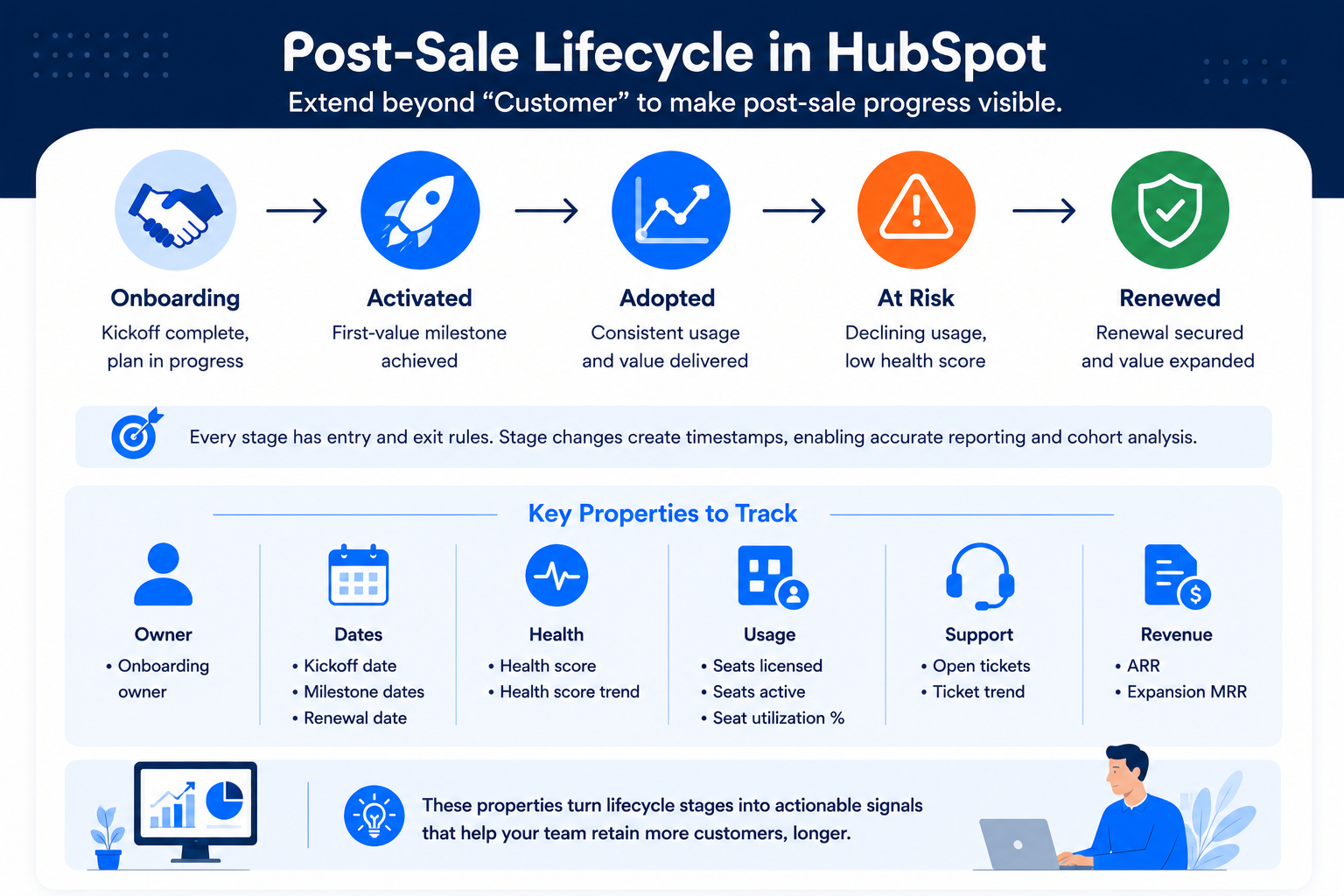
How do marketing, sales and customer success share one retention model?
They share it by agreeing on definitions and storing them in one place. Retention usually breaks down for organizational reasons rather than technical ones: marketing measures pipeline, sales measures closed revenue, customer success measures renewals. A post-sale lifecycle inside HubSpot forces a shared vocabulary, so Activated means one thing to everyone and customer success stops rebuilding the same list every Monday. That is what turns retention into one of the B2B SaaS strategies the whole revenue team runs.
What does a 90-day rollout look like?
|
Window |
Focus |
Output |
|
Days 1 to 30 |
Definitions and data audit |
Activation milestone named, retention metrics defined, duplicate and ownership cleanup complete |
|
Days 31 to 60 |
Structure |
Post-sale lifecycle stages live, properties created, product usage and billing data syncing |
|
Days 61 to 90 |
Automation and reporting |
Milestone workflows, decay alerts and renewal plays running, cohort report on time to value built |
Teams that build workflows before definitions tend to rebuild the whole thing within two quarters, because reporting only becomes useful once a first cohort has passed through the stages.
Key takeaways
- B2B SaaS customer retention depends on how early a team detects drift, and onboarding decides that.
- Define revenue retention, activation rate and time to value as stored fields before building automation.
- Extend HubSpot's lifecycle past Customer with written entry and exit rules for each post-sale stage, then sync product usage, support history and contract terms.
- Trigger workflows on missing milestones and health score decay rather than on activity, and clean duplicate records first.
Dive Into our
Client Testimonials
Listen to business owners like you share how we’ve helped them grow. Your story could be next!





.svg)

“Recently we reached out to Webdew for a website inside of HubSpot and they also did some mocking automation for us.”

“Webdew team was quite honest and quite easy to work with in terms of taking feedback implementing it, showing that it doesn’t happen again and things like making sure that it meets our expectations.”

“We worked with webdew to help us build our HubSpot website and they did an amazing job with it. They were very quick.”

“webdew has helped us optimize the sales and marketing processes, and this is automating a lot of processes.”

“Hi everyone my name is Kara and I work as a channel consultant at HubSpot Singapore. I’ve been working closely with webdew agency”

“Hi my name is Christian from OpenDoors Mortgage team and I’m in the mortgage business and just trying to work on new projects and kind of incorporating HubSpot for my operations”

“I’m one of the technology directors for Travelopia. We are the largest experiential travel company in the world. We’ve engaged webdew recently, not recently, it’s been about a couple of quarters now.”
“We worked with Chehak over the past several months to create a series of animated videos for an academic planner that we produce. And from the very beginning, she was absolutely professional and a pleasure to work with.”


6x
We helped clients multiply their website conversion rates through strategic design and UX optimization.
20%
Our marketing campaigns led to a 20% uplift in customer engagement across digital channels.
2K+
Delivered over 2,000 qualified leads through targeted funnels and smart automation.
120+
Our video content has earned 120,000+ views, driving brand awareness and audience retention.
“I recently had the pleasure of working with Chehak on a video demo project, and I was thoroughly impressed with her services.”
.svg)

Additional Resources
Access expert tips, trends, and strategies designed for small businesses. Stay ahead of the curve and make informed decisions with our comprehensive resources!