

 We typically respond the same day

You do not migrate your way out of a messy database. You carry it with you.
That is the trap most B2B SaaS teams walk into right before a CRM migration. The plan is to start fresh on a new platform, but the legacy data, duplicate contacts, dead leads, half-filled fields, and five different spellings of the same company come along for the ride. Worse, it arrives faster than before, because the new platform's automation now circulates the bad records at scale.
The cost is not theoretical. Gartner estimates poor data quality drains organizations an average of $12.9 million a year, and B2B contact data decays at roughly 22% to 30% annually as people change jobs and companies get acquired (NRev, 2026). Clean the data before it moves, and the migration delivers what you paid for. Skip that step, and you have rebuilt the same problem on a new bill.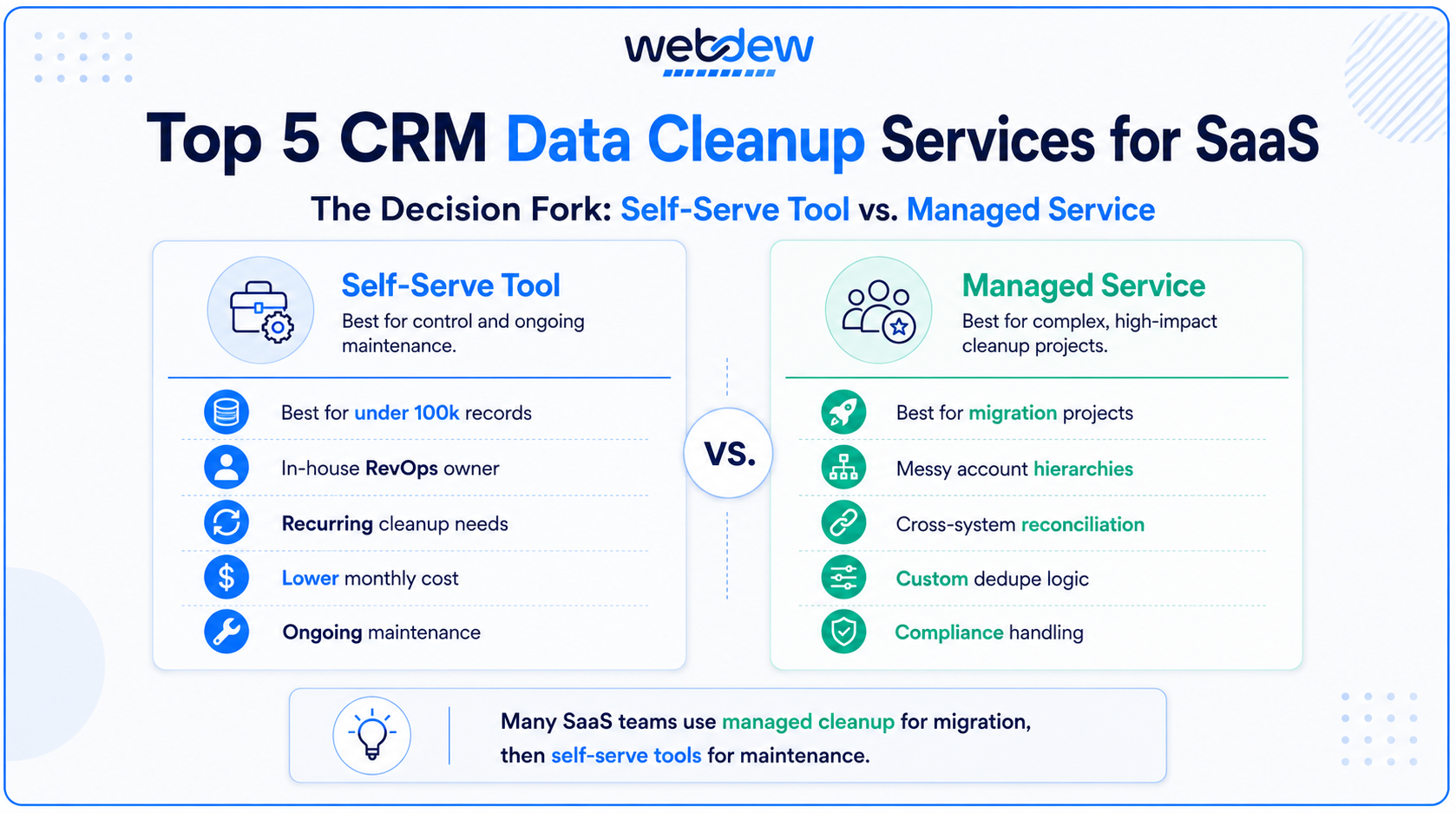
This guide breaks down five CRM data cleanup options worth evaluating before you migrate, what each one is built for, and the selection criteria that actually separate a good fit from an expensive mismatch. It draws on the pre-migration work Webdew does with B2B SaaS teams, so the focus is on account hierarchies, buying committees, and the firmographic data that B2B records depend on, not generic contact lists.
First, decide what kind of cleanup you actually need
Before comparing vendors, get clear on one fork in the road: self-serve tool or managed service.
A self-serve tool makes sense if you have a RevOps function with at least one person who owns data quality, and your database is under roughly 100,000 records. You run deduplication, standardization, and enrichment workflows yourself, on your own cadence. A good deduplication and standardization tool runs between $500 and $2,500 a month depending on size and features (Fundraise Insider, 2026).
A managed service makes sense for complex, one-time projects, exactly the migration scenario, where you need cross-system reconciliation, custom deduplication logic for messy account hierarchies, and compliance handling. Managed cleanup projects typically run between $5,000 and $25,000, with per-record pricing from $0.02 to $0.10 for basic cleanup and $0.15 to $0.50 when enrichment is included (Fundraise Insider, 2026).
Many mature teams settle on a hybrid: managed help for the migration itself, self-serve tools for ongoing maintenance afterward. Keep that fork in mind as you read the five options below, because the right answer depends as much on your team's capacity as on the tool's feature list.
1. Webdew: best for managed pre-migration cleanup on HubSpot
For the migration itself, the work is less about a single tool and more about coordination, and that is where a managed partner earns its fee. A migration involves cross-system data reconciliation, custom deduplication logic for complex parent-subsidiary account trees, and field-mapping decisions that are difficult to reverse later. Webdew handles that end-to-end for B2B SaaS teams, as a HubSpot solutions partner that scopes the cleanup, runs it, and maps legacy data into HubSpot so the new platform starts clean rather than inheriting old problems.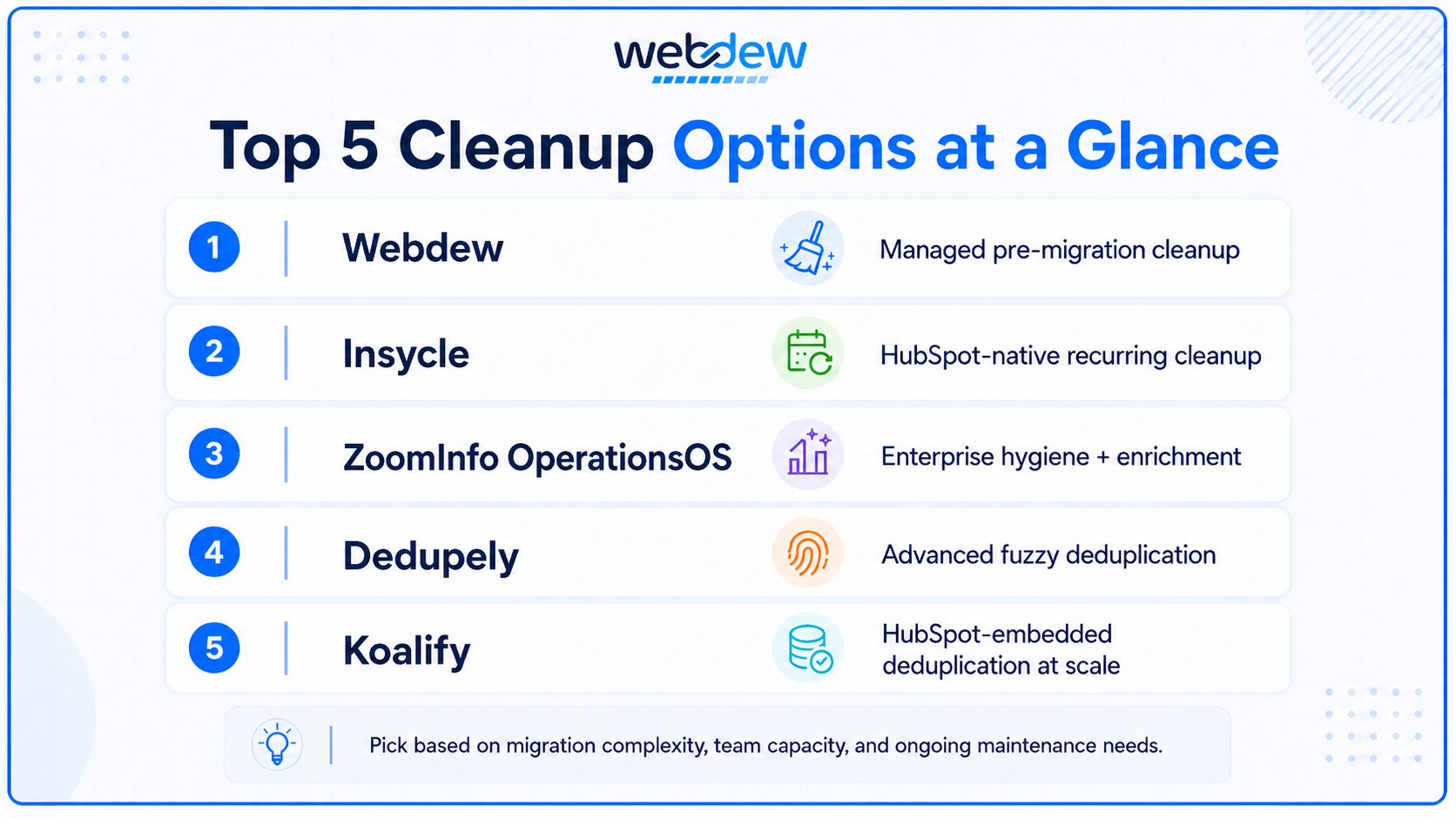
What makes a managed approach fit B2B specifically is the structure of the data. B2B records carry multi-contact account hierarchies, buying-committee structures, and firmographic attributes like funding stage and employee count that generic providers handle poorly (Fundraise Insider, 2026). A B2B-fluent partner accounts for that during reconciliation rather than flattening it. The same applies to documented accuracy; reputable cleanup work commits to a defined accuracy rate, typically 95% to 98%, with clear remediation if it falls short.
- Best for: B2B SaaS teams running a HubSpot migration who want the cleanup owned and coordinated, not DIY
- Strengths: cross-system reconciliation, B2B account-hierarchy logic, legacy-to-HubSpot field mapping, ongoing data strategy after cutover
- Watch for: a managed engagement is a larger commitment than a self-serve tool; it suits the migration project itself more than routine monthly upkeep
For routine maintenance after the migration closes, most teams pair this kind of managed pass with one of the self-serve tools below.
2. Insycle: best for HubSpot-native cleanup before and after migration
If you want a self-serve tool to run inside HubSpot, Insycle is the option most directly built for the job. It audits the database against more than 30 common data errors automatically and gives RevOps teams pre-built templates for deduplication, formatting, and bulk field updates (Insycle, 2026).
What makes it fit the migration use case is the recurring workflow design. You can build a cleanup template, schedule it, and keep the database clean on an ongoing basis rather than treating hygiene as a one-time scramble. It also works across multiple CRM environments, which helps if you are consolidating records from several sources into HubSpot.
- Best for: HubSpot-bound B2B SaaS teams with an in-house RevOps owner
- Strengths: visual interface, scheduled recurring cleanups, strong formatting, and bulk-update tooling
- Watch for: it is a self-serve tool, so it assumes someone owns the cadence; it will not run itself
This is the tool most often paired with a managed cleanup pass for the migration, because it keeps the database clean long after the project closes.
3. ZoomInfo OperationsOS: best for enterprise-scale hygiene with enrichment built in
When the database is large, and the priority is continuous accuracy rather than a single cleanup, ZoomInfo's data operations platform covers the full quality suite: deduplication, field standardization, record scoring, and automated merging, plus native bidirectional sync with major CRMs (SyncGTM, 2026).
Its distinguishing move is waterfall enrichment. The system checks multiple data sources and returns the highest-confidence result, falling back to secondary sources when the primary lacks coverage. For B2B SaaS teams where data quality feeds revenue forecasting and pipeline reporting, that breadth matters. The tradeoff is cost: typical pricing runs from roughly $15,000 to $40,000 a year (SyncGTM, 2026), which puts it firmly in enterprise territory.
- Best for: larger B2B SaaS teams that want cleanup and ongoing enrichment in one platform
- Strengths: waterfall enrichment across many sources, continuous stale-record detection, deep CRM sync
- Watch for: price; this is overkill for a small database or a one-off pre-migration clean
4. Dedupely: best for catching duplicates that simpler tools miss
Deduplication is the single highest-value cleanup task before a migration, because duplicates distort attribution, lifecycle tracking, and forecasting once they move into a new system (IntegrateIQ, 2026). HubSpot's native duplicate management handles standard cases on email and domain, but it misses the messier ones.
Dedupely fills that gap with advanced fuzzy matching and configurable merge rules, catching near-duplicates where names, formatting, or domains differ slightly (Pixcell, 2025). For a SaaS database that has accumulated records from product sign-ups, integrations, and outbound sequences over several years, fuzzy matching is what separates a real cleanup from a cosmetic one.
- Best for: teams whose duplicate problem has outgrown native tooling
- Strengths: fuzzy matching, custom merge logic, catches cross-format duplicates
- Watch for: it is focused on deduplication; you will still need separate tooling for enrichment and validation
5. Koalify: best for HubSpot-embedded deduplication at scale
If your deduplication needs to live entirely inside HubSpot, Koalify is built for exactly that. It runs fully embedded in HubSpot, so duplicates get detected, reviewed, and merged without your team ever leaving the platform. You define custom rules that match on any combination of HubSpot properties, including custom fields, then merge automatically through HubSpot workflows or manually from CRM cards (Koalify, 2026).
What makes it fit the migration use case is the combination of rule-based control and bulk automation. You can build lists, reports, and owner alerts from Koalify's custom properties to review duplicates before merging, then clear thousands at once through a workflow action rather than one record at a time. It handles contacts, companies, deals, tickets, and custom objects, which matters when an integration is generating duplicate records across multiple object types. It's a HubSpot Certified App with SOC 2 Type II and ISO 27001 compliance and carries a 5.0 rating based on 100+ marketplace reviews (Koalify, 2026).
Best for: HubSpot-bound B2B SaaS teams that want deduplication rules and bulk merging running natively inside HubSpot
Strengths: fully HubSpot-embedded, custom rule matching on any property, workflow-based bulk merge, custom-object support, strong compliance posture
Watch for: it is focused on deduplication; you will still need separate tooling for enrichment and email validation
How to choose: five questions that cut through the vendor pitches
The feature lists all look similar. These questions separate fit from mismatch:
- Self-serve or managed? Match the model to your team's capacity. A tool you have no one to run is worse than no tool at all.
- Does it understand B2B structure? Account hierarchies and buying committees are not optional for B2B SaaS. Confirm the vendor handles them natively.
- What is the documented accuracy rate? Reputable providers commit to 95% to 98% and define remediation. Vague answers are a red flag.
- How does pricing scale? Per-record models suit one-time migration cleanups; subscriptions suit ongoing maintenance. Calculate cost per cleaned record, not just the sticker price.
- Does it support the sequence cleanse first, enrich second? Enrichment on top of dirty, duplicated data just multiplies the mess. The order is not negotiable.
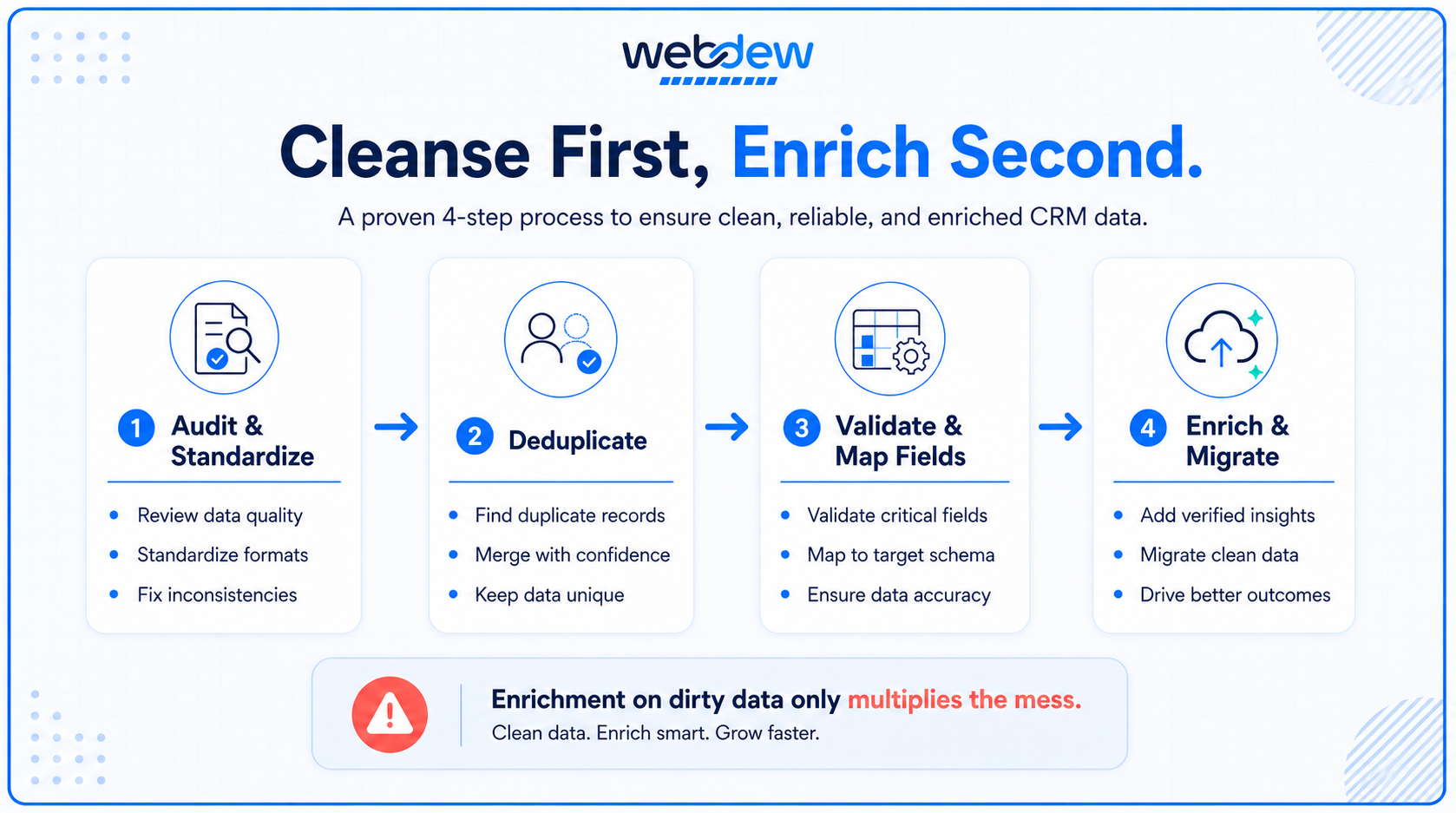
The honest takeaway: there is rarely one tool that does everything. Most B2B SaaS teams that migrate cleanly use a small stack, deduplication, validation, and enrichment, often coordinated by a managed partner for the migration itself, then maintained in-house afterward.
If you are planning a migration and want help scoping which of these your database actually needs, the team at Webdew works with B2B SaaS companies on pre-migration cleanup and HubSpot data strategy.
Dive Into our
Client Testimonials
Listen to business owners like you share how we’ve helped them grow. Your story could be next!





.svg)

“Recently we reached out to Webdew for a website inside of HubSpot and they also did some mocking automation for us.”

“Webdew team was quite honest and quite easy to work with in terms of taking feedback implementing it, showing that it doesn’t happen again and things like making sure that it meets our expectations.”

“We worked with webdew to help us build our HubSpot website and they did an amazing job with it. They were very quick.”

“webdew has helped us optimize the sales and marketing processes, and this is automating a lot of processes.”

“Hi everyone my name is Kara and I work as a channel consultant at HubSpot Singapore. I’ve been working closely with webdew agency”

“Hi my name is Christian from OpenDoors Mortgage team and I’m in the mortgage business and just trying to work on new projects and kind of incorporating HubSpot for my operations”

“I’m one of the technology directors for Travelopia. We are the largest experiential travel company in the world. We’ve engaged webdew recently, not recently, it’s been about a couple of quarters now.”
“We worked with Chehak over the past several months to create a series of animated videos for an academic planner that we produce. And from the very beginning, she was absolutely professional and a pleasure to work with.”


6x
We helped clients multiply their website conversion rates through strategic design and UX optimization.
20%
Our marketing campaigns led to a 20% uplift in customer engagement across digital channels.
2K+
Delivered over 2,000 qualified leads through targeted funnels and smart automation.
120+
Our video content has earned 120,000+ views, driving brand awareness and audience retention.
“I recently had the pleasure of working with Chehak on a video demo project, and I was thoroughly impressed with her services.”
.svg)

Additional Resources
Access expert tips, trends, and strategies designed for small businesses. Stay ahead of the curve and make informed decisions with our comprehensive resources!